Players with an existing console or PC
You want to buy extra gamepads that suit your device generation and local game mode, rather than judging compatibility by the controller’s shape alone.


Choose an extra controller based first on your console or PC, then on the inputs supported by the specific game for each player. In compatible Switch games, one Joy-Con may be enough; other game modes require a different controller set-up. A different controller won’t solve screen reflections in a bright room – what matters is where the screen is positioned and, if supported, whether you can use TV mode.
You want to buy extra gamepads that suit your device generation and local game mode, rather than judging compatibility by the controller’s shape alone.
You want to check before buying whether a pair of controllers will cater for two players, or whether the game requires each player to have a full controller. Nintendo notes that how you can hold a Joy-Con depends on the game and game mode.
You play in daylight and want to assess screen reflections separately from the connection available at your seat.
| What you’re buying | What to check before buying | Who it matters most to |
|---|---|---|
| Compatibility with your device and game | Check that the console generation and full model variant match, and that the local game mode is supported. For a PC, also check the operating system and connection required. | When I buy an extra controller, I want to make sure it works with my console or PC and the game first. Around 36% of consumers put device and game compatibility first. |
| Number and type of inputs | Check the player count and the required way to hold the controller in the specific game. Nintendo says whether individual Joy-Con can be used as separate controllers depends on the software and game mode. | When playing with a group, I want to know whether each person will have the inputs they need or needs a full gamepad. Around 29% of consumers focus first on the number and type of player inputs. |
| Visibility in a bright room and connection | Check the screen from every seat in daylight and reposition it if needed. Also check the cable route or whether a wireless receiver is required; Nintendo Switch Lite does not support TV mode. | When we play in daylight, I want to see the screen clearly from my seat and connect the controller comfortably. Around 21% of consumers prioritise visibility and the connection from their seat. |
| Power for multiple controllers | Check what’s included and how the specific variant is charged. Nintendo lists a separately sold charging grip as an alternative way to charge Joy-Con. | When we need several controllers ready for a game, I want to know how they’re charged or powered and what accessories are needed. Around 14% of consumers prioritise power and potential extra purchases. |
Nintendo says whether individual Joy-Con work as separate controllers depends on the game and the game mode selected. So a pair won’t necessarily work for every local multiplayer game.
Check the controls required by the specific game and find out whether it supports individual Joy-Con or full gamepads.
Joy-Con 2 are designed for Switch 2; original Joy-Con can be used wirelessly with Switch 2. 8BitDo connections also vary by model.
Check the full model name and manufacturer’s specifications against your platform. If you’re using a Windows controller with a 2.4 GHz connection, also check that the correct USB receiver is included.
A controller won’t change how daylight reflects off the screen. If you’re playing from different seats, the connection from each position may also matter.
Check how clearly you can see the screen in daylight and reposition it if needed. Separately, check whether your console supports TV mode.
What’s included and how the controller charges can vary by model. Nintendo lists a separate charging grip as an alternative way to charge Joy-Con.
Before buying, compare what’s included and how each controller you need is charged. Read voluntary warranty terms separately from your statutory rights if something is faulty.
Joy-Con and Joy-Con 2 are worth considering for supported Switch game modes that let you use controllers individually; Joy-Con 2 are for Switch 2.
DualSense is an option for extra controllers on PS5 and, according to Sony, can also be used with other supported devices.
The Xbox Wireless Controller is suitable for Xbox consoles and Windows PCs.
The officially licensed Advantage Wireless model is a gamepad option for Switch 2 games that support a standard controller.
The Ultimate 2C Wireless and Ultimate 2 Bluetooth are different product ranges, with their own platform and connection specifications.
This selection includes extra controllers for Nintendo Switch and Switch 2, PS5 and – for the BEITONG PanGu – PC. For each model, check that it works with your specific game and intended platform.
 No image available
For compatible Switch 2 games that let you use two individual Joy-Con as separate inputs.
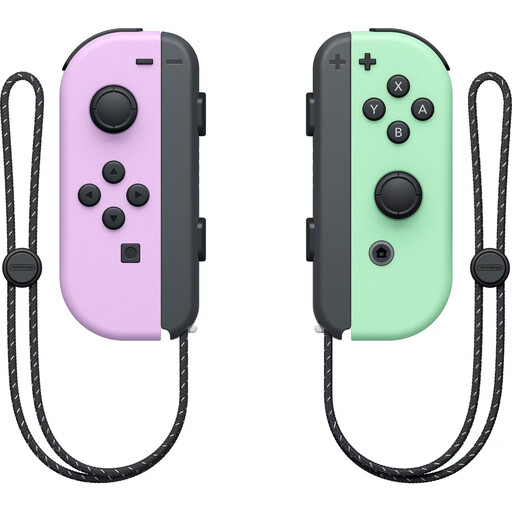
The set includes one left and one right Joy-Con 2, plus two wrist straps. Motion controls, HD Rumble 2 and mouse mode are available in compatible games.
 No image available
For local Switch games that support individual Joy-Con as controllers.
The pair includes one left and one right Joy-Con. The description lists Bluetooth, vibration, an accelerometer and a gyroscope. Whether two people can play with one pair depends on the game mode.
 No image available
For a PC or Switch game that supports this controller on the platform you’re using.
The listed platforms are PC, Nintendo Switch and Switch 2. The description lists wired, wireless and Bluetooth connections; check which connection works with your device.
 No image available
For an extra PS5 controller when the specific game supports local multiplayer.
Sony says you can use up to four controllers at the same time on PS5. The product description lists USB and Bluetooth; haptic feedback and adaptive triggers require support in the game and, in some cases, a suitable connection.
 No image available
For Switch 2 games that support a full gamepad.
Features listed include HD Rumble 2, motion controls and amiibo functionality. The description lists Bluetooth and a USB-C cable in the box.
Only if the specific game supports individual Joy-Con held horizontally as separate controllers in local mode. Nintendo notes that how you can hold them depends on the software and game mode.
No. Nintendo designed Joy-Con 2 for Switch 2; original Joy-Con can be used wirelessly with Switch 2.
Sony recommends first pairing a controller using USB. You can then pair another controller wirelessly via ‘Settings > Accessories > General > Bluetooth Accessories’, using the Create and PS buttons.
No. Microsoft also lists USB and Xbox Wireless as connection options. Depending on your PC, you may need a separately sold adapter for Xbox Wireless.
No. The Verbraucherzentrale distinguishes between a voluntary warranty and your statutory claims against the seller. For ordinary movable goods, § 438 BGB generally provides for a two-year limitation period from delivery; the specific position depends on the circumstances.