First, check how many players the specific game mode supports at once, then count the compatible controllers you already have. In supported Switch games, individual Joy-Con can provide extra player slots; a full-size controller, by contrast, is for one player. Nintendo points out that the number of controllers that can be synchronised does not automatically match the number of players a game supports.
Who is this choice relevant to?
A Switch session with a large group
You want to set up as many separate inputs as possible for a supported arena game mode, and need to decide whether individual Joy-Con or full-size controllers are right for your group. Nintendo says that Super Smash Bros. Ultimate supports battles for up to eight players in Smash mode.
A PC or Xbox gaming session
You’re adding gamepads and checking whether the specific game supports that many simultaneous local players. Maddy Makes Games Inc. describes TowerFall Ascension as a local game for four players.
A group with different controller preferences
Some players want a full set of buttons and grips, while others mainly need extra separate inputs. So check which control options the game supports and which features your group actually needs.
What should you look for when buying?
Start by choosing the game, platform and mode. Then you can count the inputs you already have and decide whether extra individual Joy-Con or full-size controllers are a better fit for your group.
| Consideration |
What to check before buying |
Who is this especially important to? |
| Game and platform compatibility |
Check the player limit and control method for the specific mode, as well as the relevant console or PC version. Nintendo says Super Smash Bros. Ultimate supports up to eight players in Smash mode; Maddy Makes Games Inc. describes TowerFall Ascension as a local game for four players. |
If I want to make sure the whole group can play in the mode we’ve chosen, I check the game, platform and control method first. This compatibility is the top priority for about 33% of consumers. |
| Separate inputs |
Count your existing controllers individually and check whether the game accepts Joy-Con as separate controllers. Nintendo says Joy-Con 2 can be used individually in horizontal mode, provided the game supports this play style. |
If I need extra player slots for a larger group, the number of individual inputs that can actually be used matters most to me. This is the deciding factor for about 27% of consumers. |
| Connection and charging |
Check cable length and docked-mode requirements for wired models. Nintendo limits the number of wirelessly connected controllers to two when Bluetooth audio devices are in use; original Joy-Con need a suitable charging option with Switch 2. |
If I’m getting several devices ready for a gaming session, I want to know in advance how they connect and charge. A practical set-up is the main consideration for about 20% of consumers. |
| Controls and features |
Compare the button layout you need and any specific features with the game’s requirements. Features vary by model: Nintendo says the Switch Pro Controller includes motion controls and HD Rumble, among other features; the PowerA Enhanced Wired described here does not offer these. |
If I prefer a full button layout or need particular features, I don’t want to pay for extras I won’t use. Controls and features are the deciding factor for about 20% of consumers. |
Common buying mistakes
-
Assuming the maximum number of controllers equals the number of players a game supports
The number of devices that can connect doesn’t automatically tell you how many people a game mode supports at once. Nintendo says Smash mode in Super Smash Bros. Ultimate supports up to eight players; this isn’t a general figure for other games.
Choose the game, platform version and mode first. Then count the controllers you’ll need for the number of players that mode supports.
-
Choosing Joy-Con for the wrong Switch generation
Nintendo says Joy-Con 2 and the Nintendo Switch 2 Pro Controller don’t work with the original Switch. Original Joy-Con can be used wirelessly with Switch 2, but can’t be attached to the console.
Check your console generation before buying, and make sure you have a suitable way to charge original Joy-Con with Switch 2. Nintendo recommends using an original Switch or suitable charging accessories.
You may also need suitable charging accessories to charge original Joy-Con with Switch 2.
-
Expecting a wired controller to work as a universal replacement
According to the manufacturer, the PowerA Enhanced Wired described here can only be used when the Switch is docked and doesn’t support motion controls. It isn’t designed for games that require Joy-Con.
Check the game’s requirements, whether it needs to be played in docked mode, and the cable length against the specific controller model.
Key brands at a glance
Nintendo
Joy-Con and Pro Controllers for Switch and Switch 2; choosing the right generation and a supported play style is key.
- Nintendo documents individual Joy-Con play styles and the specific features of individual controller models.
- Joy-Con 2 and the Switch 2 Pro Controller aren’t compatible with the original Switch. Original Joy-Con need a suitable charging option with Switch 2.
PowerA
Licensed wired and wireless Switch controllers; features and operating requirements depend on the specific model.
- PowerA says the Enhanced Wired described here has a 3 m cable and doesn’t need batteries while in use.
- The Enhanced Wired described here is designed for use with a docked Switch, and not for games that require Joy-Con. These details don’t apply to all PowerA models.
Xbox
The Xbox Wireless Controller is an option for Xbox and compatible Windows PCs for local games with gamepad support.
- Microsoft lists Windows PCs and Bluetooth among the supported uses.
- Whether several people can play at once depends on the specific game and mode.
8BitDo
The Ultimate 2 Bluetooth Controller is a model-specific option for supported Switch and Windows set-ups.
- 8BitDo lists compatibility with Switch and Windows, as well as support for Switch 2 after a firmware update.
- Check the exact model’s compatibility and the game mode’s requirements before deciding how many controllers you need.
Joybuy products for local multiplayer
This Joybuy selection includes individual Joy-Con and full-size controllers for supported local games on Nintendo Switch, Nintendo Switch 2, Xbox and Windows PCs.
 No image available
Nintendo Switch 2 Joy-Con 2 2-Piece Set (Blue/Light Yellow)
For a Switch 2 gaming session where a supported game allows separate Joy-Con inputs.
The set includes one left and one right Joy-Con 2, plus two wrist straps; the controllers connect wirelessly.
For Nintendo Switch 2 only; separate use requires a compatible game.
View at Joybuy
 No image available
Nintendo Switch Pro Controller (Black)
For one player who wants a full controller layout instead of a single Joy-Con on Nintendo Switch.
According to the product description, this wireless controller offers motion controls, HD Rumble and a rechargeable battery.
View at Joybuy
 No image available
Microsoft Xbox Series X/S Wireless Controller (Pulse Red)
For local multiplayer on Xbox or a compatible Windows PC, provided the game supports multiple gamepads.
The product description lists Xbox Wireless, Bluetooth, a hybrid D-pad and a 3.5 mm headset jack.
View at Joybuy
 No image available
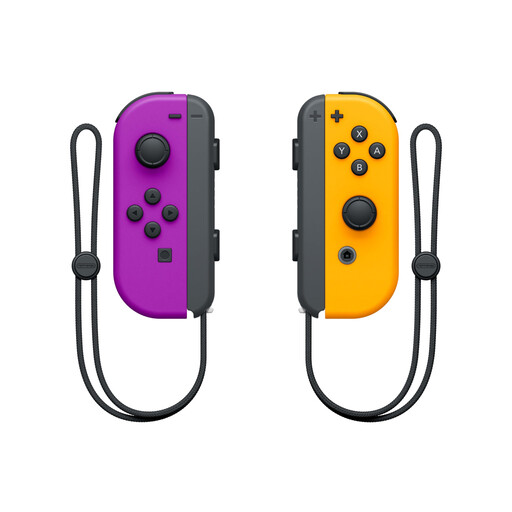
Nintendo Switch Joy-Con Pair (Neon Purple/Neon Orange)
For supported Switch games where two Joy-Con can be used as separate inputs.
According to the product description, the pair connects via Bluetooth; separate use requires a compatible game.
View at Joybuy
 No image available
Nintendo Switch 2 Pro Controller
For one player who prefers a full wireless controller layout on Switch 2.
The product description lists motion controls, HD Vibration 2 and assignable GL and GR buttons.
View at Joybuy
Frequently asked questions
Are eight connected controllers always enough for eight players?
No. The number needs to match the game mode you’ve chosen: Nintendo says Smash mode in Super Smash Bros. Ultimate supports up to eight players. On Switch 2, the number of controllers that can be synchronised also depends on the controllers and features in use, according to Nintendo.
Can a pair of Joy-Con give two people extra player slots?
Yes, if the specific game supports separate use. Nintendo says Joy-Con 2 can be used individually as controllers in horizontal mode; check the game mode before counting a pair as two inputs.
Which Joy-Con work with Switch 2?
Joy-Con 2 are designed for Switch 2, while original Joy-Con can be used wirelessly with it. Original Joy-Con can’t be attached to Switch 2 and need an original Switch or suitable charging accessories to charge.
Why can’t I pair all my controllers when Bluetooth audio is connected?
Nintendo limits the number of wirelessly connected controllers to two when Bluetooth audio is active on Switch and Switch 2. If your group needs more wireless controllers, disconnect the Bluetooth audio device, then check how many controllers the game supports.


