What should you check before buying?
Start with the game and platform, then count the inputs you actually need and finally check that the connection will work from the seat you have in mind.
| Consideration |
What to check before buying |
Who is this important to? |
| Game and platform compatibility |
Check the operating system or console generation, connection type and controller support in the specific game. |
If I’m looking for an extra gamepad for a particular game, it needs to work with that game’s platform and local mode. Around 31 % of consumers say compatibility is their main concern. |
| Separate inputs for everyone |
Check the local player limit and whether a single Joy-Con counts as a complete input. |
If everyone is to play at the same time, I want to know which inputs the game requires for each person. Around 25 % of consumers prioritise having enough separate player inputs. |
| Connection and seating |
Measure the safe cable length to your seat, or check the wireless mode, receiver and power supply. |
If my seat is further from the screen, I want to play without a cable; if I use a cable, it needs to be routed safely. Around 19 % of consumers have this concern. |
| Being considerate in a shared space |
Check the vibration options on your system and in the game; don’t assume they indicate how loud the buttons are. |
If other people are in the room, I want to be able to adjust the feedback to suit the shared gaming session. Around 13 % of consumers prioritise these settings. |
| Equipping every player fully |
Count the compatible controllers you already own and check what’s included, including batteries, charging cables and, where applicable, a receiver. |
If the group needs several extra inputs, I want to know in advance what else is needed for each player. Around 12 % of consumers prioritise having everything they need, including power. |
Joybuy controllers for local multiplayer
This selection includes a Joy-Con 2 set for Switch 2 and wireless full gamepads. For each model, check that the platform, connection and local game mode are compatible.
 No image available
Nintendo Switch 2 Joy-Con 2 (2-piece set, blue/light yellow)
For local Switch 2 sessions when the game supports individual Joy-Con 2 as separate inputs.
The set includes one left and one right Joy-Con 2; Nintendo describes two-player use with compatible games. For Switch 2 only.
View at Joybuy
 No image available
NAXSIR wireless Bluetooth gamepad with phone holder
An option if you’re looking for a wireless gamepad with a phone holder and can check that it connects to your specific game.
The product title lists Bluetooth 5.2, 2,4-GHz wireless and Android, iOS, PC, Smart TV, PS3 and Switch. Check the right connection mode and in-game support before buying.
View at Joybuy
 No image available
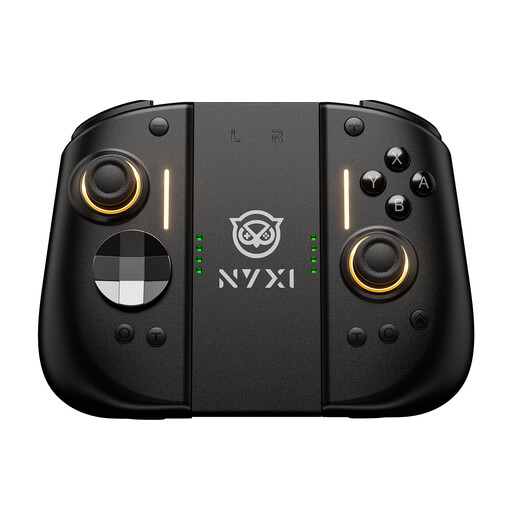
NYXI Hyperion 3 wireless controller for Switch 2, black
For local Switch 2 sessions when a full gamepad suits the game’s input mode.
The product title lists Hall Effect joysticks, a 9-axis gyro and adjustable vibration. Check that the game supports the controller input you want to use.
View at Joybuy
 No image available
Microsoft Xbox Series X/S Wireless Controller, Deep Pink
For supported Xbox or PC sessions when wireless play suits your setup.
The product title lists Xbox One, Xbox Series X/S and PC. According to the product description, the controller requires two AA batteries, which are included.
View at Joybuy
 No image available
BIGBIG WON Rainbow 3 wireless controller
For wireless PC or Switch 2 sessions, provided the specific platform and game are supported.
The product title lists PC, Switch 2, iOS and Android, as well as a 6-axis gyroscope and a 3,5-mm audio jack. Check compatibility with the local game you plan to play.
View at Joybuy
Frequently asked questions
Is one pair of Joy-Con 2 enough for two people?
Only if the specific Switch 2 game supports one left and one right Joy-Con 2 as separate inputs in local mode. Nintendo describes this use for compatible games; Switch 2 already comes with one pair.
How many controllers can you use with a PS5 or Windows PC?
Sony says you can use up to four controllers with a PS5. Xbox Support says you can connect up to eight Xbox Wireless Controllers simultaneously to a Windows PC via USB; the limit is lower when certain chat headsets are connected. The specific game must also support the number of local players you want.
How do you get ready for a gaming session with housemates?
Connect each controller using a mode designed for your device, then check that each player has a separate input in the specific game. With a wired model, make sure the cable can reach your seat safely. For DualSense on PC, PlayStation Support lists Bluetooth and USB; haptic feedback requires a compatible game and a USB connection.
What happens if a controller develops a fault, and how should you dispose of used batteries?
Your statutory rights are with the seller; a manufacturer’s warranty is a voluntary benefit and is separate, as explained by the German consumer advice centre. According to the Federal Environment Agency, used batteries and rechargeable batteries must not be put in household waste; take them to a suitable collection point.
What legal requirements apply to a wireless controller sold in Germany?
The German Federal Network Agency says radio equipment needs CE marking and the required accompanying documents. Retailers must check, among other things, the labelling and, where applicable, German-language instructions and safety information. CE marking is the manufacturer’s declaration of conformity; it doesn’t tell you whether a controller is compatible with your game.


