Choose additional controllers to suit your gaming system first, then check which control options and player numbers the specific arena game supports. Nintendo says Joy-Con 2 can be used individually with Switch 2, provided the game and play style allow it; for PS5, Xbox and PC, you’ll need compatible full-size controllers. The number of controllers you can pair doesn’t, by itself, tell you how many people can play together in a game.
Who is this selection for?
Multiplayer sessions on Switch 2
You want to give several players their own controls, so check whether your arena game supports using individual Joy-Con 2 controllers. According to Nintendo, the number of controllers you can use also depends on the controllers and features involved.
Hosts with a PS5 or Xbox
You’re adding full-size controllers to a console you already own, so check separately how many people can play the specific game locally. Sony says you can use up to four controllers at once with PS5.
PC sessions with different gamepads
You need a gamepad whose exact model and connection are compatible with your PC. You should also check that the game supports the controller. Microsoft lists Windows PCs as a supported platform for the Xbox Wireless Controller, while 8BitDo offers different Ultimate 2C variants for different devices.
What should you consider when buying?
Switch 2 with Joy-Con 2
A good fit if: Your game supports individual Joy-Con 2 controllers held horizontally and you want several people to play.
Bear in mind: According to Nintendo, using a Joy-Con 2 individually depends on the software and play style; Joy-Con 2 controllers don’t work with the original Switch.
Original Switch with Joy-Con
A good fit if: You already own Joy-Con and the game supports using them individually.
Bear in mind: Nintendo says original Joy-Con can be used wirelessly with Switch 2, but they can’t be attached to or charged by the console.
PS5 with DualSense
A good fit if: You’re playing locally on PS5 and everyone needs a full-size controller.
Bear in mind: Sony says you can use up to four controllers at once with PS5; the number of players in a particular game may be different.
Xbox or Windows PC with Xbox Wireless Controller
A good fit if: You already play on Xbox or a Windows PC and want a full-size gamepad.
Bear in mind: The platforms listed by Microsoft don’t confirm how many people your game supports locally.
Platform-specific alternatives
A good fit if: You need an additional controller for a specifically supported platform or a wired option for a docked Switch.
Bear in mind: 8BitDo Ultimate 2C Wireless and Bluetooth are different variants; according to the manufacturer, the PowerA controller covered here doesn’t support games that require Joy-Con.
| Buying consideration |
What to look for |
Who is it important to? |
| System and model variant |
Check the console or PC, full model name and connection type against the game’s requirements. |
If I’m looking for a gamepad for the system I already own, I want to avoid choosing a similarly named variant intended for something else. Around 36% of consumers prioritise platform and model compatibility. |
| Number of independent controls |
Check the local player limit and the controller modes supported by the specific game; count the controls you already have and the ones you still need. |
If several people are going to play at once, I want to know whether everyone will have a control option accepted by the game. Around 29% of consumers put the number of simultaneous players first. |
| Control type |
Check whether the game needs individual controllers, motion controls or specific buttons, and which features the model offers. |
If my game requires a particular type of control, I want a layout that suits it rather than paying for features I don’t need. Around 21% of consumers prioritise the right control type. |
| Power and accessories |
Check the charging options, what’s included, and whether you need cables or adapters for all the controllers you plan to use. |
If I want several additional controls ready for a gaming session, I also need to plan for charging and any accessories. Around 14% of consumers first consider power, accessories and the related costs. |
Avoid common buying mistakes
-
Assuming eight connectable controllers means eight players
Nintendo gives a pairing limit for Switch 2 that depends on the controllers and features being used. How many people can play an arena game locally is a separate question.
Before buying, check the local player limit and the controller modes supported by the specific game.
-
Assuming similarly named 8BitDo variants are interchangeable
8BitDo lists the Ultimate 2C Wireless for Windows and Android, while the Ultimate 2C Bluetooth is for Switch and, after a firmware update, Switch 2.
Check the full model name and listed platform instead of searching for “Ultimate 2C” alone.
-
Confusing wireless use of older Joy-Con with charging them on Switch 2
Nintendo confirms that original Joy-Con can be used wirelessly with Switch 2, but not that they can be attached to or charged by the console.
If you need to charge these Joy-Con for your gaming session, plan to use an original Switch or suitable charging accessories.
-
Assuming a wired Switch gamepad can replace every Joy-Con control option
For the Enhanced Wired Controller covered here, PowerA excludes games that require Joy-Con. The manufacturer also says this model doesn’t support motion controls or HD Rumble.
Check the game’s requirements and that it can be used in docked mode before relying on wired additional controllers for everyone.
Key brands at a glance
Nintendo
Joy-Con 2 are an option for individual or shared controls on Switch 2, as long as the game and play style support them.
- Nintendo describes each Joy-Con 2 as an individual controller when used horizontally.
- Joy-Con 2 don’t work with the original Switch. Original Joy-Con can’t be attached to or charged by Switch 2.
PlayStation
DualSense is a full-size additional controller for local PS5 games; Sony also lists supported computers as a possible platform.
- Sony says you can use up to four controllers at once with a PS5.
- According to Sony, haptic feedback and adaptive triggers depend on support in the game and may require USB.
Xbox
Microsoft lists Xbox consoles and Windows PCs as platforms for the Xbox Wireless Controller.
- Microsoft lists Bluetooth and button mapping among the controller’s features.
- The platform information doesn’t specify how many people a particular game supports locally.
8BitDo
Ultimate 2C Wireless and Ultimate 2C Bluetooth are variants for different platforms.
- 8BitDo lists the Wireless variant for Windows and Android, and the Bluetooth variant for Switch and, after a firmware update, Switch 2.
- The shared Ultimate 2C name doesn’t mean both variants support the same platforms.
PowerA
According to PowerA, the Enhanced Wired Controller covered here is a wired additional controller for a docked Switch, and is also listed for Switch 2.
- For this product, PowerA lists a 3-m USB cable and battery-free operation.
- According to PowerA, this product doesn’t support games that require Joy-Con, motion controls or HD Rumble.
Joybuy products for local gaming sessions
The following Joybuy models offer additional control options for local gaming on Switch 2, Switch and PC. Always check the platforms listed for each model against the requirements of the specific game.
 No image available
BIGBIG WON Fight Master Leverless Controller
An option for fighting game sessions if you’re looking for a Hitbox controller for one of the listed platforms.
Platforms listed in the product name: Switch 2, Switch, PC, iOS and Android; Bluetooth, 2.4G and wired connections; mechanical switches.
Joybuy
 No image available
Nintendo Switch 2 Joy-Con 2 pair, blue/light yellow
For local gaming on Switch 2 when the game supports using the two controllers separately.
According to the product description, the set includes one left and one right Joy-Con 2; using them separately for multiplayer is supported in compatible games.
Joybuy
 No image available
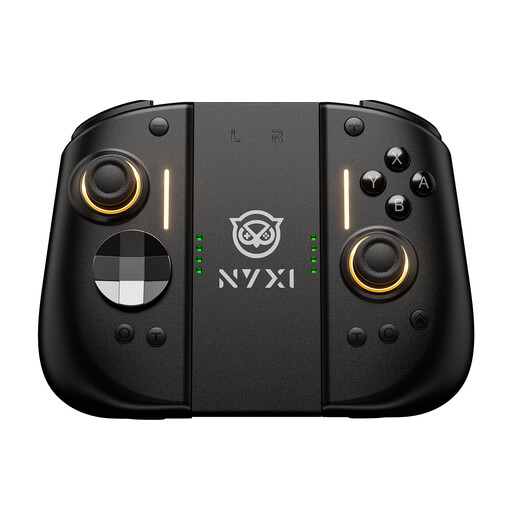
NYXI Hyperion 3 Wireless Controller for Switch 2
A wireless controller option for Switch 2, as stated in the product name.
Features listed in the product name: 9-axis gyroscope, Hall Effect joysticks, mechanical buttons and two rear buttons.
Joybuy
 No image available
BIGBIG WON Rainbow 3 Wireless Controller
An option for PC or Switch 2 gaming sessions if the listed platforms and connection are compatible with your game.
Platforms listed in the product name: PC, Switch 2, iOS and Android; capacitive joysticks, mechanical buttons, gyroscope and 3.5 mm audio jack.
Joybuy
 No image available
Nintendo Switch Joy-Con pair, neon blue/neon yellow
For Nintendo Switch sessions where the specific game supports using detachable Joy-Con for multiple players.
According to the product description, the set includes one left and one right Joy-Con, plus two straps.
Joybuy
Frequently asked questions
Are two Joy-Con 2 enough for two people?
Yes, if the specific game supports using each controller individually in a horizontal position: Nintendo describes each Joy-Con 2 as an individual controller in this mode. If the game requires both halves to be used together, the pair provides just one control option.
How many controllers can I use with a PS5 at once?
Sony says you can use up to four controllers at once with a PS5. Whether four people can join your arena match also depends on the game’s local multiplayer mode.
Can I use and charge my existing Joy-Con with Switch 2?
Nintendo confirms that original Joy-Con can be used wirelessly with Switch 2, but not that they can be attached to or charged by the console. Nintendo lists an original Switch or suitable charging accessories for charging them.


