What should you look for when buying?
Start with your platform and game, then consider the number of players and where you’ll be sitting. Power and extra features come next.
| What matters |
What to check before buying |
Who should pay particular attention? |
| Platform and game |
Check the console or operating system, exact model variant, connection method on that platform and the game’s controller support. According to Nintendo, Joy-Con 2 are designed for Switch 2, not the original Switch. |
If I want to play on my existing console or PC, I need to be sure the controller and game are compatible. Around 33% of consumers say platform and game are their main consideration. |
| Connection from your seat |
Check the cable length and whether you can route it safely. With a wireless model, check the connection mode it uses and whether you’ll need a receiver. 8BitDo lists 2.4 GHz or wired connectivity for the Ultimate 2C Wireless on Windows, while Bluetooth is listed for Android. |
If I’m sitting further away from the console or PC, I don’t want to trail a cable across the room, but I still need to use the right connection mode. Around 27% of consumers say connection from their seat is their top priority. |
| Separate inputs |
Check the player limit and supported ways of holding the controller in the game, and count the controllers you already have. Nintendo says that, in most circumstances, up to eight wireless controllers can be used with Switch; however, the number depends on the controller type and features. |
If several people are playing at once, I need the right separate inputs for each person. Around 27% of consumers focus mainly on the number of players and the inputs required. |
| Power and features |
Check whether the controller uses a rechargeable battery, replaceable batteries or a cable, as well as which features the game needs. According to PowerA, the documented Enhanced Wired Controller model doesn’t need batteries, but it doesn’t support motion controls or HD rumble, among other features. |
If the controller needs to be ready for a longer gaming session, I want to check its power requirements and the features I’ll actually need in advance. Around 13% of consumers say this is their main consideration. |
Controllers at Joybuy
This selection includes controllers for Switch 2, Xbox, PS4 and PC, as well as models for wireless play or wired use. Before buying, check that the listed platform and connection method suit your game and setup.
 No image available
Nintendo Switch 2 Joy-Con 2 (2-piece set, blue/light yellow)
For a Switch 2 gaming session when the particular game supports using the two Joy-Con 2 separately.
The set includes one left and one right Joy-Con 2. According to Nintendo, each controller can be used individually in a horizontal position, provided the software supports it. Not compatible with the original Switch.
View at Joybuy
 No image available
The G-Lab K-PAD-HELIUM-WL wireless controller (2 rear buttons)
For wireless gaming on PC when a USB port is available for the wireless receiver.
The product description lists a 2.4 GHz connection with USB receiver and a rechargeable battery. PC and PS3 are listed as compatible platforms.
View at Joybuy
 No image available
Wireless controller compatible with PS4 and PC
For wireless play on one of the platforms listed in the product description.
PS4, PS4 Slim, PS4 Pro and PC are listed as compatible. The description also includes a charging cable, touchpad, gyroscope, vibration motors and audio port.
View at Joybuy
 No image available
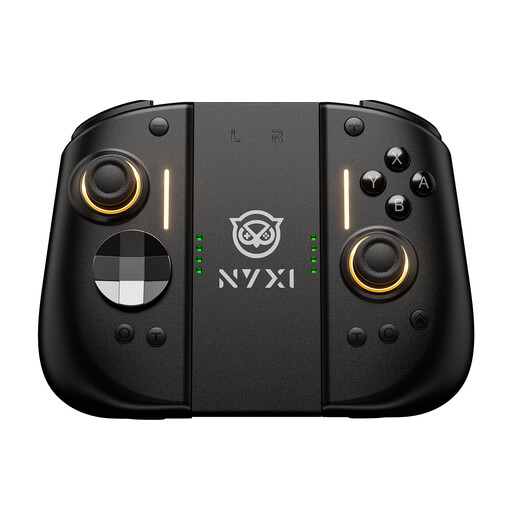
NYXI Hyperion 3 wireless controller for Switch 2 (black)
For a Switch 2 gaming session if you’re looking for a wireless controller with the controls listed in the product name.
The product name lists Hall Effect joysticks, mechanical buttons, two rear buttons and a 9-axis gyroscope.
View at Joybuy
 No image available
Microsoft Xbox Wireless Controller Series X/S (Deep Pink)
For wireless gaming on one of the listed Xbox platforms or a compatible PC.
The product description lists Xbox One, Xbox Series X|S and PC, as well as Xbox Wireless and Bluetooth. The controller runs on AA batteries.
View at Joybuy
Frequently asked questions
Can each person use one Joy-Con 2 from a pair on Switch 2?
Yes, if the software supports using a Joy-Con 2 individually in a horizontal position. Nintendo also describes using both Joy-Con 2 together, so check the ways of holding the controller supported by the particular game.
Why won’t my 8BitDo Ultimate 2C Wireless connect to my Windows PC via Bluetooth?
For this model on Windows, 8BitDo lists the 2.4 GHz receiver or a cable; Bluetooth is listed for Android in the model specifications. For a wireless Windows connection, you’ll need the receiver supplied for this purpose and a suitable USB port.
What should I charge or have ready for a longer gaming session?
Check the battery level of wireless models and have the appropriate charging option ready. The documented PowerA wired model doesn’t need batteries; according to Nintendo, older Joy-Con used with Switch 2 must be attached to an original Switch or charged using suitable charging accessories.
Who should I contact in Germany if a new controller is faulty?
For statutory rights relating to faulty goods, the seller is generally the first point of contact. The Verbraucherzentrale states that new goods are covered for two years from delivery; this is separate from any voluntary manufacturer’s guarantee. For sales contracts from 31 July 2026, the Verbraucherzentrale also lists additional information requirements and a one-off extension of the time limit if you choose a repair.
Can a faulty controller be put in household rubbish in Germany?
No. The German Environment Agency explains that electrical and electronic waste must be collected separately, for example at a recycling centre or an appropriate take-back point. Where possible, removable batteries should be taken out and disposed of separately before the controller is returned.


