First, choose a controller that suits your console or PC and the requirements of the specific game. In supported Switch 2 games, individual Joy-Con 2 controllers can provide extra inputs without everyone needing a full gamepad; the game determines whether they’re enough for the number of players you want. For Xbox and Windows, Microsoft, GameSir and 8BitDo specify different wireless and wired connections depending on the model. So also check the seating arrangements, cable routes, what’s included and how the controller is powered.
Which controllers are right for you?
A Switch session with several guests
You want to provide enough controls for everyone on a Switch 2 without buying full gamepads unnecessarily. The key is the type of controller required by the specific game. Nintendo advises checking the player numbers and controller requirements listed for each game.
A PC or Xbox session in a small space
You want to give players a choice of seats and need to decide between a wireless connection and a USB cable routed safely. For the Xbox Wireless Controller on PC, Microsoft lists USB, the Xbox Wireless Adapter or Bluetooth; GameSir describes the G7 HE as a wired model.
Buyers who already own a controller
You want to keep using a controller you already own, so you’re checking platform compatibility, pairing and whether you need a separate charging option. Sony describes USB-C and Bluetooth connections for using a DualSense with compatible PC games. Check separately whether a particular game supports the inputs you want.
What should you look for when buying?
| Consideration |
What to check before buying |
Who is this most important for? |
| Platform and game |
Check the platform, player numbers and required controller type for the specific game. |
If I want to provide controllers for several players on a Switch 2, I check that the game supports individual Joy-Con and the number of players we want. That’s why around 33% of consumers put platform and game compatibility first. |
| Available seating |
Check the cable route, walkways and the wireless connection specified for your system. |
In a small living room, I want to use the seating flexibly without a controller cable running across a walkway. That’s why around 27% of consumers prioritise freedom of movement and clear walkways. |
| Buttons you need |
Check the buttons required, whether the game supports single-controller mode and your preferred control layout. |
If my arena game requires certain buttons or a full-size gamepad, I don’t want to choose based only on extra features. That’s why around 20% of consumers focus first on having the right button controls. |
| Controllers and power |
Count the devices you already have and check what’s included and how they can be charged. |
If I already own controllers, I want to know which ones will work for our session and how to charge or power them. That’s why around 20% of consumers prioritise the number of devices needed and their power supply. |
Avoid common buying mistakes
-
‘Local multiplayer’ doesn’t automatically mean one Joy-Con per person
The number of players and controllers supported depends on the game. So a single Joy-Con won’t be enough for every local gaming session.
Before buying, check the player numbers and controller requirements for the specific game.
Depending on the game, you may need additional full-size controllers.
-
‘Wireless’ doesn’t tell you which connections will work everywhere
For the Ultimate 2C, 8BitDo specifies Bluetooth for Android and a 2.4 GHz or wired connection for Windows. So the product name alone doesn’t confirm Windows Bluetooth or console compatibility.
Check the full model name and specified connection against your platform.
-
Reusing existing Switch Joy-Con without planning how to charge them
Nintendo says older Switch Joy-Con can be used wirelessly with a Switch 2, but they can’t be attached to the console and charged there.
Plan for a charging option recommended by Nintendo before using your existing controllers for a gaming session.
-
Buying a USB gamepad without checking the cable route
The GameSir G7 HE connects via a USB-C cable. In a small living room, the cable between the device and the seating area could get in the way.
Check the actual cable route to each planned seat before choosing a wired model.
Key brands at a glance
Nintendo
Joy-Con 2 controllers may suit supported multiplayer modes on Switch 2; the Switch 2 Pro Controller is a full-size gamepad.
- Nintendo lists motion controls, as well as buttons and sensors on the right Joy-Con 2.
- Nintendo says Joy-Con 2 are designed for Switch 2. The type of controller you need depends on the game.
Microsoft Xbox
The Xbox Wireless Controller is listed for compatible Xbox consoles and Windows PCs.
- For a PC connection, Microsoft lists USB, the Xbox Wireless Adapter for Windows or Bluetooth.
- Make sure you have the right power supply for each additional gamepad. The platforms listed don’t confirm compatibility with Switch or PS5.
GameSir
GameSir describes the G7 HE as a wired option for Xbox and Windows, provided the connection is practical for your seating arrangement.
- For this model, GameSir lists USB-C, Hall Effect sticks and remappable rear buttons.
- These features don’t guarantee better performance in a particular game, and you’ll need to route the cable safely in a small room.
8BitDo
The Ultimate 2C Wireless is listed for Windows with a 2.4 GHz receiver or a wired connection.
- 8BitDo lists Bluetooth for Android and 2.4 GHz or a wired connection for Windows.
- This doesn’t confirm general Windows Bluetooth or console support.
Sony PlayStation
The DualSense is designed for PS5 and is also relevant for compatible PC games via supported connections.
- Sony describes USB-C and Bluetooth connections for PC.
- Check separately whether a particular game supports the inputs and features you want.
Joybuy products for local gaming sessions
This selection includes controllers for Switch 2 and Windows PCs, as well as models for Xbox and PS5. Before buying, check that the specific game supports the platform and controller type you want.
 No image available
Nintendo Switch 2 – Joy-Con 2 two-piece set (Blue/Light Yellow)
For compatible local multiplayer modes on Switch 2. Whether individual Joy-Con and the number of players you want are supported depends on the game.
The set includes one left and one right Joy-Con 2, plus two wrist straps. The connection is wireless.
View on Joybuy
 No image available
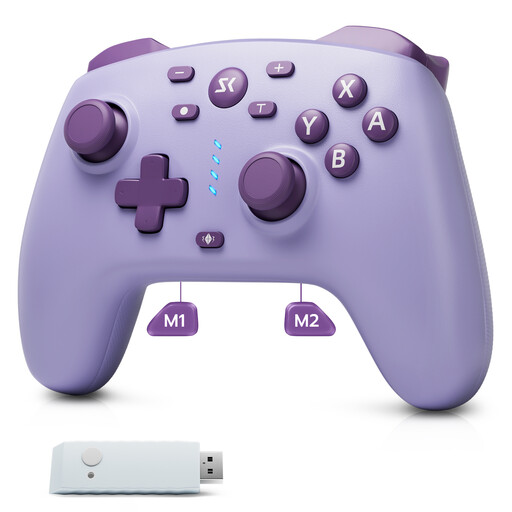
CHENGDAO Wireless Controller (Purple)
For wireless gaming, provided the specific system and game support the controller.
The product title lists a 2.4 GHz receiver, two rear buttons, and Hall Effect sticks and triggers. The listed platforms are Switch, Switch 2 and Windows; check that the connection is compatible with your system.
View on Joybuy
 No image available
Microsoft Xbox Wireless Controller (Deep Pink)
For wireless gaming on the Xbox systems listed in the product details, or with a compatible PC.
The listed platforms are Xbox One, Xbox Series X/S and PC. The product description specifies batteries for power, so make sure you have a suitable power source.
View on Joybuy
 No image available
PlayStation 5 DualSense Controller (Starlight Blue)
For PS5 gaming sessions or compatible PC games, provided the game supports the DualSense inputs you want.
The product description lists Bluetooth and haptic feedback. Sony describes USB-C and Bluetooth connections for PC; support for individual features depends on the game.
View on Joybuy
 No image available
BEITONG KP70 Elite Wireless Gaming Controller
For PC or Switch 2, provided the specified connection and the game are compatible.
The product description lists six programmable buttons, a 1500-mAh battery, and wired, wireless and Bluetooth connections. Check in advance which connection mode is intended for your system.
View on Joybuy
Frequently asked questions
Is one Joy-Con 2 enough per person?
Only if the specific Switch 2 game supports this controller mode for the number of local players you want. Nintendo advises checking the player numbers and controller requirements listed for each game.
Can I use existing Switch Joy-Con with a Switch 2?
Yes, Nintendo says they can be used wirelessly. However, you can’t attach them to the Switch 2 and charge them there. You’ll need a Switch console or suitable charging accessories recommended by Nintendo.
How do I connect an Xbox Wireless Controller to a Windows PC?
Microsoft lists a USB cable, the Xbox Wireless Adapter for Windows or Bluetooth. Check which of these connections your PC supports.
What if a controller is faulty after an EU consumer purchase?
According to information from the European Union, consumer purchases in the EU are covered by a legal guarantee from the seller for at least two years from the date you receive the goods. This is separate from a voluntary manufacturer’s warranty. If a product is faulty, you may initially be entitled to a free repair or replacement.


