What should you look for when buying?
First, check that the controller, gaming device and local mode you want to play all work together. Then consider your seating distance and power supply to help you decide between wired and wireless.
| What matters |
What to check before buying |
Who is this particularly important to? |
| Compatibility |
Approval for your device and support for local play in the specific game. |
I first check whether the controller and game work on my console or Windows PC; around 36 % of consumers put compatibility first. |
| Playing together |
Count the controllers you already have and check that the game version and mode support two players on one device. |
If someone else is joining in, I want to use the controllers I already have rather than buy another gamepad unnecessarily. Around 29 % of consumers prioritise being able to play together without an unnecessary extra purchase. |
| Wired or wireless |
Measure the cable length and the actual route to your seat; for wireless, check the required connection or receiver. |
For my bedroom setup, I want to work out whether a cable will reach or wireless would be more convenient; around 21 % of consumers focus on getting the right connection and freedom of movement. |
| Power supply |
Check what’s included, the battery type, charging cable and whether you need to buy charging accessories separately. |
I want to know whether I’ll need batteries or to charge a rechargeable battery before I play. For around 14 % of consumers, the power supply and any accessories needed are a key consideration. |
Controllers at Joybuy
This Joybuy selection includes controllers for Switch 2, Windows PC, Xbox and PS5. Check that each model works with your gaming device and the local mode you want to play.
 No image available
Nintendo Switch 2 Joy-Con 2 (2-piece set, Blue/Light Yellow)
For local matches on Switch 2, when the game supports one Joy-Con 2 per player.
The set includes one left and one right Joy-Con 2. Local multiplayer support depends on the game; Electronic Arts describes individual use for local matches in EA SPORTS FC 26 on Switch 2.
View at Joybuy
 No image available
The G-Lab K-PAD-HELIUM-WL Wireless Gaming Controller
For a Windows PC, if you want to play wirelessly using a USB receiver.
The product details list Windows 10/11, a 2.4-GHz connection via the USB RF receiver, a rechargeable battery and two programmable back buttons. Battery life is stated as up to 10 hours.
View at Joybuy
 No image available
Razer Wolverine V3 Tournament Edition White
For Xbox Series X|S, Xbox One or a Windows PC, if a wired controller suits your seating position.
The product details list a detachable 3-m USB-C cable, four back buttons and six mappable buttons.
View at Joybuy
 No image available
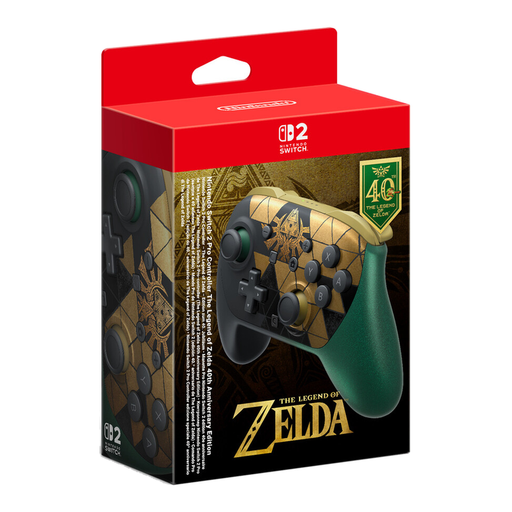
Nintendo Switch 2 Pro Controller The Legend of Zelda 40th Anniversary Edition, 2026
For Switch 2, if you’d prefer a full-size gamepad to using a Joy-Con 2 individually.
The product details list Bluetooth, a USB-C charging cable, HD Rumble 2 and mappable GL/GR buttons. This model is listed for Nintendo Switch 2.
View at Joybuy
 No image available
PlayStation DualSense Wireless Controller Midnight Black with USB cable
For a PS5 or a supported PC game, if you want to use a DualSense as an additional controller.
The product details list Bluetooth, USB-C, an included cable and a built-in rechargeable battery. The battery needs to be charged for wireless play.
View at Joybuy
Frequently asked questions
Do I definitely need a second controller for FC 26 on Switch 2?
No, not for the local match described by Electronic Arts, which uses two Joy-Con 2 controllers individually. Whether that setup works for you is a personal choice; this applies to the specified game and console version.
How do I connect an additional controller to a Windows PC?
For the Xbox Wireless Controller, Microsoft lists USB, Bluetooth or Xbox Wireless, if your PC has the right hardware or you use an adapter. For the DualSense, Sony lists USB or Bluetooth; the game must also support the controller.
Can I use Joy-Con 2 with an older Nintendo Switch?
No. Nintendo specifically describes Joy-Con 2 as controllers for Switch 2. According to Nintendo, older Joy-Con can connect wirelessly to Switch 2; you’ll need a compatible charging option to recharge them.
Who can help if a controller I bought from a retailer is faulty?
If you buy from a business seller in the EU, official EU consumer information states that you’re generally entitled to a minimum two-year legal guarantee from the seller. This is separate from any additional manufacturer’s guarantee; the rules explained there don’t apply to purchases from private individuals.
Do I have a legal right to cancel when buying a controller online?
For a qualifying distance-selling contract, official EU consumer information generally provides a 14-day cancellation period from the day the goods are delivered. Return postage may apply under the conditions set out there; a retailer’s voluntary returns policy should be considered separately.


