Listeners with a regular morning routine
If you want to start a news station or a briefing episode in just a few steps, first check that the programme you want is available through your chosen service.


If you don’t already have a suitable audio set-up, a Wi-Fi speaker or an internet radio with built-in speakers is the obvious choice. If you already have active speakers or an amplifier, a separate network streamer may be all you need. First, check whether the news programme you want is available through the service you plan to use on your device. DAB+ and FM are ways to receive live radio; they don’t automatically provide podcasts on demand.
If you want to start a news station or a briefing episode in just a few steps, first check that the programme you want is available through your chosen service.
If you want to hear speech from different parts of the room, consider where you’ll place the device, how easy it is to use and how loud it is at your usual listening spot. Technical sound specifications can’t replace this practical check.
If you want to keep using your amplifier or active speakers, you’ll need a network streamer with an output that matches the input you already have.
A good fit if: you mainly listen to a live news station and want a standalone device with speakers.
Consider: DAB+ or FM won’t give you podcasts on demand, so check reception where you plan to place the radio.
A good fit if: you don’t have an existing hi-fi system and want to play podcasts from a supported service or compatible app.
Consider: you can’t search every podcast catalogue in the Sonos app, and you may need to buy an adapter separately to use additional connections.
A good fit if: you already have active speakers or an audio system and want to keep using them to listen to the news.
Consider: a streamer such as the WiiM Mini isn’t an amplifier for passive speakers, so you’ll need a suitable amplifier.
| Buying priority | What to check before you buy | Who will find this most important? |
|---|---|---|
| Find and start a programme | Search for the specific episode in your chosen service; check which station favourites or presets are available. | If I want to listen to a particular episode in the morning, I want to start it in the service I plan to use without any fuss. That’s why around 36% of consumers put direct access to the specific programme first. |
| Listen to speech in an open-plan room | Check the placement, controls and volume at your usual listening spot. | If I spend time in different parts of an open-plan loft, I want to follow the news clearly from my usual listening spot. Around 29% of consumers prioritise listening to spoken content around the room. |
| Keep using an existing audio system | Check whether you have active or passive speakers, and factor in the amplifier you need and the right input. | If I want to keep my speakers or audio system, I need a streamer with a compatible connection. Around 21% of consumers prioritise continuing to use their existing audio equipment. |
| Use alternative radio reception | Check whether you have a DAB+ or FM tuner and whether you can receive the station you want where you plan to use it. | If I want to listen to live news via traditional radio as well, I look for the right tuner. Around 14% of consumers prioritise an additional way to receive live stations. |
The WiiM Mini sends audio to active speakers or an audio system. It doesn’t amplify passive speakers.
Before you buy, plan the signal path from the app or station, through the streamer and amplifier, to the speakers.
Having access to a live news station doesn’t mean you can search for a specific episode on demand using the device.
Search for the programme you want in your chosen service, and check whether you can play it from a compatible app as an alternative.
Sonos says that Line-In and wired Ethernet on the Sonos Era 100 require adapters, which are sold separately.
Before you buy, check which connections you need and whether your set-up requires a compatible adapter.
The notes below refer to the product ranges mentioned. The playback method you need and the connections on the specific model remain the key considerations.
The WiiM Mini is a network streamer for existing active speakers or an audio system, not a standalone speaker.
The Era 100 combines network playback with built-in speakers.
The DAB 7000i is an internet radio with built-in speakers and additional radio reception options.
The MXN10 is a compact network streamer for an existing hi-fi or desktop system.
The NODE is aimed at owners of an existing audio system who want a network streamer with additional connections and control options.
The Joybuy products below are internet radios with built-in speakers. For your daily briefing, check that you can access the podcast you want and get reception where you plan to place the radio. If a device has Wi-Fi or Bluetooth, also check the compliance information for the specific product listing in Germany.
 No image available
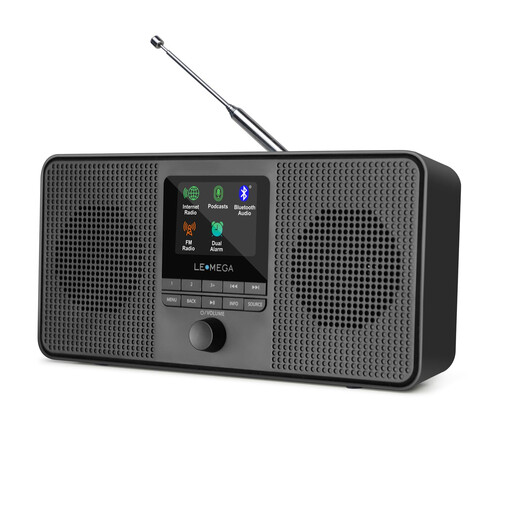
The product description lists podcasts and Spotify Connect. Check whether the news programme you want is available through your chosen service.
Wi-Fi, Bluetooth, DAB and FM; 40 internet radio presets; display and dual alarm.
Mains powered or runs on AA batteries.
 No image available
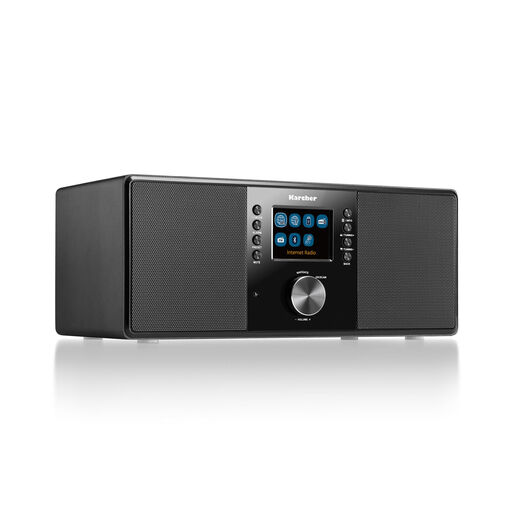
The product description lists Wi-Fi access to stations, podcasts and streaming services. Check in advance that the podcast service and specific episode you want are available.
DAB+, FM, Bluetooth and built-in stereo speakers; 2.4-inch colour display.
Includes USB, AUX-in, Line-out, headphone socket, alarm clock and remote control.
No, not with every service. Sonos Support notes that you can’t search every podcast catalogue in the Sonos app. Check whether the programme you want is available, and if necessary, try playing it from your phone app.
With the WiiM Mini, you’ll need active speakers or an amplifier for passive speakers. WiiM describes the Mini as a streamer, not an amplifier. Check that the input on your audio system matches the streamer’s analogue or optical output.
A saved preset can make it easier to access a supported live station. The WiiM Help Centre explains how presets work on WiiM devices; check that your station and chosen device are supported. A station preset doesn’t mean that every podcast episode will start automatically.