
Lieferung heute & morgen

Qualitätsgarantie

Willkommens-Angebote freischalten: KOSTENLOSE Lieferung | Bis zu 80 % RABATT | Kostenlose 30-Tage-JoyPlus-Testphase
App herunterladen
A Logitech mouse can make your daily work easier, but there are significant differences between compact Bluetooth models, ergonomic work mice and gaming mice. If you only focus on DPI numbers or an especially long battery life, you can easily overlook important factors.
A high sensor resolution is mainly relevant for certain gaming situations. For word processing, spreadsheets or browsing, a moderate setting is often sufficient. What matters is whether you can adjust the pointer speed and whether the sensor works reliably on the surface you're using.
A wireless Logitech mouse can connect via Bluetooth, a 2.4 GHz receiver or Logitech LIGHTSPEED. Bluetooth saves a USB port and works well with many laptops and tablets. A USB receiver, on the other hand, can be practical with older computers or in environments with demanding connection conditions. For gaming mice, response time and polling rate are also important.
A Logitech mouse with long battery life isn't automatically comfortable for long work sessions. Compact models are portable, but they can be less comfortable for larger hands. Right-handed users should also check whether the shape and thumb buttons actually suit their hand position. Left-handed users often need a symmetrical or explicitly ambidextrous model.
A Bluetooth mouse can pair directly with many notebooks, tablets and computers. The Logitech M240 Silent connects without a dongle and, according to the product specifications, supports Windows, macOS, iPadOS, ChromeOS, Linux and Android, among others. For devices with few ports, this is a practical advantage.
A wireless mouse with a Nano or Unifying receiver, on the other hand, requires a free USB port. The setup is often straightforward: plug in the receiver, switch on the mouse and start using it. Gaming models like the Logitech G502 X LIGHTSPEED use a special wireless connection and are aimed at users who need low latency and programmable controls.
For office and home office tasks, a stable optical sensor and smooth pointer movement are more important than the highest possible DPI rating. For creative applications, finer speed levels can be helpful. Gaming mice like the Logitech G502 HERO offer a range of 200 to 25,600 DPI and 11 programmable buttons, according to the product data.
A sensor with up to 8,000 DPI, like the one in the Logitech MX Master 3S or MX Anywhere 3S, can work precisely on different surfaces. Nevertheless, you should use the mouse on a suitable, clean surface. Glass tracking is a technical feature that isn't the same as working on every transparent or highly reflective surface.
An ergonomic mouse should suit your hand size and preferred grip. The Signature M650 L is designed for larger hands and right-handed users, according to the product description. The MX Master 3S also has a contoured right-handed shape and additional buttons for workflows.
For a library, office or late working hours, a quiet mouse can be a good idea. With the M240 Silent and M220 Silent, the click volume is reduced by up to 90 per cent, according to the manufacturer. This mainly affects the click sound; the scroll wheel and movement noises may still be audible.
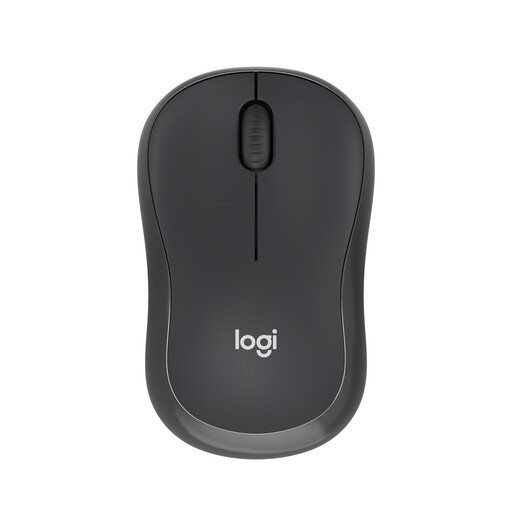
Why this product suits the profile: This compact Bluetooth mouse is ideal for laptops, studying and everyday office tasks. It doesn't need a USB receiver and is designed for both right- and left-handed users.
The connection works directly via Bluetooth, while the automatic sleep mode reduces power consumption. The product specifications state up to 18 months with one AA battery.
Quiet clicks, up to 10 metres range and support for multiple operating systems.
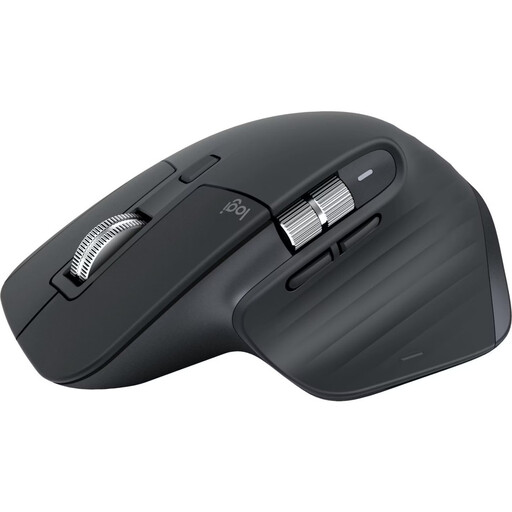
Why this product suits the profile: For developers, creatives and professional users, this mouse offers a right-handed shape, multiple buttons and the ability to switch between up to three devices.
The shape, button assignment and pointer speed can be customised via Logi Options+. Bluetooth prevents a USB port from being permanently occupied.
8,000 DPI sensor, MagSpeed scroll wheel, seven programmable buttons and up to 70 days battery life according to product data.
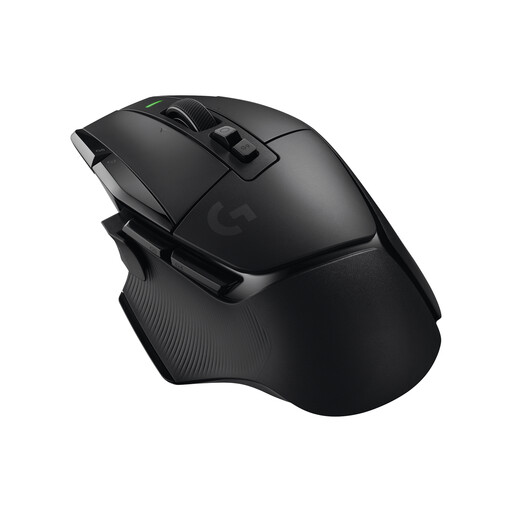
Why this product suits the profile: This Logitech G mouse is aimed at gamers who need programmable buttons, a gaming-grade wireless connection and profiles for different games.
The LIGHTSPEED connection is designed for gaming. The 13 programmable controls and adjustable DPI range are concrete features rather than mere design elements.
HERO 25K sensor, dual-mode scroll wheel, USB-C port and up to 140 hours battery life according to product data.
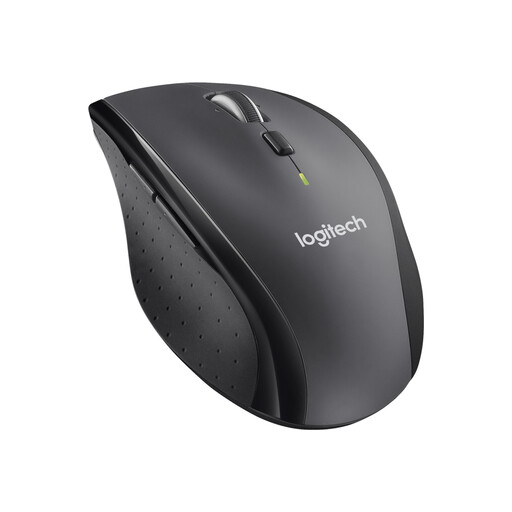
Why this product suits the profile: This wireless mouse is interesting for the office, home office and long documents, if a USB receiver and infrequent battery changes are acceptable.
The product description states up to three years battery life and a power-saving mode. Before buying, you should check the battery type and what's included with the specific variant.
Hyper-fast scroll wheel, ergonomic right-handed shape and laser tracking according to product data.
We've put together a complete, regularly updated list of products that fully meet these strict selection criteria and the safety regulations in force in the EU.
For a laptop, a compact Bluetooth mouse like the M240 Silent or the MX Anywhere 3S is practical because it doesn't use a USB port for a receiver. Check before buying whether your device supports Bluetooth and whether the mouse you want is compatible with your operating system.
The battery life depends on the model, usage and power-saving features. For the products mentioned, the manufacturer's specifications range from several months to several years. Rechargeable models need a USB-C charging cable regularly, while battery-powered mice can usually be kept running quickly with an AA battery.
No. SilentTouch or comparable technologies mainly reduce the click sound. The scroll wheel, placing the mouse down and movements on the surface can still make noise. For shared spaces, a quiet mouse is still a sensible option.