
Lieferung heute & morgen

Qualitätsgarantie

Willkommens-Angebote freischalten: KOSTENLOSE Lieferung | Bis zu 80 % RABATT | Kostenlose 30-Tage-JoyPlus-Testphase
App herunterladen
A Logitech mouse can vary considerably depending on its connection, design and intended use. If you only look at the DPI figure or product photos, you could easily miss important details. Is the receiver compatible with your laptop? Is the shape suitable for your preferred hand? Does it need a battery or charging cable?
This buying guide helps home users, office workers, people working from home and gamers choose the right mouse for a PC, Mac, Chromebook or laptop.
A higher DPI figure simply means the cursor moves further with the same physical movement of the mouse. Moderate settings are often enough for office applications. A more precise setting can be useful for photo editing, large monitors or gaming. The key is whether you can adjust the sensitivity and whether the sensor works well on your surface.
A wireless Logitech mouse can connect either via Bluetooth or a USB receiver. A USB receiver needs a compatible port on your computer. Bluetooth may be more convenient if your modern laptop has few USB-A ports. A receiver, on the other hand, can be a good choice if you want straightforward plug-and-play setup.
Before you buy, also check whether you need a USB-C adapter and whether the receiver is included.
For a quiet mouse, terms such as “SilentTouch” or “Silent Click” usually refer to the main buttons. The scroll wheel or middle button may still make an audible noise. If you’ll be using your mouse in a library, shared office or communal workspace, it’s worth checking the full product description.
If you’re choosing a mouse for PC and Mac, check which operating systems it supports. Many models work with Windows and macOS, while some also support ChromeOS, Linux, iPadOS or Android.
For a mouse for a laptop and Chromebook, check whether it connects via USB-A, USB-C or Bluetooth only.
An ergonomic Logitech mouse should suit your hand size, preferred hand and how long you use it each day. Symmetrical designs may suit both left- and right-handed users. Right-handed models, however, often have a pronounced thumb rest.
Weight and height also affect how a mouse feels to use. A compact mouse is easier to carry, while a larger design may offer more support during long working hours. A vertical design such as the Logitech MX Vertical changes your hand position significantly, so check the dimensions before you buy.
Wireless models use either replaceable batteries or a built-in rechargeable battery. Battery-powered models don’t need charging breaks, but you’ll need to plan for replacement batteries and dispose of them in line with local guidance. A USB-C cable isn’t necessarily included with a rechargeable model.
Check:
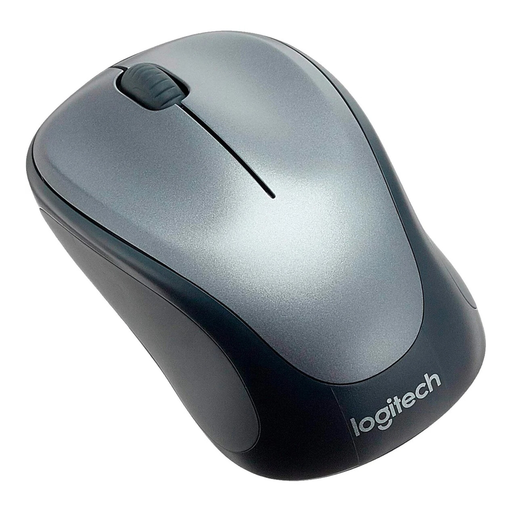
Why it suits this profile: This compact wireless mouse connects via a 2.4 GHz USB receiver and is suitable for everyday tasks on a PC, Mac, laptop or Chromebook.
The product description specifies a USB receiver, 1,000 DPI and an AA battery included in the box. That makes the connection and power requirements clear before you buy.
Symmetrical design, optical sensor with 1,000 DPI and an on/off switch.
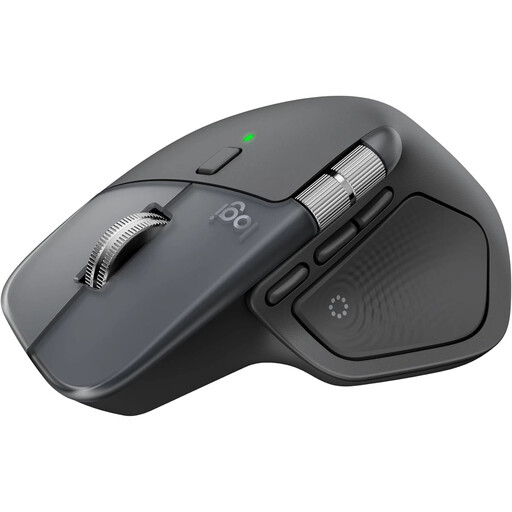
Why it suits this profile: This model is designed for people who use multiple devices, customise their settings and regularly work with long documents or large workspaces.
Bluetooth and a Logi Bolt USB-C receiver are listed as connection options. Compatibility includes Windows, macOS and ChromeOS, among others.
8K DPI sensor, USB-C charging, switching between up to three devices and a MagSpeed scroll wheel, according to the product description.

Why it suits this profile: Its vertical design and 57-degree angle are intended for people who want to try a different hand position during longer working sessions.
The unusual design is clearly set out in the technical specifications. This lets you check before buying whether the hand position and dimensions will work for your workspace.
400 to 4,000 DPI, Bluetooth and USB receiver, plus a rechargeable battery with a USB-C connection.
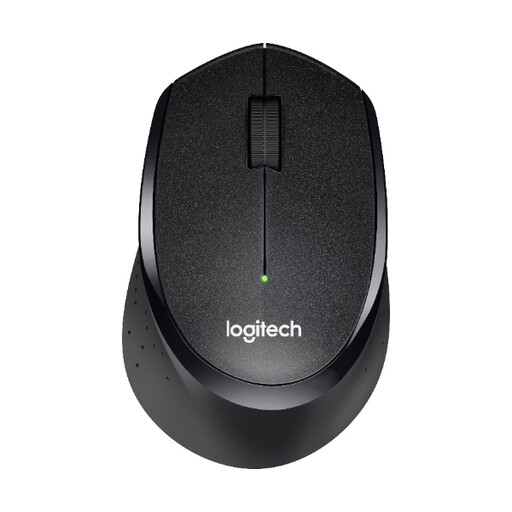
Why it suits this profile: This wireless mouse is designed for offices, home working and shared spaces where you want to keep clicking noises to a minimum.
It connects via a Nano USB receiver. According to the product description, the noise-reduction claim applies to the click buttons and not necessarily to the scroll wheel.
1,000 DPI sensor, wireless range of up to 10 metres according to the product specifications, and stated battery life of up to 24 months.
We’ve put together a complete, regularly updated list of products that meet these strict selection criteria and fully comply with the safety regulations in force in the EU.
Many models support both Windows and macOS. Before buying, also check the connection type, receiver and any software required. A USB mouse is particularly straightforward, while Bluetooth can be useful for devices with few USB ports.
Battery life depends on the model, connection and how you use it. Battery-powered models run on a replaceable battery, while rechargeable models need regular charging via USB-C. Bear in mind that stated battery life is based on manufacturer or product specifications under particular usage conditions.
An RGB gaming mouse can certainly be used for office tasks. However, extra buttons, adjustable DPI settings and lighting aren’t necessary for every workspace. If you mainly work with text, focus first on the shape, noise level, connection and comfort in your hand.