
Lieferung heute & morgen

Qualitätsgarantie

Willkommens-Angebote freischalten: KOSTENLOSE Lieferung | Bis zu 80 % RABATT | Kostenlose 30-Tage-JoyPlus-Testphase
App herunterladen
A Logitech mouse can work reliably for many years in everyday use – provided it suits your hand size, workspace and connectivity needs. However, there are clear differences between a compact Bluetooth mouse, an ergonomic wireless mouse and a Logitech gaming mouse.
Many purchasing decisions fail not because of the brand, but because the specifications do not match the user’s needs. Focusing only on DPI values, long battery life or eye-catching extra features can mean overlooking ergonomics, connection type and the actual cost of use.
A wide DPI range does not automatically mean that a mouse works more precisely in everyday use. Moderate settings are often sufficient for office applications. In gaming, sensor behaviour, polling rate, tracking and the surface also play an important role. A high maximum resolution is therefore only relevant if it suits the particular application and your personal sensitivity.
A wireless Logitech mouse can connect via Bluetooth, a 2.4 GHz USB receiver or both options. Bluetooth saves a USB port and is suitable for laptops and tablets. A USB receiver, on the other hand, can provide a straightforward plug-and-play connection with compatible devices.
Before buying, check the following:
Manufacturers’ battery-life claims depend on settings, lighting, polling rate and how the mouse is used. A gaming mouse with a high signal rate may perform differently from a simple office mouse with an AA battery. With integrated batteries, you should also have a USB-C cable available. For battery-powered models, replacement batteries and proper disposal are ongoing cost factors.
An ergonomic mouse must suit your hand and preferred grip style. Right-handed models may have a pronounced thumb rest, while symmetrical designs can also be suitable for left-handed users. Compact models are convenient for travelling, but may offer less support for larger hands.
Weight also affects handling: lightweight gaming mice can be moved quickly, while heavier office devices may sit more firmly on the desk. Figures such as 60 g, 102 g or 141 g are therefore objective points of comparison, but they do not represent a universal assessment of quality.
For a workspace with a laptop, tablet and desktop PC, a mouse with multi-device functionality is a sensible choice. Some models can store up to three devices and switch between them at the press of a button. Bluetooth is particularly suitable for mobile devices. A USB receiver may be more practical with older computers or fixed workstations.
Gaming models often use LIGHTSPEED wireless connectivity. Buyers should check the receiver, the stated polling rate and compatibility with the required software.
A quiet mouse is useful in open-plan offices, libraries or when working in the evening. According to the manufacturer, SilentTouch or Quiet Click technologies reduce click noise. However, the perceived sound also depends on the surface and the acoustics of the room.
For office work, a precise scroll wheel and sensibly assignable side buttons are important. Gamers may need additional buttons, adjustable DPI levels and possibly onboard profiles, depending on the genre. More buttons also increase the configuration effort.
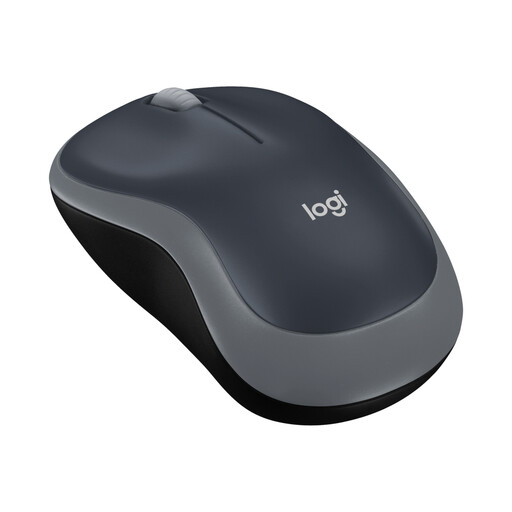
Why this product suits the profile: This compact wireless mouse uses a 2.4 GHz USB receiver and is designed for basic office tasks, mobile working and everyday navigation.
Instead of unnecessary gaming features, it offers a straightforward specification with a plug-and-play receiver, a 1,000 DPI sensor and a stated battery life of up to twelve months.
Ambidextrous, compact design; USB receiver and AA battery listed as included.
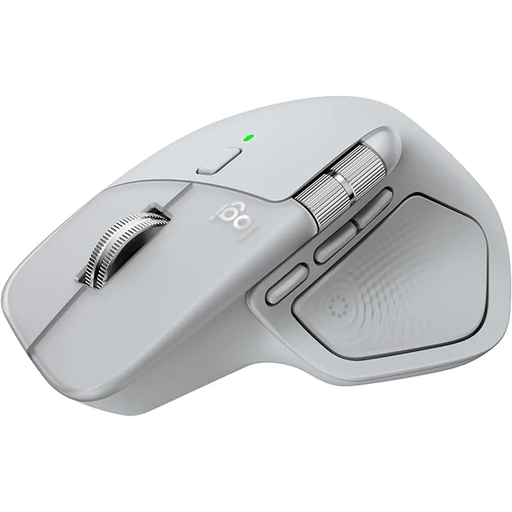
Why this product suits the profile: For home offices, offices and multi-device working, this model combines Bluetooth and a Logi-Bolt receiver with an ergonomic shape and programmable functions.
You can choose between different connection options, and pair up to three devices. The 8,000 DPI sensor and MagSpeed scroll wheel are designed for precise cursor movements and long documents.
Quiet clicks according to the product information; USB-C battery with up to 70 days of battery life and 1-minute fast charging for up to three hours of use.
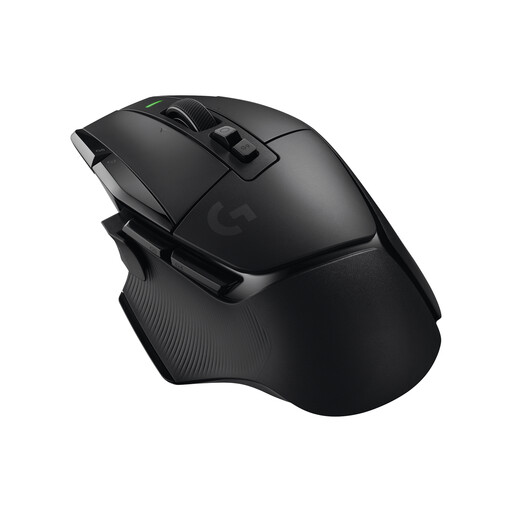
Why this product suits the profile: This Logitech gaming mouse is aimed at users who need plenty of assignable buttons, a precise sensor and wireless connectivity for demanding games.
The relevant gaming specifications are clearly stated: HERO-25K sensor, up to 25,600 DPI, 1,000 Hz polling rate and LIGHTSPEED 2.4 GHz connectivity.
13 programmable controls, five onboard profiles, dual-mode scroll wheel and a stated battery life of up to 140 hours.
For e-sports-focused users, the Logitech G PRO X SUPERLIGHT 2 LIGHTSPEED Wireless Gaming Mouse is also worth considering. According to the product information, it weighs 60 g, features a HERO-2 sensor with up to 44,000 DPI and supports a polling rate of up to 8,000 Hz. These figures are particularly relevant when the game, monitor and personal settings genuinely make use of high signal rates.
We have put together a complete, regularly updated list of products that fully meet these strict selection criteria and the safety regulations applicable in the EU.
For office and home-office use, quiet clicking, a comfortable shape and a reliable connection are essential. A Bluetooth mouse such as the M240 Silent saves a USB port. For multiple devices, models with Easy-Switch functionality are a good choice. If you work with lots of documents, you may benefit from a fast or electromagnetic scroll wheel.
Neither option is inherently better. Bluetooth is convenient for laptops, tablets and devices with few USB ports. A USB receiver provides a simple connection to compatible computers. Before buying, check that the receiver, adapter and required ports are suitable for your workspace.
The service life depends on the switches, battery or rechargeable battery, transport and daily use. Models with an AA battery avoid charging breaks, but require regular battery replacement. With a mouse featuring an integrated lithium battery, make sure you have USB-C charging accessories and use it safely. A dry environment, a clean scroll wheel and avoiding drops are also important for extending its lifespan.