
Lieferung heute & morgen

Qualitätsgarantie

Willkommens-Angebote freischalten: KOSTENLOSE Lieferung | Bis zu 80 % RABATT | Kostenlose 30-Tage-JoyPlus-Testphase
App herunterladen
A Logitech mouse can offer very different features depending on how you plan to use it. For office work, quiet clicks, a suitable shape and a straightforward connection are important. For gaming, the sensor, polling rate, button layout and weight are more decisive. If you focus only on DPI figures or long battery life, you can easily overlook other important details.
A high sensor resolution does not automatically mean more suitable control. Moderate DPI values are often enough for office work, while gaming also depends on tracking performance, polling rate and software profiles. What matters is whether the sensitivity can be adjusted and whether it suits your screen, game and personal working style.
A wireless Logitech mouse can connect via Bluetooth or a 2.4 GHz receiver. Bluetooth leaves a USB port free and is well suited to laptops, tablets and multiple devices. A USB receiver, on the other hand, often provides simple plug-and-play setup. Before buying, check whether your target device has Bluetooth or whether you need a spare USB port.
An ergonomic Logitech mouse needs to suit your hand size, grip style and preferred way of using it. A vertical mouse such as the Logitech MX Vertical encourages a different hand position from a compact, symmetrical mouse. Weight and the position of the thumb buttons also affect usability. A shape that looks comfortable in the product image will not suit every hand equally well.
For changing workstations or using a notebook and tablet, a Logitech Bluetooth mouse is practical. According to the product specifications, models with Easy-Switch can connect to up to three devices. If you use a desktop PC without Bluetooth, you can choose a Logitech USB mouse or a model with a USB receiver.
Pay attention to:
Optical sensors are suitable for many everyday surfaces. Depending on the model, laser or Darkfield sensors can also be used on more challenging surfaces. The DPI figure describes sensitivity, not overall product quality.
For office and home-office use, 800 to 4,000 DPI is sufficient for many applications. A Logitech gaming mouse often offers considerably higher figures, such as up to 25,600 DPI on certain G502 models or up to 44,000 DPI on selected PRO models. Polling rate is also relevant for fast-paced games: it describes how often the mouse reports its position to the computer.
A mouse with an AA battery does not need to be recharged, while an integrated battery can be charged via USB-C. Actual battery life depends on usage, lighting and connection. With a quiet mouse, buyers should bear in mind that noise-reduction claims may apply to specific clicks and do not necessarily include every scroll or side-button sound.
Programmable buttons are useful for shortcuts during everyday work and for commands or macros when gaming. However, additional buttons usually increase the weight and often require configuration software such as Logi Options+ or Logitech G HUB.
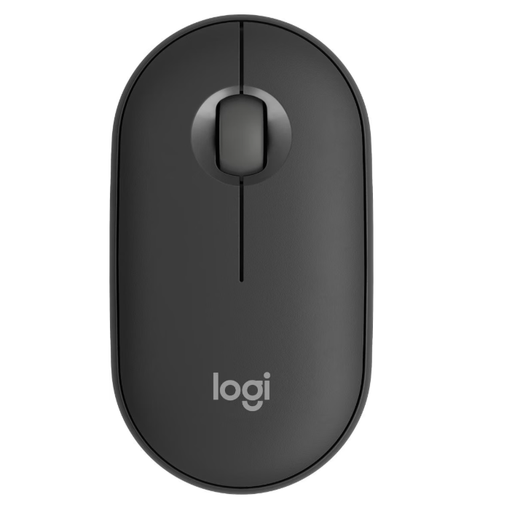
Why this product suits this profile: This compact, symmetrical Bluetooth and RF wireless mouse is suitable for mobile workstations, notebooks and simple everyday tasks.
Easy-Switch for up to three devices and Silent-Touch functions address unnecessary cable swapping and distracting click noises.
76 g weight, up to 4,000 DPI according to the product specifications, and compatibility with several operating systems.
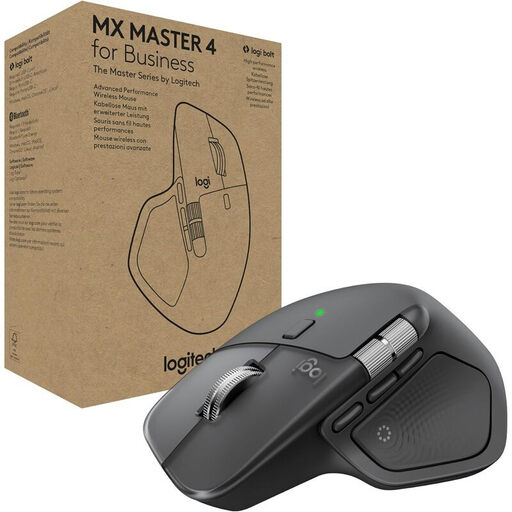
Why this product suits this profile: For productive work across multiple devices, this model offers an ergonomically angled shape, gesture controls and extensive customisation options.
The connection options are clear: Bluetooth or Logi Bolt. Customisation is handled through Logi Options+ rather than relying on vague claims about comfort.
8K DPI Darkfield sensor, MagSpeed scroll wheel, support for up to three devices and USB-C battery according to the product specifications.
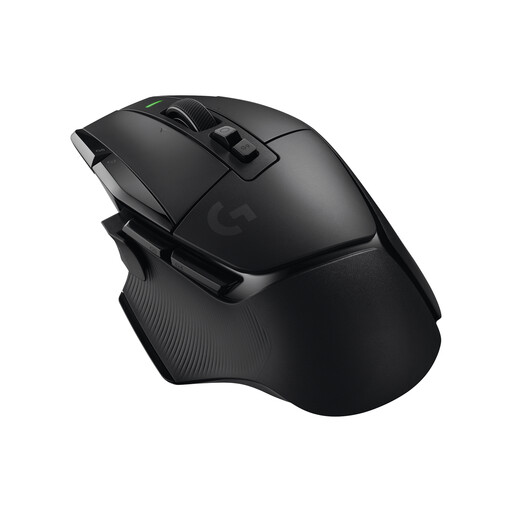
Why this product suits this profile: A suitable choice for users looking for a Logitech gaming mouse with numerous buttons, wireless connectivity and adjustable profiles.
The choice is not based on DPI alone: LIGHTSPEED, LIGHTFORCE switches, 13 programmable controls and onboard profiles are all specified features.
HERO-25K sensor, up to 25,600 DPI, USB-C charging and up to 140 hours of battery life according to the product specifications.
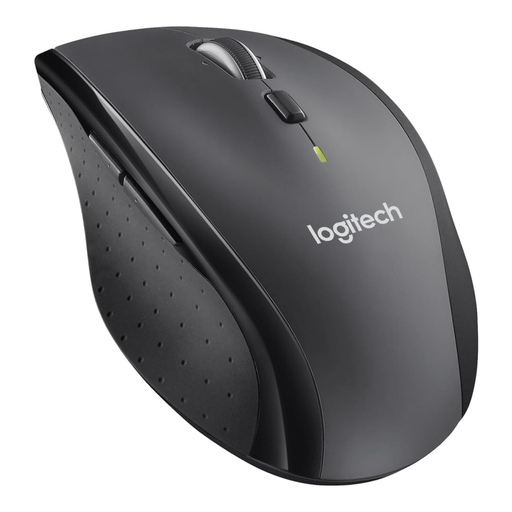
Why this product suits this profile: For long documents, spreadsheets and regular office work, the M705 combines a USB receiver with a fast scroll wheel.
Using a USB receiver avoids Bluetooth compatibility questions, while the battery indicator helps you plan when to replace the battery.
Laser tracking, hyper-fast scroll wheel and up to three years of battery life according to the product specifications.
We have put together a complete, regularly updated list of products that fully meet these strict selection criteria and the safety regulations applicable in the EU.
For office and home-office use, quiet clicks, a comfortable shape and a reliable connection are usually more important than very high DPI values. The Logitech M240 Silent is designed for Bluetooth workstations, while the M705 offers a USB receiver and a fast scroll wheel. Models with Easy-Switch are practical when using multiple devices.
Bluetooth does not use up a USB port and is particularly suitable for modern notebooks and tablets. A USB receiver is useful if Bluetooth is unavailable or if you want a simple plug-and-play connection. Logitech gaming mice often use a dedicated 2.4 GHz connection such as LIGHTSPEED.
Service life depends on how often you click, transport, dirt, battery or rechargeable-battery use and mechanical strain. It is not possible to give a general service-life estimate. Before buying, check the warranty terms, power supply and availability of software or firmware support. With wireless models, the stated battery life should also be treated as a guideline rather than a fixed guarantee.