
Lieferung heute & morgen

Qualitätsgarantie

Willkommens-Angebote freischalten: KOSTENLOSE Lieferung | Bis zu 80 % RABATT | Kostenlose 30-Tage-JoyPlus-Testphase
App herunterladen
A Logitech mouse can make everyday work on a PC or laptop much more convenient – provided that its design, connectivity and power supply suit the way you use it. There are functional differences between a compact wireless mouse for taking on the go, a large ergonomic mouse for the office and a rechargeable multi-device mouse that are not always immediately apparent from the product image.
A wireless Logitech mouse can connect via Bluetooth or through a USB receiver. A model with a 2.4 GHz receiver requires a free USB-A or USB-C port, depending on the receiver. Tablets, many MacBooks and slim laptops may not have the necessary port. A Bluetooth mouse, on the other hand, can be paired directly through the system settings, but it requires Bluetooth support and may occasionally need to be reconnected after updates or when switching devices.
A mouse for large hands should be sufficiently long and wide. Compact models can be useful on small desks or when travelling, but may feel less comfortable in larger hands. Hand position also matters: right-handed users get different support from strongly contoured models than from a symmetrical mouse. An ergonomic shape is therefore not a universal measure of quality – it must suit your hand size and preferred grip style.
For battery-powered mice, battery life is often stated in months and depends on usage, power-saving mode and battery quality. A rechargeable mouse, on the other hand, needs to be charged regularly. Check whether a cable is included and which connector it uses. Some models are advertised as offering up to 70 days of use per charge; this is a manufacturer’s figure, not a guaranteed runtime for every household.
For a single office PC, a mouse with a USB receiver is often straightforward: plug in the receiver, switch on the mouse and connect. This is particularly suitable for Windows PCs and devices with a permanently available USB port. Bluetooth, by contrast, leaves a USB port free and is an attractive option for laptops, tablets and Mac devices.
Models such as the Logitech MX Master 3S and MX Master 4 support Bluetooth and a compatible receiver. A multi-device mouse can store up to three devices and switch between them. This is practical if, for example, you use a work laptop, a personal computer and a tablet.
Pay attention to the measurements rather than just the word “ergonomic”. The Logitech M190 is described as having a full-size body and, according to the product specifications, is suitable for medium-sized to large hands. The M185 and Pebble Mouse 2 are more compact and easier to carry.
For a right-handed design with greater support, you could consider the MX Master models, the M650 L or the MX Vertical. Left-handed users or those who alternate between hands should look at symmetrical models such as the M185 or certain M-series mice.
A quiet mouse is useful in open-plan offices, libraries and shared workspaces. Logitech uses the terms SilentTouch and Quiet Click for selected models. The product specifications state a noise reduction of up to 90 per cent compared with conventional click sounds. This does not indicate the volume of every individual sound, but it does provide a meaningful basis for comparison within the product description.
For office tasks, optical sensors with moderate resolution are normally sufficient. High-resolution Darkfield sensors with up to 8,000 DPI are aimed more at users who need finely adjustable pointer control or tracking on different surfaces. A higher DPI figure is not automatically necessary for every application.
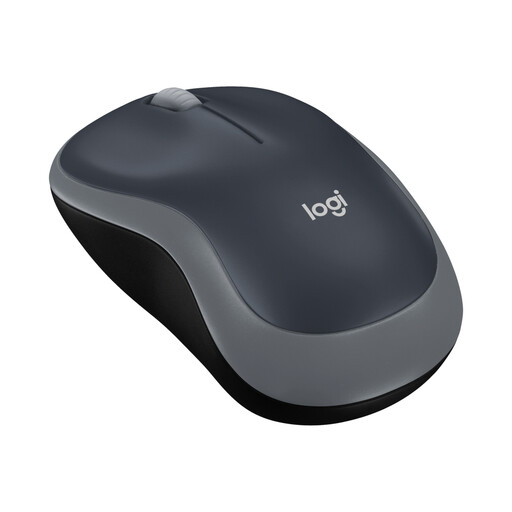
Why this product suits the profile: The compact M185 uses a nano USB receiver, offers plug-and-play connectivity and is designed for small to medium-sized hands and mobile workspaces.
The connectivity technology and required USB port are clearly specified. This means you can check before buying whether your device is compatible.
Symmetrical design, optical sensor, wireless range of up to 10 metres and battery life of up to 12 months according to the product specifications.
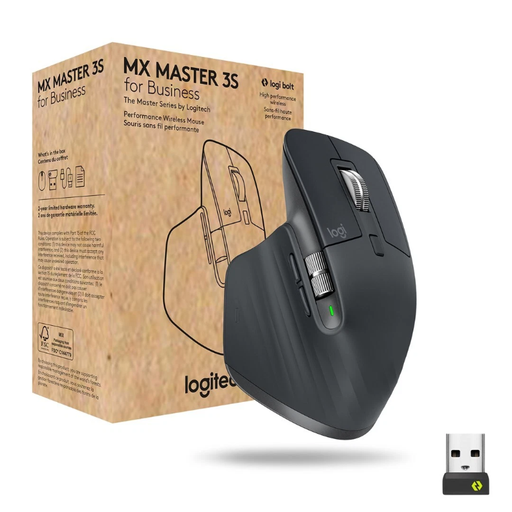
Why this product suits the profile: The right-handed design, seven programmable buttons and ability to switch between up to three devices are suited to professional workflows.
The product data specifies Bluetooth, Logi Bolt, sensor resolution, number of buttons and charging method. The broader range of features is therefore described in concrete terms rather than merely as a marketing claim.
Darkfield sensor with up to 8,000 DPI, MagSpeed scroll wheel, Quiet Clicks and a USB-C battery offering up to 70 days of use according to the manufacturer.

Why this product suits the profile: The vertical design with a 57-degree angle is of interest to users who prefer a different hand position from that of a flat standard mouse.
The specialised shape is clearly stated. Buyers should consider the adjustment period and the right-handed orientation before purchasing.
Bluetooth and USB receiver, up to 4,000 DPI, three device channels and a rechargeable battery with an advertised runtime of up to four months.
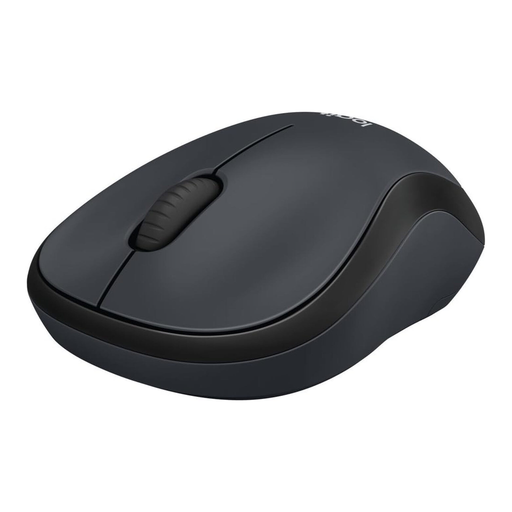
Why this product suits the profile: This compact, ambidextrous mouse with SilentTouch technology is suitable for libraries, shared offices and working from home.
The noise reduction, USB nano receiver and required AA battery are clearly specified. This makes it easier to set realistic expectations for noise levels and maintenance.
Ambidextrous design, 2.4 GHz connection, range of up to 10 metres and battery life of up to 18 months according to the product data.
We have put together a complete, regularly updated list of products that fully meet these strict selection criteria and the safety regulations applicable in the EU.
For larger hands, full-size models such as the Logitech M190 or the Signature M650 L are worth considering. The M190 is described as having an ergonomically curved design, while the M650 L is specifically marketed for large hands. The exact body dimensions and your preferred hand position remain the deciding factors.
Neither type of connection is inherently preferable. Bluetooth saves a USB port and suits many laptops, tablets and Mac devices. A USB receiver often provides a simple plug-and-play setup. Before buying, check the available ports, operating system and whether you need to connect multiple devices.
Service life depends on build quality, switches, the battery or rechargeable battery, transport and care. For the models featured, manufacturer specifications for battery-powered versions range from around 12 to 36 months; rechargeable models are given specific figures in days or months. Liquids, excessive heat and damaged rechargeable batteries can shorten the product’s lifespan.