
Lieferung heute & morgen

Qualitätsgarantie

Willkommens-Angebote freischalten: KOSTENLOSE Lieferung | Bis zu 80 % RABATT | Kostenlose 30-Tage-JoyPlus-Testphase
App herunterladen
Choosing the right computer mouse can significantly impact your daily work at your desk. But the market is saturated with marketing promises and technical specs that often confuse more than they clarify. Many users invest in a premium mouse only to find it doesn't fit their workflow, or that its advertised features are impractical in everyday use. This guide will help you understand the crucial features and make an informed decision that will genuinely boost your productivity.
Before you make a decision, it's important to recognise common marketing traps that can lead to a poor investment.
To make the right choice, focus on the following three core parameters that have a direct impact on your daily work.
The DPI number is only part of the equation. The sensor technology is far more critical. A high-quality sensor, like Logitech's Darkfield sensor, enables precise tracking on almost any surface—even glass. This is a decisive advantage for users who work in different locations, whether at a glass table in a conference room or a wooden desk in a home office. An 8K DPI mouse also provides the necessary precision for creative professionals who need to perform pixel-perfect work on high-resolution monitors.
Modern laptops and MacBooks often have a limited number of USB ports. A dongle-free wireless mouse that connects directly via Bluetooth Low Energy is the more practical solution here. It not only saves a valuable port but also eliminates the risk of losing the small USB receiver. Ensure the mouse can maintain a stable connection to at least three devices and switch between them easily.
Thoughtful ergonomics go beyond mere shape. Features like quiet clicks are a godsend for concentration in open-plan offices or at home—for you and your colleagues. An intelligent scroll wheel like the MagSpeed Scroll Wheel can make all the difference: it allows for lightning-fast scrolling through thousands of lines of code or long documents and automatically switches to precise, line-by-line mode when needed. Programmable thumb buttons and a horizontal scroll wheel also optimise workflows in applications like Excel, Photoshop, or Final Cut Pro.
Here are some recommendations tailored to different needs and work styles.
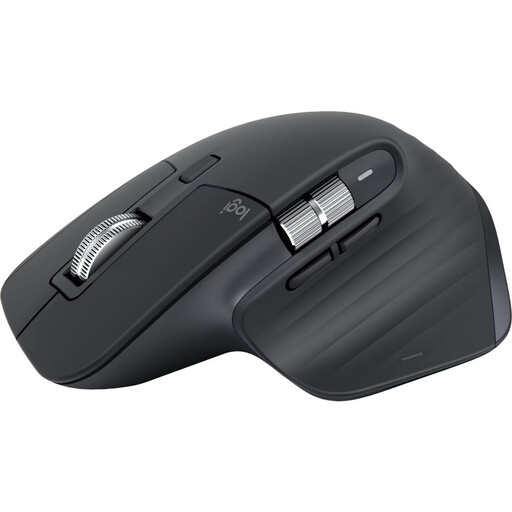
Why It's a Match: Ideal for developers, designers, and analysts who switch between multiple devices (e.g., a MacBook and a Windows PC) and require maximum precision. The dongle-free Bluetooth connection and glass-tracking sensor make it a flexible tool for any workspace.
The 8K DPI isn't just marketing here; it offers real value on high-resolution displays. The multi-device function allows for seamless switching at the touch of a button, and the proven ergonomic shape fits a wide range of hand sizes.
MagSpeed Scroll Wheel for ultra-fast and precise scrolling. Quiet Clicks for a peaceful work environment. Works even on glass thanks to the Darkfield sensor.
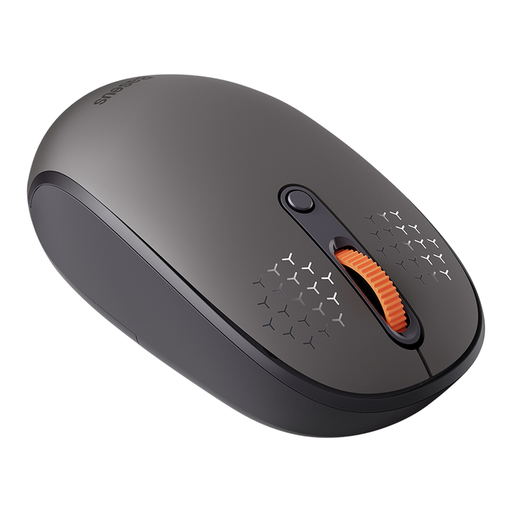
Why It's a Match: A solid choice for home offices or students looking for a flexible and quiet mouse for daily use without breaking the bank. It offers the essential features for productive work across multiple devices.
This model avoids the DPI hype with a practical range up to 1600 DPI. It offers true tri-mode connectivity (2.4GHz, 2x Bluetooth), thus sidestepping the trap of unreliable multi-device functionality in this price range.
Tri-Mode Connection for up to 3 devices. Quiet Clicks for a distraction-free environment. Operates on a standard AA battery.
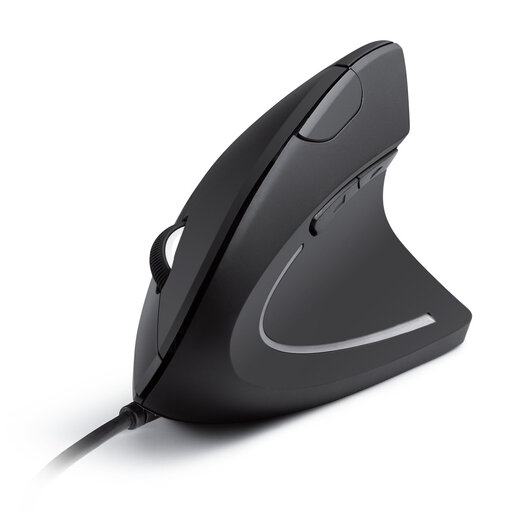
Why It's a Match: For users who experience wrist discomfort during long hours of screen time. The vertical design promotes a natural "handshake" position and can help relieve strain on the arm and wrist.
This model solves the "misunderstood ergonomics" problem by offering a fundamentally different design. It focuses on a specific ergonomic solution rather than trying to create a one-size-fits-all shape. The wired connection ensures maximum reliability.
Vertical Design to promote a neutral wrist posture. Plug-and-Play via USB for a stable, latency-free connection. Additional forward/back buttons for easy navigation.
We have compiled a complete, real-time updated list of products that fully meet these strict selection criteria and relevant safety standards.
For standard office applications on one or two monitors with Full HD or WQHD resolution, an 8K DPI mouse is not necessary. A range of 1,200 to 2,400 DPI is usually sufficient. A high DPI count only becomes relevant when you are working on very large or high-resolution screens (4K/5K) or performing tasks that require extreme precision, such as image editing or CAD design.
According to the manufacturer, the battery of the Logitech MX Master 3S lasts up to 70 days on a full charge. The actual battery life depends on individual usage. A practical feature is the fast-charging function via USB-C: just one minute of charging is said to provide up to three hours of use.
Yes, this is one of the core features of the MX Master 3S. You can pair the mouse via Bluetooth with up to three devices simultaneously, for example, a MacBook, a Windows desktop PC, and an iPad. Using the Easy-Switch button on the bottom of the mouse, you can seamlessly switch between devices without having to re-establish the connection.