
Lieferung heute & morgen

Qualitätsgarantie

Willkommens-Angebote freischalten: KOSTENLOSE Lieferung | Bis zu 80 % RABATT | Kostenlose 30-Tage-JoyPlus-Testphase
App herunterladen
As a Joybuy Product Recommendation Officer, I see users fall into the same traps every day when selecting office peripherals. A high-quality mouse is a crucial tool for productivity, yet the market is saturated with marketing buzzwords that often overpromise and underdeliver. Before you make a decision, it's important to understand the common pitfalls that can lead to a bad purchase.
Many mice are advertised with impressive specifications that are irrelevant in practice or even introduce disadvantages. Pay close attention to these three points:
To avoid purchase regret, you should focus on the technical features that directly impact your daily work.
A professional mouse must work where you do—whether at your desk, on a glass conference table, or on the go. Look for a high-quality sensor like Logitech's Darkfield sensor. This technology enables precise tracking on virtually any surface, including glass with a minimum thickness of 4 mm. This eliminates the need for a separate mouse pad and offers maximum flexibility. The resolution of up to 8000 DPI ensures smooth and responsive control, even on high-resolution monitors.
For business use, a secure and reliable connection is essential. Logi Bolt mouse technology offers a clear advantage over standard Bluetooth. It is based on the Bluetooth Low Energy wireless protocol but is engineered for an exceptionally stable and encrypted connection (Security Mode 1, Security Level 4, FIPS compliant). This minimises interference in environments crowded with wireless signals. At the same time, a multi-device mouse is a significant productivity booster. The ability to seamlessly switch between up to three computers or tablets streamlines workflows considerably.
Good ergonomics go beyond just the shape. Features like quiet clicks significantly reduce the noise level in the office, fostering a more focused work atmosphere. An electromagnetic scroll wheel, such as the MagSpeed wheel, allows for rapid switching between line-by-line precision and hyper-fast scrolling through long documents. Programmable thumb buttons and a horizontal scroll wheel complete the package of a true productivity mouse.
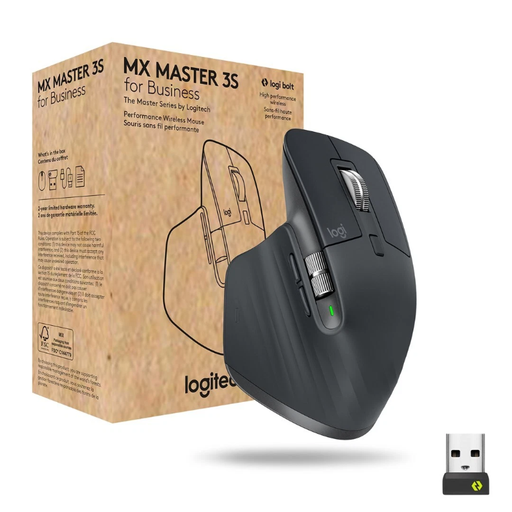
Why This Fits Their Persona: Ideal for professionals who spend many hours at the computer daily and switch between multiple devices. The combination of ergonomics, precision, and customisable buttons boosts efficiency in complex tasks like programming or design.
It offers a thoughtfully designed shape optimised for right-handers, a high-quality sensor for glass surfaces instead of just high DPI numbers, and the secure Logi Bolt connection for interference-free use in a corporate setting.
MagSpeed scroll wheel for ultra-fast navigation; 8000 DPI Darkfield sensor for precision on glass; secure connectivity via Logi Bolt and Bluetooth.
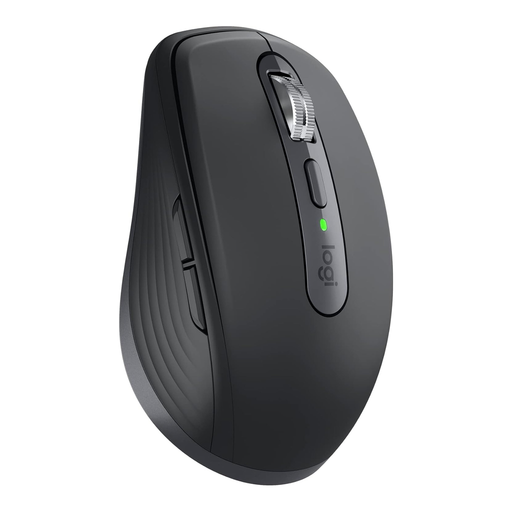
Why This Fits Their Persona: Perfect for users who travel frequently or commute between the office and home. Its compact design fits into any laptop bag without compromising on professional features.
Despite its compact size, it offers the same high-quality sensor and connection technology as the larger model. It's a full-fledged professional mouse, not a stripped-down travel mouse.
Compact and lightweight design; 8000 DPI Darkfield sensor works even on glass; MagSpeed scroll wheel and quiet clicks for discreet work.
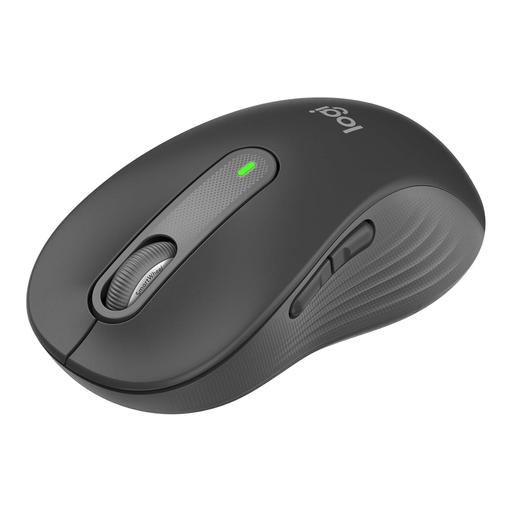
Why This Fits Their Persona: An excellent choice for users who need a reliable, comfortable, and quiet mouse for daily office use but don't require the full feature set of the MX series.
It focuses on the essentials: a good ergonomic shape (available for different hand sizes), quiet clicks, and a reliable connection (including a Logi Bolt option), without advertising unnecessary features.
SilentTouch technology for over 90% quieter clicks; long battery life of up to 24 months; SmartWheel for precise or fast scrolling.
We have compiled a complete, real-time updated list of products that fully meet these strict selection criteria and German safety regulations.
For users who work many hours at the computer every day, the investment can be worthwhile. The benefits lie in increased efficiency through the MagSpeed wheel and multi-device control, as well as comfort from the optimised ergonomics. The robust build quality and secure Logi Bolt connection are further factors that justify the price in a professional context.
According to the manufacturer, a fully charged MX Master 3S battery lasts up to 70 days. The mouse is charged via an included USB-C cable. A quick charge of just one minute is said to provide up to three hours of use.
The main difference lies in the package contents and connectivity. The "for Business" version comes standard with the Logi Bolt USB receiver. This provides a more secure and stable wireless connection, specifically designed for use in demanding corporate environments with many potential sources of interference. The standard version is often sold without a receiver or with the older Unifying receiver.