
Lieferung heute & morgen

Qualitätsgarantie

Willkommens-Angebote freischalten: KOSTENLOSE Lieferung | Bis zu 80 % RABATT | Kostenlose 30-Tage-JoyPlus-Testphase
App herunterladen
As a Joybuy Product Recommendation Officer, I see users struggle daily with choosing the right peripherals for their workspace. The market for wireless mice, in particular, is crowded and confusing. Modern laptops like MacBooks or Ultrabooks often have limited ports, making the choice of a mouse more complicated than it should be. The goal is a clean, efficient workspace—but many products fail to deliver on their promises.
Before you make a decision, you should be aware of the three most common pitfalls that lead to frustration and unnecessary expense:
To avoid these pitfalls, you should focus on the technical features that are crucial for a smooth workflow.
The most important distinction in wireless mice is the connection type. While many models use a proprietary USB dongle, high-quality mice offer a direct connection via Bluetooth Low Energy.
For a minimalist and modern workspace, a wireless mouse for MacBook or other devices with few ports that operates primarily via Bluetooth is the clear recommendation.
A mouse sensor's resolution is measured in DPI (Dots Per Inch). A higher DPI value means the cursor travels a greater distance on the screen with the same hand movement.
Even more important than the DPI value is the sensor technology itself. A Logitech mouse for glass, for example, uses a Darkfield sensor that functions flawlessly even on reflective surfaces like glass or polished tables, ensuring maximum flexibility.
A professional wireless mouse should not only be precise but also comfortable and efficient.
Based on the criteria above, we have identified a few models that are particularly well-suited for specific user groups.
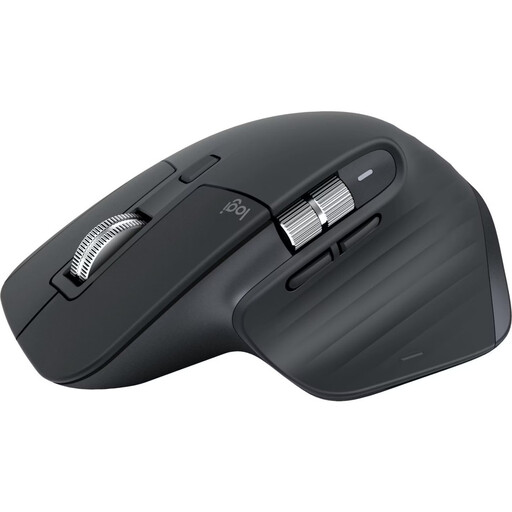
Why This Fits Their Persona: For professionals who demand maximum performance and ergonomics without compromise. Ideal for developers, designers, and analysts who work for hours at their desks and need to switch seamlessly between multiple devices.
This edition connects directly via Bluetooth, completely bypassing the "dongle trap." Its shape is the result of extensive ergonomic studies, and the 8K DPI Darkfield sensor masters any surface.
MagSpeed scroll wheel for ultra-fast or line-by-line scrolling; multi-device control for up to three devices; quiet clicks for focused work.
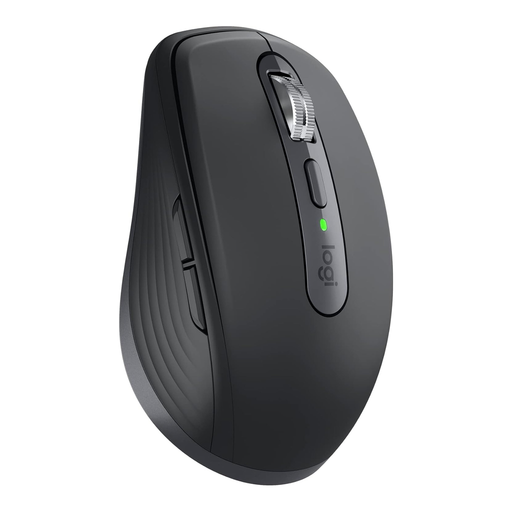
Why This Fits Their Persona: Perfect for users who are frequently on the go and need a powerful yet compact mouse. It fits easily into any laptop bag without compromising on precision.
Offers dual connectivity (Bluetooth and Logi Bolt), ensuring maximum flexibility on the road and in the office. The Darkfield sensor works even on difficult surfaces in cafés or airports.
Compact and lightweight design; 8K DPI sensor for high precision; MagSpeed scroll wheel in a mobile form factor.
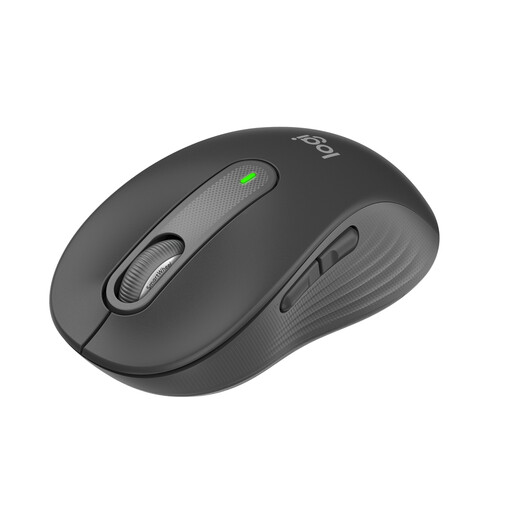
Why This Fits Their Persona: For users in the office or at home who need a reliable, comfortable, and quiet mouse for daily use without stretching the budget for premium features.
Features Bluetooth connectivity to bypass the need for a dongle. Its contoured shape offers good comfort for small to medium-sized hands, and the quiet clicks prevent noise disruption in the office.
Excellent value for money; SilentTouch technology for up to 90% quieter clicks; long battery life of up to 24 months.
A tidy workspace doesn't stop with the mouse. Thoughtful cable management is just as crucial for a productive and distraction-free environment.
We have compiled a complete, real-time list of products that fully satisfy these strict selection criteria and UK safety regulations.
According to Logitech, a fully charged battery on the MX Master 3S lasts up to 70 days. The mouse is charged via an included USB-C cable. A quick one-minute charge is said to provide up to three hours of use, minimizing downtime.
Yes, the MX Master 3S is a multi-device mouse. You can pair it with up to three devices simultaneously, such as a Windows PC, a MacBook, and an iPad. You can quickly and easily switch between paired devices using the Easy-Switch button on the bottom of the mouse.
For standard office tasks on a Full HD monitor, an 8000 DPI sensor is not strictly necessary. However, it shines when working with high-resolution monitors (4K or higher), as it allows for very precise and rapid cursor movements across large screen areas without requiring large hand movements. For users who value maximum precision and efficiency, it is a noticeable upgrade.