
Lieferung heute & morgen

Qualitätsgarantie

Willkommens-Angebote freischalten: KOSTENLOSE Lieferung | Bis zu 80 % RABATT | Kostenlose 30-Tage-JoyPlus-Testphase
App herunterladen
For professional users, choosing the right computer mouse is more than a matter of preference—it's a decision that directly impacts productivity and workplace comfort. Especially with premium models like the Logitech MX Master 3S, it's crucial to understand the features that truly make a difference and not be swayed by marketing buzzwords. This guide will help you avoid common purchasing pitfalls and make an informed decision.
When searching for a new mouse, many encounter exaggerated advertising claims or overlook critical flaws. Here are two common traps to avoid:
To make the right choice, focus on technical features that will genuinely improve your daily workflow.
A professional mouse should work reliably not just on a mouse pad, but on almost any surface. Models with high-quality sensors, like Logitech's Darkfield sensor, allow tracking even on glass. This offers flexibility for users who work in various locations—from the office desk to a conference room glass table. The sensor's precision is crucial for tasks like graphic design, video editing, or analysing large datasets.
For users working with multiple devices like a laptop, desktop PC, and tablet, seamless switching is essential. A good multi-device mouse allows for quick changes at the push of a button without needing to re-pair the connection. Look for stable connectivity options like Bluetooth Low Energy or a proprietary USB receiver. A wireless office mouse, especially a Bluetooth mouse for Mac, should ensure a reliable connection with no noticeable lag and free up valuable USB ports.
In open-plan offices or home offices, the clicking sound of a mouse can be distracting. A quiet-click mouse significantly reduces noise pollution without compromising tactile feedback. The scroll wheel is equally important. Advanced technologies like the electromagnetic MagSpeed wheel on the MX Master 3S enable rapid scrolling through long documents and automatically switch to a precise, line-by-line mode when needed.
Here are some recommendations tailored to different needs and work styles.
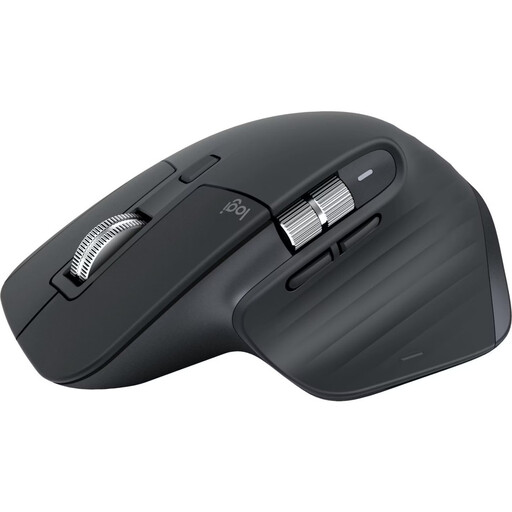
Why it's a match: Ideal for power users, developers, and creatives who demand the highest precision, comfort, and a seamless workflow across multiple devices. This mouse is designed for maximum productivity.
It relies on a high-quality 8K DPI Darkfield sensor that works on glass, rather than just advertising a high number. Its shape is the result of ergonomic studies for long-term comfort.
Quiet Clicks for peaceful work environments, MagSpeed scroll wheel for fast and precise scrolling, and seamless switching between up to three devices via Bluetooth.

Why it's a match: Designed for users looking to reduce wrist strain or proactively adopt a healthier posture. The vertical shape promotes a natural "handshake" position.
This model prioritises ergonomics over conventional aesthetics. The 57-degree angle is the result of research into reducing muscle strain, directly sidestepping the "beautiful but uncomfortable" mouse trap.
Proven to reduce muscle activity compared to a traditional mouse. Still offers multi-device connectivity and a precise 4000 DPI sensor.
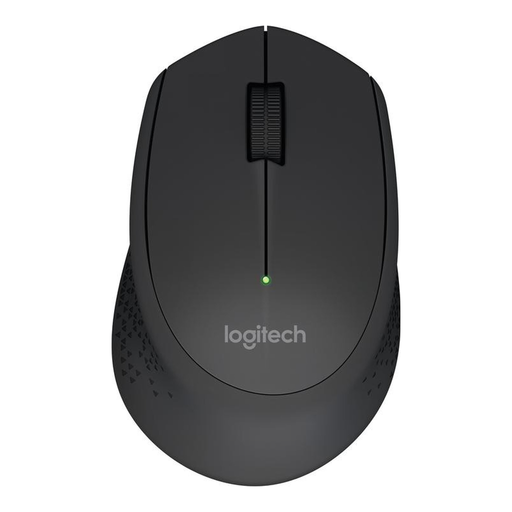
Why it's a match: A solid and reliable wireless mouse for everyday office tasks. It provides core functionality without the premium price of specialised professional features.
This model focuses on the essentials: a stable 2.4 GHz wireless connection and a comfortable, asymmetric shape. It avoids the DPI trap by offering a sensor that is perfectly adequate for office work.
Long battery life of up to 18 months, according to the manufacturer. Simple plug-and-play setup via the included nano USB receiver.
We have compiled a complete, up-to-date list of products that fully meet these strict selection criteria and all relevant safety standards.
According to the manufacturer, a fully charged battery on the Logitech MX Master 3S lasts up to 70 days. The actual battery life may vary depending on usage intensity. The mouse is charged via a USB-C cable, and a quick one-minute charge is said to provide up to three hours of use.
Yes, one of the standout features of the MX Master 3S is its 8K DPI Darkfield sensor. This technology enables precise tracking on almost any surface, including glass with a minimum thickness of 4 mm. This makes it particularly flexible for use in various workspaces.
Yes, the mouse is compatible with a wide range of operating systems. According to Logitech, compatibility includes Windows, macOS, Linux, ChromeOS, iPadOS, and Android. It can connect directly via Bluetooth Low Energy, making it an excellent choice for devices with limited USB ports, such as MacBooks.