
Lieferung heute & morgen

Qualitätsgarantie

Willkommens-Angebote freischalten: KOSTENLOSE Lieferung | Bis zu 80 % RABATT | Kostenlose 30-Tage-JoyPlus-Testphase
App herunterladen
Choosing a new mouse for professional use can quickly become overwhelming. Manufacturers advertise high DPI counts and vague promises of ergonomics. But not every expensive mouse is automatically the right one for your daily workflow. As your Joybuy Product Recommendation Officer, I'll help you identify the crucial features and avoid common purchasing traps, ensuring your investment pays off in the long run.
Before we dive into the details, let's shed light on three prevalent marketing traps that often lead to disappointment:
To make an informed decision, focus on these three objective criteria. They are the primary determinants of efficiency and comfort in your daily work.
A modern sensor is the heart of a good mouse. Models like the Logitech MX Master 4 feature an 8K DPI mouse sensor. The practical benefit here is less about extreme speed and more about the ability to function reliably on almost any surface—according to Logitech, even on glass with a minimum thickness of 4 mm. This gives you the freedom to work without a mouse pad, whether on a glass desk or a polished conference table. The precision remains consistently high, which is crucial for graphic design or navigating high-resolution 4K or 8K displays.
A truly ergonomic mouse is adapted to the natural posture of the hand. Pay attention to the following features:
A smooth workflow depends on stable technology.
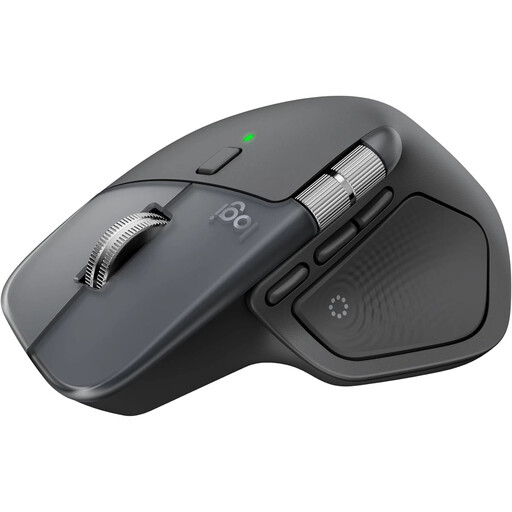
Why This Fits Their Persona: Ideal for power users who switch daily between multiple operating systems and demanding applications. The combination of precision, ergonomics, and workflow-optimizing features justifies the investment for anyone whose productivity depends on their tools.
Here, ergonomics is not an empty promise but a form refined over generations. The 8K sensor offers real added value by tracking on glass, and the dual connectivity with the Logi Bolt receiver ensures a stable connection.
The electromagnetic MagSpeed scroll wheel automatically switches between line-by-line precision and hyper-fast scrolling. The multi-device function allows control of up to three devices.

Why This Fits Their Persona: Perfect for users who spend long days at the computer and want to actively prevent postural damage or wrist discomfort. The focus here is clearly on reducing physical strain.
Here, ergonomics is not a marketing platitude but the central design principle. The 57° angle is a specific, science-based solution to reduce muscle activity, rather than just being a vaguely shaped mouse.
The vertical "handshake" position promotes a natural posture for the wrist and forearm. It also supports switching between up to three devices and is charged via USB-C.
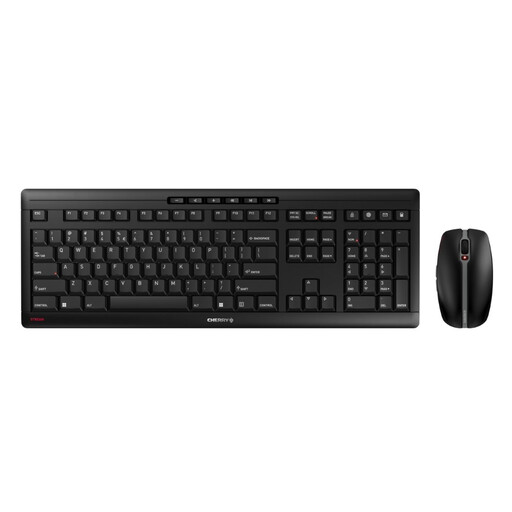
Why This Fits Their Persona: For users in the home office or corporate office looking for a reliable, wireless, and rechargeable complete solution for their desk. The focus is on durability, a quiet working environment, and excellent value for money.
This set focuses on the essentials: a sturdy construction with a metal plate, quiet and durable SX scissor technology, and a reliable 2.4 GHz connection. It forgoes exaggerated DPI values and instead delivers solid core features.
This is a complete package of a keyboard and mouse, both of which are rechargeable via USB-C. The quiet keys of the keyboard and the silent clicks of the mouse ensure a distraction-free work environment.
We have compiled a complete, up-to-date list of products that fully meet these strict selection criteria and UK regulations.
1. How long does the Logitech MX Master 4's battery last and how is it charged? According to the manufacturer, the MX Master 4's battery lasts up to 70 days on a full charge. The mouse is charged via a USB-C cable. A quick-charge feature provides up to three hours of use after just one minute of charging, according to Logitech. The mouse can be used normally while charging.
2. Is the Logitech MX Master 4 a quiet-click mouse? Yes, the Logitech MX Master 4 is equipped with "Quiet Clicks." According to Logitech, the click noise is reduced by 90% compared to the previous model, providing a significantly quieter and less disruptive work experience.
3. Can I use the Logitech MX Master 4 with multiple computers? Yes, the MX Master 4 is a multi-device mouse. It can be paired with up to three devices simultaneously, for example, a Windows PC, a MacBook, and an iPad. You can seamlessly switch between devices using the Easy-Switch button on the bottom of the mouse or by moving the cursor to the edge of the screen (with the Logi Options+ software).