
Lieferung heute & morgen

Qualitätsgarantie

Willkommens-Angebote freischalten: KOSTENLOSE Lieferung | Bis zu 80 % RABATT | Kostenlose 30-Tage-JoyPlus-Testphase
App herunterladen
A wireless mouse should respond precisely during everyday work, sit comfortably in your hand and switch reliably between multiple devices. When choosing the Logitech MX Master 4 ergonomic wireless mouse, many buyers therefore look for ergonomics, an 8K DPI sensor, quiet clicks, haptic feedback and USB-C charging. However, individual marketing claims do not always show whether the mouse is suitable for your workspace and operating system.
This buying guide from the Joybuy Product Recommendation Officer provides an objective overview of the most important details and highlights common pitfalls to watch out for before you buy.
An 8K DPI mouse can adjust pointer sensitivity across a wide range. This is particularly useful with large monitors or multiple displays. However, the DPI value alone does not indicate whether the shape, surface or wireless connection is suitable for your particular use. For office work, image editing and programming, consistent tracking, suitable software settings and a stable connection are also important.
An ergonomic mouse can alter your hand position through the shape of its housing. However, hand size, preferred grip and thumb position are the decisive factors. According to the product specifications, the MX Master 4 measures approximately 126 × 85 × 51 mm and weighs around 141 g. These dimensions should be compared with those of your current mouse. Anyone who prefers a very light mouse or a flat, symmetrical design may find a larger, more sculpted mouse unfamiliar at first.
Bluetooth is sufficient for many laptops and tablets. With desktop PCs, a USB receiver may be more practical. Depending on the variant, the Logitech MX Master 4 comes with a Logi Bolt USB-C receiver and documentation. A charging cable is not included according to the product description. Before buying, check that you have a suitable USB-C cable and a compatible port available.
According to the product specifications, the MX Master 4 uses an 8K DPI laser or Darkfield sensor. The description states that it can be used on glass with a minimum thickness of 4 mm. This is a specific product feature, but it does not replace checking your own desk surface. Very glossy, reflective or heavily textured surfaces can generally affect tracking performance.
For typical office tasks, lower sensitivity is usually sufficient. Creative applications tend to benefit more from finely adjustable pointer movement than from a permanently high DPI setting.
According to the manufacturer, the MagSpeed scroll wheel supports both precise, stepped scrolling and rapid scrolling. The product description states speeds of up to 1,000 lines per second, along with precision that is 87 per cent higher than an unspecified reference value. As these claims come from the product’s marketing material, they should be treated as manufacturer-provided technical figures.
The mouse also features a thumb wheel, a gesture button and other customisable controls. The exact button assignments can be adjusted using Logitech Options+. Functions such as the Actions Ring, Smart Actions and haptic feedback depend on the software and operating system being used.
The Logitech MX Master 4 can connect via Bluetooth or a Logi Bolt USB-C receiver and pair with up to three devices. Switching between devices is useful for people who use, for example, a Windows PC, a MacBook and a tablet. Compatibility is listed for Windows 10/11, macOS 12 or later, Linux, ChromeOS, iPadOS and Android. Before buying, check the specific system requirements and available software features.
The stated battery life is up to 70 days. According to the product information, one minute of charging should provide approximately three hours of use. Actual battery life depends on factors including usage, connection type and battery condition. The battery is rechargeable and must not be opened, pierced or exposed to excessive heat.
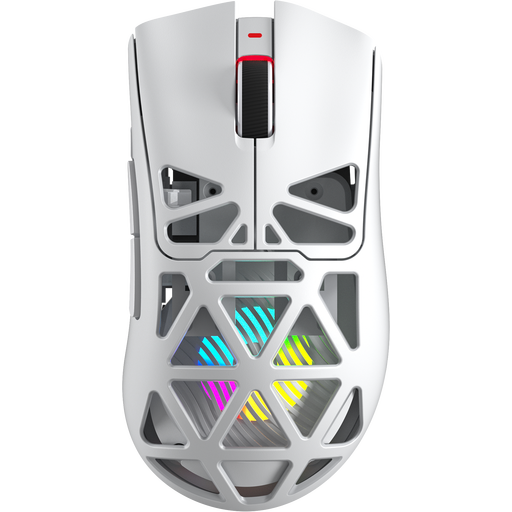
Why this product suits this profile: The SC620 is designed for users who prefer several connection options and a low-profile mouse body. It supports Bluetooth 5.0, 2.4 GHz and USB-C, and is equipped with a 400-mAh battery.
The three connection options reduce reliance on a single wireless standard. Before buying, however, check whether the 67 g weight and gaming-oriented shape suit your office requirements.
PAW3311 sensor with up to 12,000 DPI, an 8 kHz polling rate according to the product specifications, and seven programmable buttons.
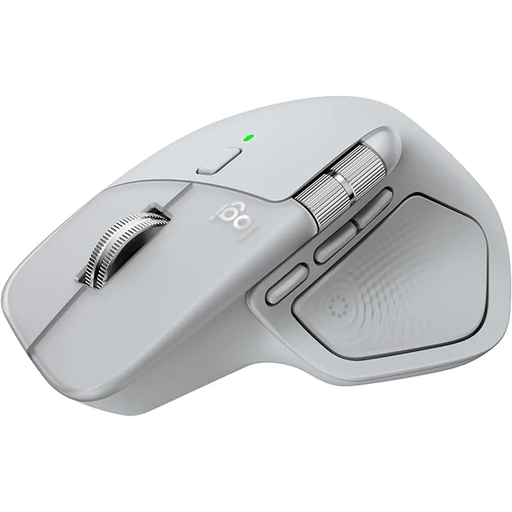
Why this product suits this profile: The mouse combines a sculpted design with Bluetooth, Logi Bolt, multi-device functionality and customisable productivity features for Mac and Windows.
The 8K DPI sensor, quiet clicks and support for up to three devices are clearly specified. However, Logitech Options+ is required for the advanced features.
MagSpeed scroll wheel, thumb wheel, USB-C charging and up to 70 days of battery life according to the product information.

Why this product suits this profile: With its vertical design and 57-degree angle, this mouse appeals to users specifically looking for a different hand position from that of a conventional mouse.
The distinctive shape is clearly stated and should be tried before buying or assessed using the dimensions. It should not be confused with the flatter MX Master design.
400 to 4,000 DPI, Bluetooth and USB receiver, support for up to three devices and a USB-C battery according to the product description.
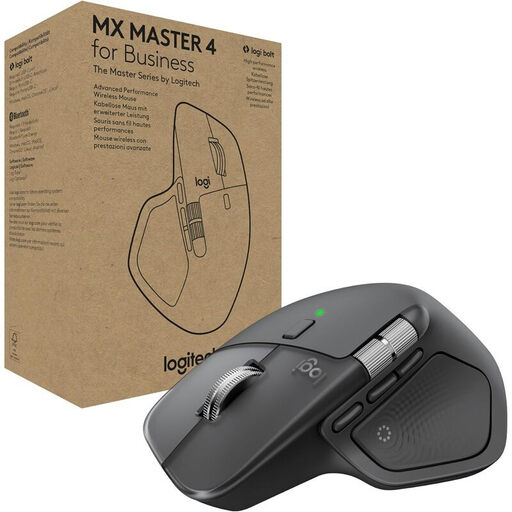
Why this product suits this profile: The business variant is designed for workspaces with multiple devices and requirements for manageable connections.
The Logi Bolt receiver is described as providing an encrypted connection that complies with FIPS requirements according to the product information. For home users, however, this focus may go beyond their actual needs.
8K DPI sensor, Actions Ring, MagSpeed scroll wheel and support for Logitech Options+, Logi Tune and Logitech Sync.
We have compiled a complete, regularly updated list of products that fully meet these strict selection criteria and the safety regulations applicable in the EU.
There are two ways to get started:
The software is particularly relevant if you want to customise buttons, haptic feedback, the Actions Ring or Smart Actions. Installation permissions may be unavailable on a company computer. In this case, the IT department should check compatibility and applicable policies.
Yes. According to the product specifications, it supports Windows 10/11 and macOS 12 or later. Linux, ChromeOS, iPadOS and Android are also listed. The features available in Logitech Options+ may vary depending on the platform.
The manufacturer states up to 70 days. According to the product description, one minute of charging should provide approximately three hours of use. Actual battery life depends on usage intensity, connection type and battery age. A charger is not included; a certified 5 V USB-C power supply should be used.
The product description states 90 per cent less clicking noise. This is a manufacturer claim, and the result may vary depending on the surface and individual perception. Nevertheless, the stated noise reduction is a relevant selection factor for shared offices or focused workspaces.