
Lieferung heute & morgen

Qualitätsgarantie

Willkommens-Angebote freischalten: KOSTENLOSE Lieferung | Bis zu 80 % RABATT | Kostenlose 30-Tage-JoyPlus-Testphase
App herunterladen
As a Joybuy Product Recommendation Officer, I analyse product information daily to offer you clear, objective guidance in an overwhelming market. When searching for a high-end mouse for professional users, like the Logitech MX Master 4, you'll quickly encounter marketing buzzwords that overpromise and underdeliver. This guide will help you identify the features that truly matter and avoid common purchasing pitfalls.
Many users invest in a new mouse, only to find that it doesn't deliver the comfort or efficiency boost they were hoping for. This is often due to exaggerated advertising claims and misunderstood technical specifications.
To avoid buyer's remorse, you should focus on the features that actually impact your productivity.
Instead of the raw DPI number, sensor quality is what counts. A high-quality sensor, like the 8K DPI sensor in the Logitech MX Master series, offers two key advantages:
A modern productivity mouse should offer flexible connection options. Look for a stable connection via Bluetooth Low Energy or a dedicated wireless receiver (e.g., Logi Bolt) that ensures an interference-free and secure connection. A Logitech mouse with USB-C is now standard, allowing for fast charging with the same cable you likely already use for your smartphone or laptop.
Thoughtful ergonomics are evident in a shape that supports a natural hand posture and in the placement of its controls. A thumb wheel for horizontal scrolling is a significant advantage for video editors and data analysts. Programmable buttons, which can be customised for specific applications via software like Logi Options+, automate repetitive tasks and boost efficiency.
Here are some recommendations tailored to different needs and work styles.
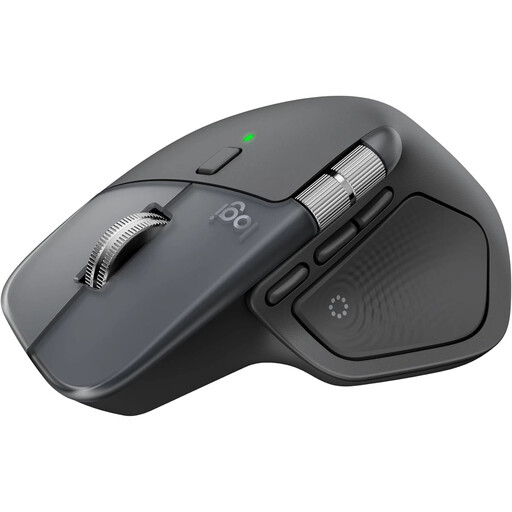
Why This Fits Their Persona: Ideal for developers, designers, and analysts who seamlessly switch between multiple devices (PC, Mac, tablet) and want to optimise their workflow with customisable actions and haptic feedback. A true wireless mouse for Mac and Windows power users.
The 8K DPI sensor focuses on precision across all surfaces, not on uselessly high numbers. The multi-device function with the Logi Bolt receiver is stable, and switching is instant at the touch of a button.
The electromagnetic MagSpeed scroll wheel and new haptic feedback allow for extremely fast yet precise control. The quiet clicks reduce noise in the office environment.

Why This Fits Their Persona: Perfect for users who spend long days at their desk and want to actively reduce wrist and forearm strain. Suitable for office workers, writers, and anyone who prioritises comfort.
This mouse avoids the vague "ergonomics" trap with a clear, science-backed design. The vertical 57° angle promotes a natural handshake posture, which Logitech claims can reduce muscle activity.
The unique shape is its main advantage. It reduces pressure on the wrist and promotes better posture. The 4000 DPI sensor is more than sufficient and precise for office applications.
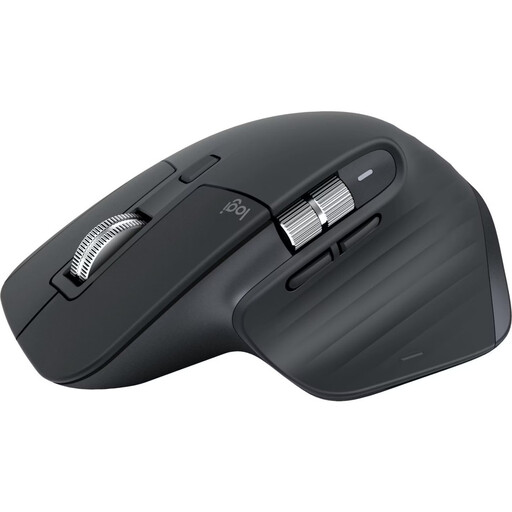
Why This Fits Their Persona: For users who want the proven premium quality and ergonomics of the MX Master series but don't need the latest features like haptic feedback. An excellent choice for a professional setup that offers great value for money.
It offers the same proven ergonomics and precise 8K DPI sensor as its successor. The Bluetooth connection is stable and the multi-device function is time-tested, making it a reliable choice.
Delivers premium-class core features like the MagSpeed scroll wheel and quiet clicks at a potentially lower price point. Its long battery life and proven shape are strong selling points.
We have compiled a complete, up-to-date list of products that fully meet these strict selection criteria and all relevant safety standards.
1. How long does the Logitech MX Master 4's battery last, and how is it charged? According to the manufacturer, the MX Master 4's battery lasts up to 70 days on a full charge. The mouse is charged via a USB-C port. A quick-charge function provides up to three hours of use from just a one-minute charge, according to Logitech. A charging cable is included in the box, but a power adapter is not.
2. Is the Logi Options+ software mandatory to use the MX Master 4? No, the mouse's basic functions (pointing, clicking, scrolling) work out of the box via Plug-and-Play with Bluetooth or the Logi Bolt receiver. However, to take full advantage of advanced features like button customisation, setting up app-specific profiles, controlling haptic feedback, or using the Actions Ring, you need to install the free Logi Options+ software.
3. What is the key difference between the Logitech MX Master 4 and the MX Master 3S? The main difference lies in the new, advanced features of the MX Master 4. These primarily include customisable haptic feedback for actions and notifications, as well as the Actions Ring, a context-sensitive overlay that places shortcuts directly at your cursor. The MX Master 3S does not have these two features, but it also offers an 8K DPI sensor, quiet clicks, and the MagSpeed scroll wheel, making it a still very capable alternative.