
Lieferung heute & morgen

Qualitätsgarantie

Willkommens-Angebote freischalten: KOSTENLOSE Lieferung | Bis zu 80 % RABATT | Kostenlose 30-Tage-JoyPlus-Testphase
App herunterladen
An ergonomic mouse should do more than simply work wirelessly. For professional office users, developers, creatives and data analysts, the right shape, controlled precision, quiet clicks and a reliable connection to multiple devices are also important. The Logitech MX Master 4 ergonomic wireless mouse combines these requirements with features such as haptic feedback, a MagSpeed scroll wheel and an 8K DPI sensor.
However, it is worth taking a closer look at your actual working conditions before buying. Certain features may sound impressive on paper, but they are not relevant to every person or workplace.
An 8K DPI mouse can move the cursor very quickly and track precisely on suitable surfaces. This is useful for spreadsheets, image editing or large monitors. In everyday office work, however, a high DPI setting is not automatically necessary. Sensor quality, the surface of the desk and finely adjustable cursor speed are also important.
According to the manufacturer, the Logitech MX Master 4 features an 8K DPI sensor that can also work on glass with a minimum thickness of 4 mm. Buyers should nevertheless check whether their own work surface is clean, even and suitable for sensor tracking.
An ergonomic mouse for the office and home office needs to suit your hand size, preferred hand and personal grip. A heavily contoured model may be comfortable for right-handed users, while left-handed users or people with smaller hands may need a different shape.
The MX Master 4 measures approximately 126 × 85 × 51 mm and weighs around 141 g. This is a full-sized design. Before buying, you should therefore check that you have enough space and that your hand can reach the side controls without changing grip.
Haptic feedback, gesture control and app profiles can enhance your workflows. However, they may require additional software and individual setup. According to the product specifications, Logitech Options+ is required on Windows and macOS if features such as Actions Ring, haptic settings or Smart Actions are to be fully customised.
If you simply want to plug in a mouse and start using it straight away, a simpler model may be a better choice. With a multi-device mouse, you should also check that Bluetooth and the supplied receiver are compatible with your existing computer.
Pay attention to the length, width, height and weight. A larger mouse gives your hand more support, but it also requires more room to move. For small desks or use on the go, a more compact model may be preferable.
The Logitech MX Master 4 is designed for right-handed users, with a natural tilt angle, thumb wheel and gesture button. This type of shape may be suitable for long work sessions, but it cannot replace an individually suitable sitting position and hand posture. Regular breaks remain advisable during extended use.
A wireless mouse with Bluetooth does not require a USB port to remain permanently occupied. The Logi Bolt USB-C receiver can be an alternative if Bluetooth is disabled on your computer or you prefer a dedicated wireless connection.
According to the manufacturer, the MX Master 4 can be paired with up to three devices. This is practical for a workstation with a Windows PC, MacBook and tablet. Nevertheless, you should check the following before buying:
According to the manufacturer, the MagSpeed scroll wheel is designed to provide both precise line-by-line scrolling and fast navigation through lengthy documents. For spreadsheets, source code and extensive websites, switching between ratchet and free-spin modes can be useful.
The MX Master 4 also features quiet clicks. According to the manufacturer, click noise is reduced by 90% compared with a standard mouse. This figure should be understood as the manufacturer’s stated value; perceived volume also depends on the desk, room and way the buttons are pressed.
The mouse is charged via USB-C. According to the product specifications, a charging cable is not included. The stated battery life is up to 70 days, while the manufacturer says that one minute of charging can provide approximately three hours of use. As a lithium battery is integrated, it should not be opened or exposed to excessive heat. Dispose of it at suitable collection points for electrical devices and batteries.
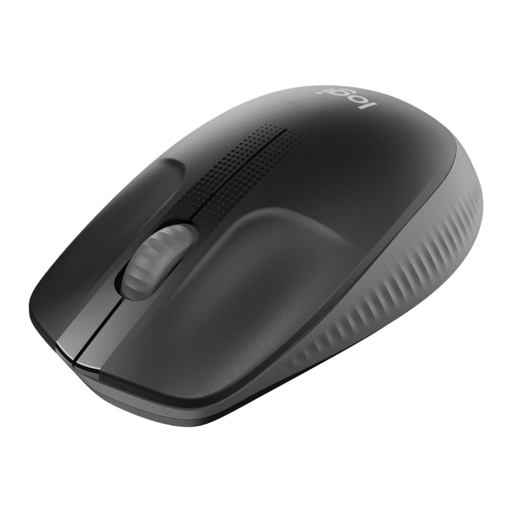
Why this product suits the profile: This full-sized, ambidextrous mouse is aimed at users looking for a straightforward solution for the office, school and home office.
It focuses not on difficult-to-assess extra features, but on a USB receiver, optical tracking and an AA battery with up to 18 months of battery life according to the product specifications.
Plug-and-play connectivity, ambidextrous design and support for Windows, macOS, Linux and ChromeOS.
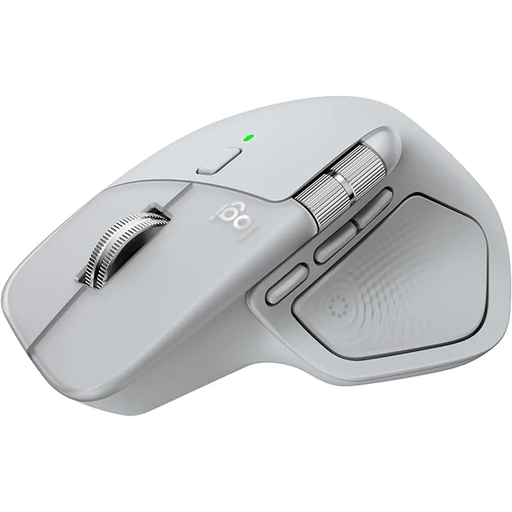
Why this product suits the profile: This mouse is aimed at frequent users who want to combine multiple devices, customisable features and a productivity-focused specification.
The technical specifications provide specific details on dimensions, the 8K DPI sensor, up to three devices, USB-C charging and software requirements.
Haptic feedback, Actions Ring, MagSpeed scroll wheel, 7 controls, plus Bluetooth and a Logi Bolt USB-C receiver.

Why this product suits the profile: The vertical design is intended for right-handed users who want to try a significantly different hand position from that of a conventional horizontal mouse.
The 57-degree design is clearly distinctive and cannot be mistaken for an ordinary flat mouse. Buyers can compare the special shape with their own grip habits in advance.
4000 DPI sensor, Bluetooth and USB receiver, up to three paired devices and USB-C charging.
We have put together a complete, regularly updated list of products that fully meet these strict selection criteria and the safety regulations applicable in the EU.
According to the product specifications, the mouse supports Windows 10 and 11, macOS from version 12 onwards, Linux, ChromeOS, iPadOS and Android. Logitech Options+ is required on Windows or macOS for full customisation of the buttons, Actions Ring and haptic feedback.
Yes. According to the manufacturer, up to three devices can be paired. You can switch between them using the multi-device function. For reliable setup, check the Bluetooth version, operating system and available USB-C ports in advance.
The mouse has an integrated lithium battery and a USB-C charging port. The stated battery life is up to 70 days. According to the product description, a charging cable and charger are not included.