
Lieferung heute & morgen

Qualitätsgarantie

Willkommens-Angebote freischalten: KOSTENLOSE Lieferung | Bis zu 80 % RABATT | Kostenlose 30-Tage-JoyPlus-Testphase
App herunterladen
For professional users, choosing the right computer mouse is more than a matter of preference—it's a decision that impacts productivity and comfort. With premium models like the Logitech MX Master 4 mouse, manufacturers promise a host of features. However, not every innovation is relevant to every workflow. This guide will help you understand the technical specifications and avoid the typical pitfalls of buying.
Before deciding on a model, you should be wary of three common marketing promises that often lead to the wrong purchase decision:
To make an informed decision, you should focus on three core parameters that determine the actual value of a professional office mouse.
The DPI number alone is only half the story. The quality of the sensor is what truly matters. Modern laser sensors, like the Darkfield sensor found in many Logitech models, enable precise tracking on almost any surface, including glass. This is particularly relevant for users who work in various locations—from a polished conference table to a glass desk in a home office. A high DPI of 8000 is especially beneficial for users with high-resolution 4K or 8K monitors, as it allows them to move the cursor across large screen areas without having to move their hand far.
A truly ergonomic wireless mouse is distinguished by a shape that holds the hand in a natural, slightly angled position, thereby reducing wrist strain. Look for a pronounced thumb rest and easily accessible auxiliary buttons. Models like the MX Master series also offer a thumb wheel for horizontal scrolling, which significantly speeds up work in wide spreadsheets or on video timelines. The ability to program buttons for specific application shortcuts via software like Logi Options+ is another factor that boosts efficiency.
For a stable multi-device mouse, the type of connection is crucial. While Bluetooth offers universal compatibility, a dedicated USB receiver (like the Logi Bolt) often provides a more stable and secure connection, especially in office environments with many wireless signals. Features that directly support your workflow are also important. A mouse with a fast scroll wheel (e.g., MagSpeed) allows you to fly through long documents and automatically switches to precise line-by-line mode when needed. A quiet click mouse reduces noise in open-plan offices or home offices, while a mouse with haptic feedback introduces a new level of interaction by providing tactile responses for specific actions.
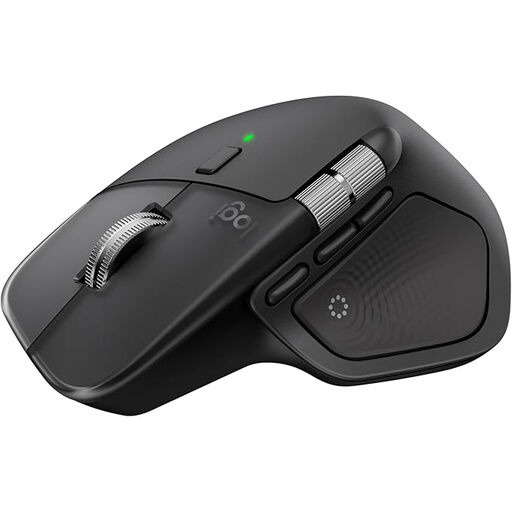
Why This Fits Their Persona: Ideal for developers, designers, and data analysts who manage complex workflows across multiple devices and applications. The haptic feedback and Actions Ring offer a new dimension of customisable control.
Its proven ergonomics prevent fatigue, while the stable connectivity via the Logi Bolt USB receiver ensures reliable multi-device switching.
Customisable haptic feedback for tactile confirmations; MagSpeed scroll wheel for extremely fast and precise scrolling.
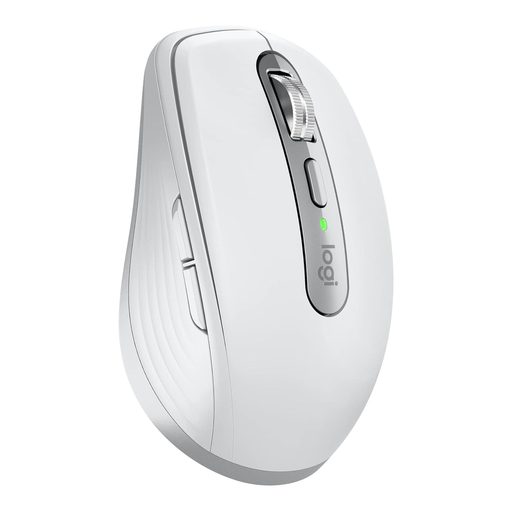
Why This Fits Their Persona: Perfect for consultants and sales representatives who travel frequently and need a compact yet powerful mouse that works on any surface in a hotel or café.
It doesn't promise full-scale ergonomics for 10-hour days, but it delivers unparalleled portability and precision. The 8K DPI sensor is not a gimmick here but is practical for working in confined spaces.
Compact design with professional features like MagSpeed scrolling and quiet clicks; Darkfield sensor works reliably on glass.
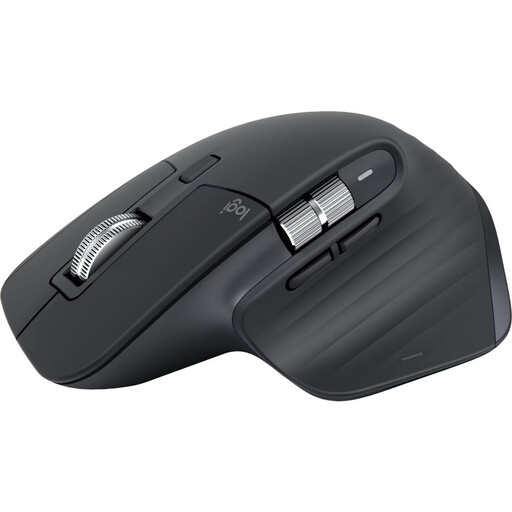
Why This Fits Their Persona: For users in home or corporate offices who are looking to upgrade from a standard mouse and want proven professional features at an attractive price-performance ratio.
This model bypasses the hype around the very latest features, instead offering the core functions of the MX series, which are more than sufficient for most professional tasks.
Offers the same ergonomics, 8K DPI sensor, and quiet clicks as newer models; the Bluetooth-only connection is ideal for MacBooks and ultrabooks with few ports.
We have compiled a complete, up-to-date list of products that fully meet these strict selection criteria and safety regulations.
The decision depends on your individual workflow. The key innovation of the MX Master 4 is the introduction of haptic feedback and the "Actions Ring." If you are a power user who would benefit from customisable, tactile feedback for actions and shortcuts, the extra cost may be justified. For most other professional users, the MX Master 3S already offers a very high level of precision, ergonomics, and functionality with its 8K DPI sensor and MagSpeed wheel.
According to the manufacturer, the MX Master 4's battery lasts up to 70 days on a full charge. The actual battery life will depend on the intensity of use. A convenient feature is the fast-charging capability via USB-C: Logitech claims that just one minute of charging can provide up to three hours of use. This significantly minimises downtime in your daily workflow.
Yes, the basic functions of the mouse (cursor movement, left/right click, scrolling) work out of the box via Plug-and-Play with Bluetooth or the Logi Bolt receiver, with no software installation required. However, to unlock the mouse's full potential—such as customising buttons, setting up haptic feedback, controlling the Actions Ring, or using application-specific profiles—you will need to install the free Logi Options+ software for Windows or macOS.