
Lieferung heute & morgen

Qualitätsgarantie

Willkommens-Angebote freischalten: KOSTENLOSE Lieferung | Bis zu 80 % RABATT | Kostenlose 30-Tage-JoyPlus-Testphase
App herunterladen
For professionals who spend hours at their computer every day, choosing the right mouse isn't a trivial matter—it's a crucial investment in productivity and comfort. Especially with premium models like the Logitech MX Master 4, the market promises a wealth of features. However, not every advertised feature is worth the premium. This guide will help you separate the wheat from the chaff and avoid common purchasing pitfalls.
As a Joybuy Product Recommendation Officer, I filter the relevant information for you so you can make an informed decision based on facts, not marketing hype.
Before we dive into the technical details, it's important to be aware of the most common marketing traps that often lead to regrettable purchases.
To avoid these pitfalls, you should focus on the following objectively measurable criteria.
The heart of any mouse is its sensor. Models like the MX Master series use a Darkfield sensor, which enables precise tracking even on glass surfaces (with a minimum thickness). An 8K DPI sensor offers more than enough resolution for high-resolution monitors and detail-oriented work. The ability to adjust DPI levels is more important than the maximum value. This allows you to tailor the cursor speed precisely to your task, whether it's for pixel-perfect photo editing or rapid navigation in large spreadsheets.
A modern Bluetooth mouse for Mac or Windows PC should offer a stable, lag-free connection. Look for current standards like Bluetooth Low Energy and proprietary receiver technologies like the Logi Bolt USB receiver, which can ensure a more robust connection in environments with a lot of wireless interference. The true power of a mouse for power users is often unlocked through its accompanying software. Programs like Logitech Options+ allow you to customize buttons, define gesture controls, and create application-specific profiles, significantly speeding up your workflow.
A good ergonomic shape supports the natural posture of your hand and wrist. Look for a pronounced thumb rest and easily accessible extra buttons. A second scroll wheel for horizontal scrolling, for example, is a significant advantage for developers and designers working with wide timelines or code files. Click volume is also a factor: a mouse with quiet clicks is a considerate choice in open-plan offices or a home office.
Based on the criteria above, we have compiled a few models for different user groups.
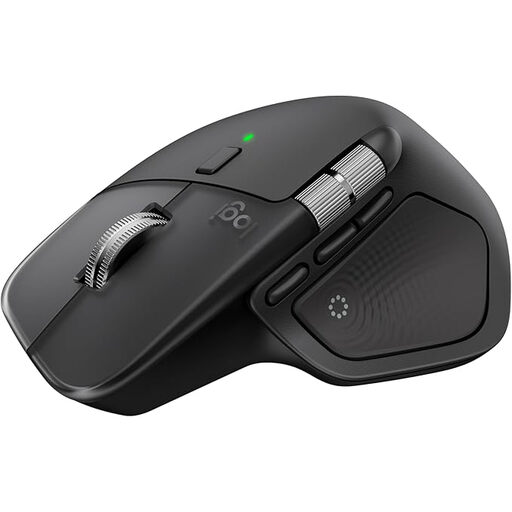
Why This Fits Their Persona: Ideal for professional users who need maximum efficiency and customisation across multiple devices (PC, Mac, tablet). The combination of a precision sensor, advanced scrolling features, and deep software customisation optimises complex workflows.
The 8K DPI sensor delivers practical precision on glass instead of boasting useless numbers. The ergonomics have been refined over generations, and the multi-device switching via Easy-Switch is fast and reliable.
The electromagnetic MagSpeed mouse wheel, which automatically switches between stepped and hyper-fast scrolling, and the haptic feedback for actions are clear productivity advantages.
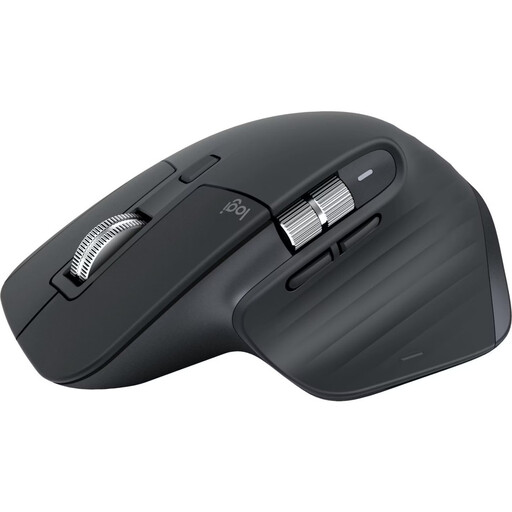
Why This Fits Their Persona: For users who want the core features of the Master series, like the precision sensor and MagSpeed wheel, but can forgo the latest features of the MX Master 4 to get better value for money.
This model already offers the proven 8K DPI sensor and mature ergonomics. You are investing in tested technology and avoiding the risk of paying a premium for brand-new features that may be unnecessary for you.
Offers Quiet Click technology for a mouse with quiet clicks and the MagSpeed scroll wheel. The price-to-performance ratio is often more attractive compared to its successor, with only minor trade-offs in core functionality.
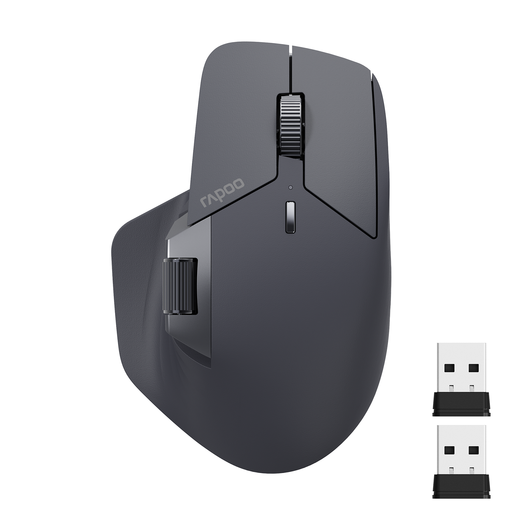
Why This Fits Their Persona: A great choice for home office users or students who need a reliable multi-device mouse with an ergonomic design and programmable buttons but have a limited budget.
This model focuses on the core requirement of a multi-device mouse: a reliable connection to multiple devices (up to 4). It forgoes premium features, instead offering a solid basic feature set at a fair price.
The ability to connect up to four devices is a strong feature in this price range. The M+ Cross-Computer technology also enables a cross-computer workflow.
We have compiled a complete, real-time updated list of products that fully meet these strict selection criteria and German regulations.
No, the Logitech MX Master 4, like its predecessors, is designed exclusively for right-handed use. Its asymmetrical, ergonomic shape is specifically tailored for right-handers. Users looking for an ambidextrous mouse should look for symmetrical models.
The basic functions of the mouse, such as pointer movement and standard clicks, work without additional software via Bluetooth or the Logi Bolt receiver. However, to use the full range of features—including button customisation, haptic feedback configuration, setting up app-specific profiles, and using Smart Actions—installing the free Logitech Options+ software is required.
Both models feature a high-precision 8K DPI sensor and the MagSpeed scroll wheel. According to the manufacturer, the main innovations of the Logitech MX Master 4 are its haptic feedback, which provides tactile responses to actions, and the so-called "Actions Ring," a context-sensitive overlay for application shortcuts. The MX Master 3S remains a very capable alternative if you can do without these specific new features.