
Lieferung heute & morgen

Qualitätsgarantie

Willkommens-Angebote freischalten: KOSTENLOSE Lieferung | Bis zu 80 % RABATT | Kostenlose 30-Tage-JoyPlus-Testphase
App herunterladen
For professional users like developers, designers, and analysts, a mouse is more than just a pointing device—it's a core tool that must function with precision and reliability for hours on end. The wrong mouse can not only disrupt your workflow but also lead to discomfort. The Logitech MX series is specifically engineered for demanding tasks, offering models designed for productivity, ergonomics, and multi-device workflows.
This guide introduces various models in the Logitech MX series and explains their key features to provide you with a solid basis for making an informed decision based on your individual needs.
Selecting the right model depends on your work style, ergonomic needs, and daily tasks. Here are some criteria you should consider.
The shape of the mouse has a direct impact on comfort during long-term use.
In modern work environments, switching between a laptop, desktop PC, and tablet is a daily routine. A multi-device mouse significantly boosts efficiency. The MX series models typically support connection with up to three devices simultaneously. Switching is done at the press of a button. The connection is established either via Bluetooth or the included Logi Bolt USB receiver, ensuring flexible use across Windows, macOS, and other operating systems.
The sensor resolution, measured in DPI (Dots Per Inch), determines how sensitive the mouse is to movement. A high DPI count, like the 8K DPI sensor in some MX models, allows for precise cursor movements on high-resolution monitors with minimal hand movement. Furthermore, the Logi Options+ software enables extensive customisation of buttons, scroll speed, and application-specific profiles to further optimise productivity.
Based on different user profiles, we have compiled a selection of models from the Logitech MX series.
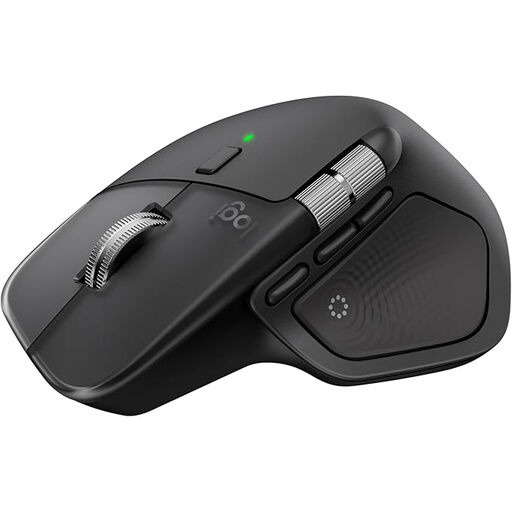
What Sets It Apart As the flagship model, the Logitech MX Master 4 is designed for maximum performance and customisability. The electromagnetic MagSpeed scroll wheel allows you to switch between precise, line-by-line scrolling and a hyper-fast mode that, according to Logitech, can fly through 1,000 lines per second. The 8K DPI sensor offers high tracking accuracy on almost any surface, including glass (at least 4mm thick). A special feature is the haptic feedback, which provides tactile responses for certain actions.
Pros
Who Is It For? This professional mouse is aimed at power users, developers, video editors, and creative professionals who require the highest level of control, precision, and efficiency for their stationary workstation.
View details for the Logitech MX Master 4
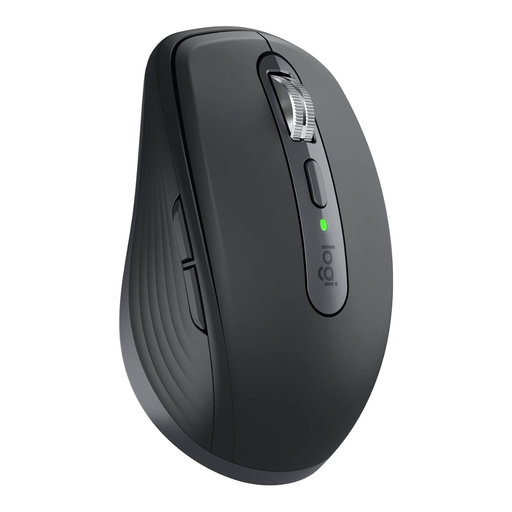
What Sets It Apart The MX Anywhere 3S combines many of the Master series' performance features in a compact, mobile form factor. Despite its small size, it features the MagSpeed scroll wheel and an 8K DPI Darkfield sensor that works reliably even on glass surfaces. The Quiet Clicks make it a quiet mouse, ideal for use in libraries, trains, or open-plan offices.
Pros
Who Is It For? The MX Anywhere 3S is the ideal wireless mouse for mobile professionals, consultants, and anyone who frequently switches between a home office, the main office, and working on the go. It's also a great choice for users with smaller hands or those who prefer a minimalist desk setup.
View details for the Logitech MX Anywhere 3S
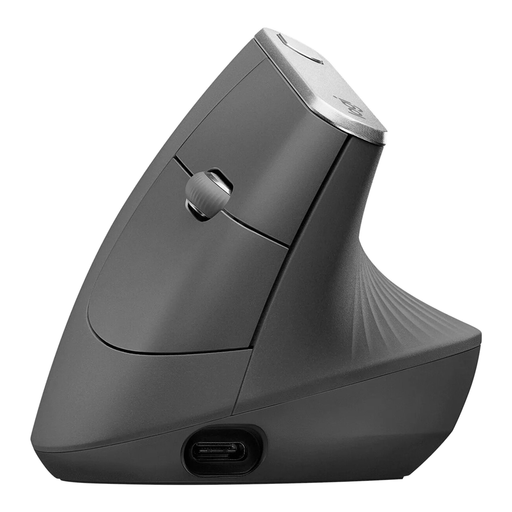
What Sets It Apart The Logitech MX Vertical takes a radically different ergonomic approach. Its unique 57-degree vertical angle promotes a natural handshake posture. According to Logitech, this posture can reduce muscle activity by 10% compared to a conventional mouse and alleviate wrist pressure. The 4000 DPI sensor ensures precise control and requires four times less hand movement to move the cursor, according to the manufacturer.
Pros
Who Is It For? This ergonomic mouse is designed for users who spend long hours at the computer and value a comfortable hand posture or want to take preventative measures against discomfort. It is suitable for office workers, programmers, and anyone looking for an alternative to the traditional mouse shape.
View details for the Logitech MX Vertical
If the models presented here don't exactly meet your requirements, or if you'd like a broader overview of available peripherals, you can find a larger selection of input devices for various use cases in our category.
Discover More USB Wireless Computer Mice
The main difference lies in their size and intended use case. The MX Master is a large, full-featured mouse for a stationary workstation, offering maximum control and ergonomics for power users. The MX Anywhere, on the other hand, is compact and lightweight, designed for mobile users who need a high-performance mouse on the go.
A vertical mouse like the MX Vertical is engineered to promote a more natural hand and wrist posture. According to the manufacturer, Logitech, the 57-degree angle is intended to reduce muscle strain. Many users report increased comfort during long work sessions. However, it is not a medical product, and individual results may vary.
Most Logitech MX mice feature an "Easy-Switch" button on the underside. After pairing the mouse with up to three devices (e.g., via Bluetooth or a Logi Bolt receiver), you can seamlessly switch between your PC, laptop, and tablet by pressing this button. The Logi Options+ software also offers the "Flow" feature, which even allows you to move the cursor across the screen edges from one computer to another, copying and pasting text, images, and files between them.