
Lieferung heute & morgen

Qualitätsgarantie

Willkommens-Angebote freischalten: KOSTENLOSE Lieferung | Bis zu 80 % RABATT | Kostenlose 30-Tage-JoyPlus-Testphase
App herunterladen
Long days at the computer, switching between a laptop, tablet, and desktop PC, and the demand for precise and efficient workflows place high demands on our peripherals. A high-quality mouse is not a luxury, but a central tool that can boost productivity and improve comfort. The Logitech MX series was specifically developed for these professional requirements.
This article serves as a guide. We will introduce you to various models in the Logitech MX line and explain their key features to help you select the right Logitech MX mouse for your individual needs.
The decision for a specific model depends on your work style, ergonomic needs, and daily tasks. Here are three key criteria you should consider.
Anyone who spends many hours at a desk every day knows the strain it can put on the hand and wrist. An ergonomic mouse is shaped to support a more natural hand posture and reduce muscle strain. Logitech offers different approaches to this:
Modern workspaces are rarely limited to a single device. A wireless mouse that can seamlessly switch between multiple systems is therefore a significant productivity advantage. Look for the following features:
The precision of a mouse is largely determined by its sensor. The DPI (Dots Per Inch) indicates how sensitive the mouse is to movement. A higher DPI value allows for fast cursor movements with minimal hand motion.
Logitech often uses Darkfield sensors in its MX series. This advanced technology allows for precise tracking on almost any surface, even glass. This is particularly useful for a mouse for on-the-go, when you don't always have a mouse pad handy.
Based on the criteria mentioned, we have compiled a selection of models suitable for different user profiles and requirements.
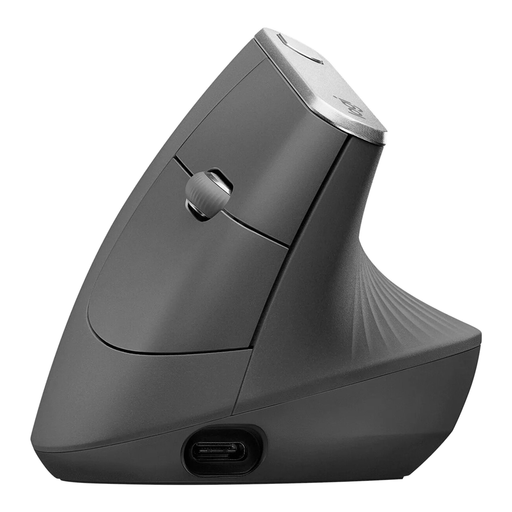
Why it stands out The MX Vertical is notable for its unique design. The 57° vertical angle is engineered to place the hand in a natural handshake position. According to Logitech, this can reduce muscle activity compared to a conventional mouse and decrease pressure on the wrist.
Pros
Who is it for? Users who spend long days at the computer and value an ergonomic workspace. It's an excellent choice for individuals looking to prevent or alleviate wrist discomfort and who are willing to adapt to a new mouse shape.
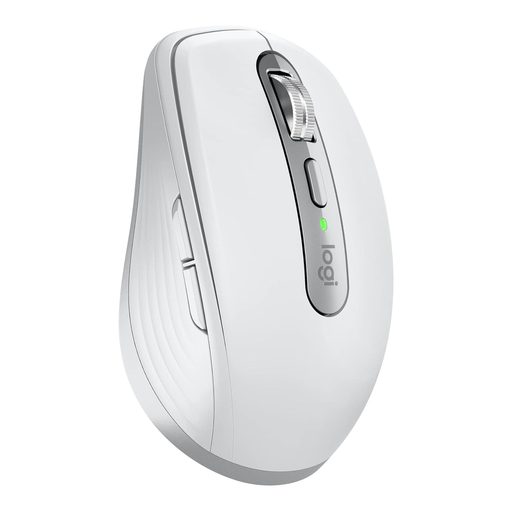
Why it stands out The MX Anywhere 3S is the compact solution for maximum flexibility. Its 8000 DPI Darkfield sensor enables precise work on virtually any surface, including glass. The "Quiet Clicks" significantly reduce clicking noise, making it ideal for offices, libraries, or other quiet environments.
Pros
Who is it for? Mobile professionals, commuters, and anyone who works in various locations. Its compact size and versatile sensor make it a reliable companion for travel. It's also a great option for users with smaller hands or limited desk space.
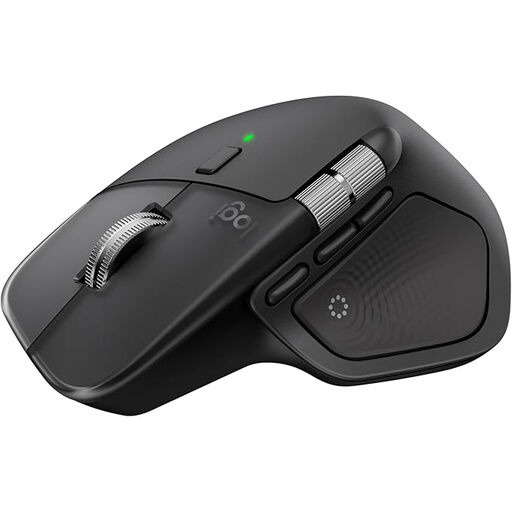
Why it stands out The Logitech MX Master 4 is the flagship for users seeking a high-productivity mouse. It combines a thoughtful ergonomic shape with a wealth of advanced features. These include haptic feedback that makes actions tangible and an electromagnetic MagSpeed scroll wheel for extreme speed and precision.
Pros
Who is it for? Power users, creative professionals like designers and developers, and any user who needs maximum control and customisation for complex workflows. It is the tool of choice for anyone looking to maximise their efficiency at a desktop workstation.
The Logitech MX series offers specialised solutions for professional users. If these models don't exactly match your needs or if you'd like a broader overview of input devices, there are many other alternatives to discover.
Explore our entire range of touch mice and find the right model for your needs.
The main difference lies in size and intended use. The MX Master is a large, full-featured mouse for a stationary desk setup, designed for maximum ergonomics and control. The MX Anywhere is a compact, portable mouse optimised for mobile use and flexibility.
Most MX mice use Easy-Switch technology. After pairing the mouse with up to three devices (via Bluetooth or a USB receiver), you can seamlessly switch between them by pressing a button on the bottom or top of the mouse. The active device is often indicated by an LED.
A vertical mouse is designed to promote a more ergonomically advantageous posture. Switching from a traditional mouse may require a short adjustment period. Many users find the posture more comfortable after this phase, especially during long work sessions. However, whether it is suitable for an individual depends on personal preference and hand size.