
Lieferung heute & morgen

Qualitätsgarantie

Willkommens-Angebote freischalten: KOSTENLOSE Lieferung | Bis zu 80 % RABATT | Kostenlose 30-Tage-JoyPlus-Testphase
App herunterladen
A compact mouse for laptops, tablets and multiple devices should click quietly, connect reliably and take up minimal space when you’re out and about. With the Logitech Pebble Mouse 2 M350s, many shoppers therefore look at the colour and price first. However, the connection type, compatibility, noise levels and actual ongoing costs are more important.
When buying a wireless mouse, three common misconceptions can lead to unnecessary expense:
If you’re looking for a wireless Bluetooth mouse for a laptop, tablet and possibly a smartphone, check the operating systems before buying. According to the product specifications, the Logitech Pebble Mouse 2 M350s is compatible with Windows 10/11 or later, macOS 11 or later, iPadOS 14 or later, Android 9.0 or later and ChromeOS.
For anyone switching between, for example, a work laptop and a tablet, the Easy-Switch function is particularly useful. It lets you save up to three wireless devices and switch between them using the connection button. That’s more convenient than setting up a new Bluetooth pairing every time. The Bluetooth connection uses Bluetooth Low Energy. The technical specifications also mention a 2.4 GHz wireless connection, so check which connection option is included with the particular product configuration before buying.
A quiet mouse is especially useful in an open-plan office, library or home office with a shared room. The Pebble Mouse 2 M350s uses Silent-Touch technology. According to the manufacturer, it reduces clicking noise by more than 90 per cent compared with a standard mouse.
This figure refers to clicking and shouldn’t be interpreted as complete silence. The scroll wheel, placing the mouse on the desk and the desk surface can also affect the perceived noise level. When choosing a Silent-Touch mouse, it’s therefore worth looking for smooth operation and using a suitable surface.
Measuring approximately 10.67 × 5.87 × 2.66 cm and weighing 76 g, the Logitech Pebble Mouse 2 M350s is one of the flatter, more portable mice. Its low weight can be useful for commuters and students. At the same time, a flat mouse feels different in the hand from a taller model. If you prefer more pronounced palm support, compare the shape with your usual preferences before ordering.
The optical sensor offers an adjustable range of 400 to 4,000 dpi. A higher dpi figure doesn’t automatically mean more precise or more comfortable operation. For documents, spreadsheets and web applications, controlled pointer movement is the key consideration.
Power comes from one AA alkaline battery, which is included according to the product details. The stated runtime is up to 24 months. The automatic sleep mode can help reduce energy consumption. Nevertheless, you should factor the cost of an AA battery into the ongoing running costs. If the battery is visibly damaged, leaking or swollen, stop using it and dispose of it in accordance with local waste-disposal requirements.
The following recommendations are based on objective features such as colour, connection options, dimensions and multi-device functionality. You can find the pink version directly here: Logitech Pebble Mouse 2 M350s Tonal Rose.
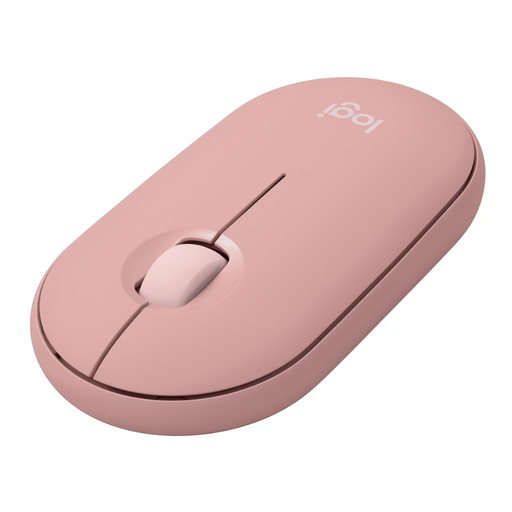
Why this product suits this profile: The compact pink version offers Bluetooth connectivity, an AA battery and a slim design for laptop workstations, studying and mobile use.
The technical specifications state specific compatibility details and a runtime of up to 24 months, rather than making only general claims about portability and endurance.
Silent-Touch technology, 400–4,000 dpi and support for up to three devices.
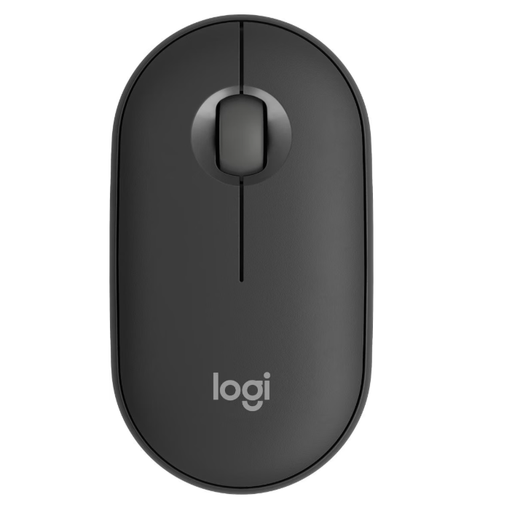
Why this product suits this profile: The graphite version blends discreetly into office and work environments, combining optical tracking with Bluetooth and RF wireless specifications.
The choice isn’t based on design alone: sensor resolution, three-button layout, operating systems and battery type are all clearly specified.
76 g weight, up to 4,000 dpi and up to three saved device connections.
Why this product suits this profile: For intensive users who switch between a Windows PC, MacBook, tablet and other devices, the Easy-Switch button is the key feature.
Instead of using several mice for different work devices, you can pair up to three devices and select them at the press of a button.
Programmable middle button via Logi Options+, plus Silent Touch and a power-saving mode.
To connect the mouse for the first time, remove the protective tab from the pre-installed AA battery and set the switch to “On”. Then open the Bluetooth settings on your device and select “Pebble M350s”.
To connect another device, press and hold the Easy-Switch button for around three seconds until the status indicator flashes rapidly. Then start the search in the Bluetooth settings. A short press of the button lets you switch between saved devices later.
The scroll wheel’s middle button can be customised in Windows and macOS using the Logi Options+ app. Depending on the application, you can use it to trigger browser functions or shortcuts, for example. For iPadOS and Android, check which customisation options are supported by the relevant platform.
We’ve put together a complete, regularly updated list of products that fully meet these strict selection criteria and the safety regulations applicable in the EU.
Yes. According to the available product information, it is compatible with Windows 10/11 or later and macOS 11 or later. Compatibility should be checked separately before buying if you’re using an older operating system.
The stated battery life is up to 24 months when using an AA alkaline battery. This figure depends on usage, the battery and power-saving behaviour. The battery can be replaced when its performance starts to decline.
According to the manufacturer, Silent-Touch technology reduces clicking noise by more than 90 per cent compared with a standard mouse. The scroll wheel and noises caused by the desk surface may still be audible. It is therefore designed for quieter clicking in libraries, offices and home offices, but it isn’t completely silent.