
Lieferung heute & morgen

Qualitätsgarantie

Willkommens-Angebote freischalten: KOSTENLOSE Lieferung | Bis zu 80 % RABATT | Kostenlose 30-Tage-JoyPlus-Testphase
App herunterladen
A Logitech wireless mouse and keyboard can make your workspace tidier and more flexible. However, the models differ significantly in layout, connection, battery and design. If you only focus on a high DPI count or a long battery life, you might overlook important details for everyday use.
A wireless mouse with 8000 DPI offers a wide adjustment range for pointer speed. However, that does not automatically mean you need this resolution. For office work, spreadsheets and word processing, consistent tracking, suitable sensor control and a comfortable shape are often more relevant than the maximum value.
Some Logitech models feature a Darkfield sensor with up to 8000 DPI. According to the product specifications, it can also be used on many smooth surfaces. On reflective or transparent surfaces, tracking may still be impaired.
A Bluetooth mouse and keyboard can be connected to many laptops, tablets and desktop PCs without an additional receiver, provided a compatible Bluetooth module is available. Logi Bolt, on the other hand, uses a USB receiver and is designed for a stable connection in an office or corporate environment. With the Logitech MX Keys Combo for Business Gen 2, the wireless connection is transmitted encrypted, according to the product description.
Before buying, you should check:
For users in Germany, a wireless QWERTZ keyboard is usually the most obvious choice. The German layout arranges the letters Z and Y differently from the US QWERTY layout and includes country-specific key markings. Even with a budget-friendly offer, you should therefore explicitly look for "German QWERTZ" or "German layout" in the product details.
A multi-device mouse can make work easier if you regularly switch between an office PC, laptop and tablet. With the MX models mentioned here, switching is done via Easy-Switch; according to the product data, up to three devices can be paired. Actual compatibility depends on the operating system, available ports and installed software.
The Logi Options+ app can be used, depending on the model, to customise buttons, mouse keys, scrolling behaviour or Smart Actions. Such features are particularly interesting for developers, content creators and users with repetitive workflows, but are not necessary for everyone.
A compact mouse is easy to transport and suitable for changing workstations. A larger, ergonomic mouse with a pronounced thumb rest, on the other hand, may be better suited to a fixed desk environment. The shape should match your hand size, preferred grip style and frequency of use.
With keyboards, flat scissor mechanisms, mechanical switches and classic standard keys are different solutions. An illuminated keyboard can be practical in changing light conditions. The lighting should be switchable or adjustable in brightness if longer battery life is more important to you.
Battery life figures come from the manufacturer and depend on factors such as lighting, usage, wireless connection and environmental conditions. The MX Anywhere 3S and MX Master 3S are described with a stated battery life of up to 70 days. For the MX Mechanical, the product data indicates up to 15 days with the lighting on and up to 10 months without lighting.
For shared spaces, quiet clicks and a restrained typing sound are relevant. The MX mice feature Quiet Clicks according to the product description. The MagSpeed scroll wheel on compatible models allows both step-by-step and fast scrolling. A mechanical keyboard, even with "Tactile Quiet" switches, can have a different sound profile than a scissor-switch keyboard.
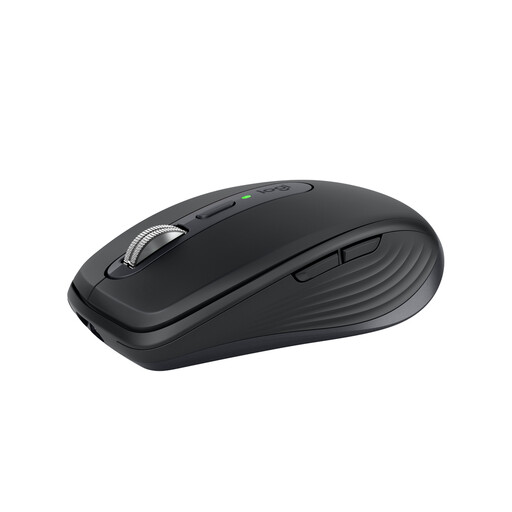
Why this product fits the profile: The compact mouse is ideal for mobile workstations, the home office and people who switch between several devices. Bluetooth and an optional Logi Bolt receiver offer different connection options.
The technical specifications clearly state the sensor range, connection and compatibility. This makes it easy to check whether the mouse suits your device and workspace.
8000 DPI Darkfield sensor, MagSpeed scroll wheel, Quiet Clicks and switching between up to three devices.

Why this product fits the profile: The set combines a German QWERTZ keyboard with the MX Master 3S and is aimed at fixed workstations, professional office setups and demanding multi-device workflows.
The German QWERTZ layout, Bluetooth and Logi Bolt are explicitly stated. This makes the selection less dependent on general marketing claims.
Illuminated keyboard, Smart Actions, up to three devices and MX Master 3S with 8000 DPI sensor.
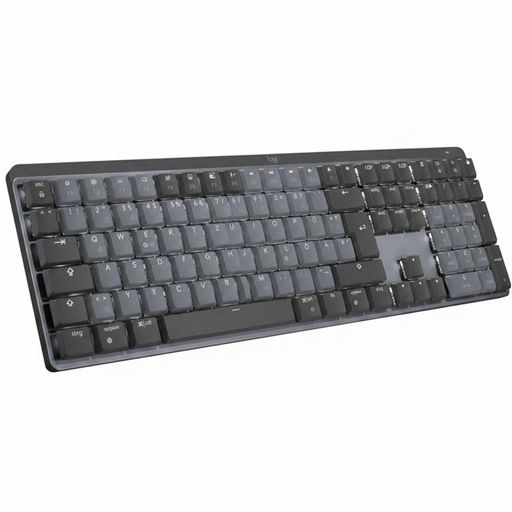
Why this product fits the profile: The keyboard is designed for developers, content creators and people who spend long hours typing and want a mechanical feel with a low profile and reduced noise.
The switch type, QWERTZ layout, lighting and intended connection methods are all specifically stated. This helps you better assess the typing feel before purchase.
Tactile Quiet low-profile switches, adaptive backlighting, Bluetooth, Logi Bolt and USB-C charging.
We have compiled a complete, regularly updated list of products that fully meet these strict selection criteria and the safety regulations in force in the EU.
First, pair each device via Bluetooth or a Logi Bolt receiver. Then you can switch between saved devices using the Easy-Switch button or the designated device keys. The exact number and function depend on the model; with the MX products mentioned, up to three devices are supported.
The product specifications for the MX Anywhere 3S and MX Master 3S state up to 70 days. Actual battery life can be affected by usage, wireless connection and charge level. For keyboards with lighting, it is also relevant whether the backlighting remains active.
Logi Bolt can be useful if you prefer a USB receiver or if an encrypted connection is important for your intended workflow. Before buying, you should check whether the receiver is included in the package and whether your computer has a suitable USB port available.