
Lieferung heute & morgen

Qualitätsgarantie

Willkommens-Angebote freischalten: KOSTENLOSE Lieferung | Bis zu 80 % RABATT | Kostenlose 30-Tage-JoyPlus-Testphase
App herunterladen
A Logitech wireless mouse can make your workspace much tidier. However, not every model automatically provides a comfortable user experience. Differences in hand size, connectivity, click noise, sensor and power supply have a greater impact on everyday use than design or marketing claims.
If you are looking for a mouse for the office and home office, studying, creative applications or use with multiple devices, you should not focus solely on the price. Three common buying misconceptions are particularly relevant:
A Logitech Bluetooth mouse can be paired directly with compatible laptops, tablets and desktop computers. This is particularly convenient when only a few USB ports are available. When choosing a connection, check which operating systems are actually supported: a Logitech mouse for Windows and Mac will often also work with ChromeOS, Linux, iPadOS or Android, but the additional software may be limited to certain systems.
A USB receiver provides a simple plug-and-play setup. Logi-Bolt models also offer a wireless connection designed for business use. If you want to switch between a work computer, personal laptop and tablet, choose a multi-device mouse with Easy-Switch functionality. Some models support up to three paired devices.
For longer work sessions, the mouse’s length, width, height and orientation are more important than a general label such as “ergonomic”. Right-handed users will find more contoured designs with thumb rests among the MX and M650 models. Depending on the version, the Signature M650 is available for small to medium-sized or large hands. Left-handed users have their own M650-L Left version.
A vertical design such as the Logitech MX Vertical changes the angle of your hand. This may suit users who prefer a different hand position. It is not a medical product and does not guarantee protection against discomfort. What matters is whether the shape suits your hand and allows relaxed operation.
A quiet wireless mouse often uses SilentTouch or Quiet Click technology. Logitech states that several models reduce click noise by up to 90 per cent compared with conventional mice. This should be understood as a manufacturer’s specification; the perceived volume also depends on the surface and the pressure applied.
For office work, 1,000 to 4,000 DPI is sufficient for many applications. Creative users, developers working with multiple monitors or people who make only small mouse movements may benefit from a higher, adjustable resolution. According to the product specifications, the MX Master 3S and MX Master 4 feature sensors offering up to 8,000 and 8K DPI respectively.
There are two common power-supply options:
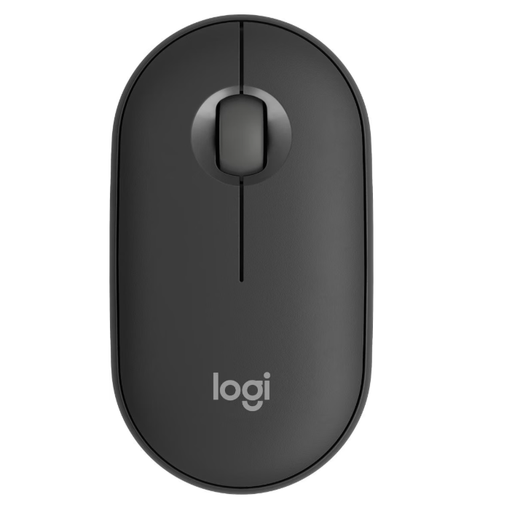
Why this product suits this profile: Weighing 76 g, its flat, ambidextrous design is ideal for laptop users, students and people who work in different locations. Bluetooth and Easy-Switch allow connection to up to three devices.
The Bluetooth connection does not require a conventional USB port. Silent Touch reduces click noise according to the manufacturer; power is supplied by an AA battery.
400 to 4,000 DPI, wireless range of up to 10 m and up to 24 months of battery life according to the product specifications.
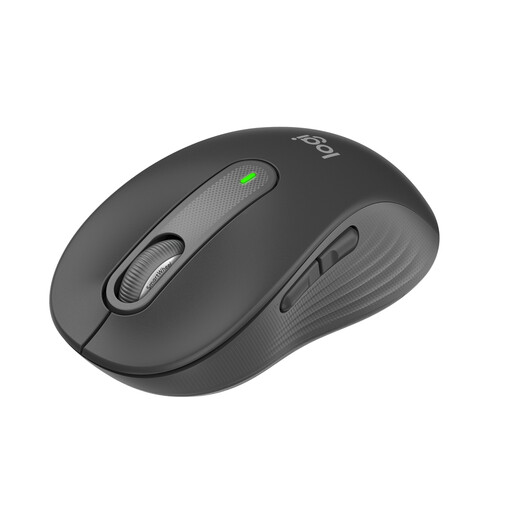
Why this product suits this profile: The contoured design is intended for small to medium-sized hands. Five buttons, SmartWheel, Bluetooth and Logi Bolt are well suited to typical office and home-office tasks.
The size specification prevents a one-size-fits-all choice based purely on appearance. The side buttons can be customised in Windows and macOS using Logi Options+.
SilentTouch, SmartWheel and up to 24 months of battery life from a single AA battery.
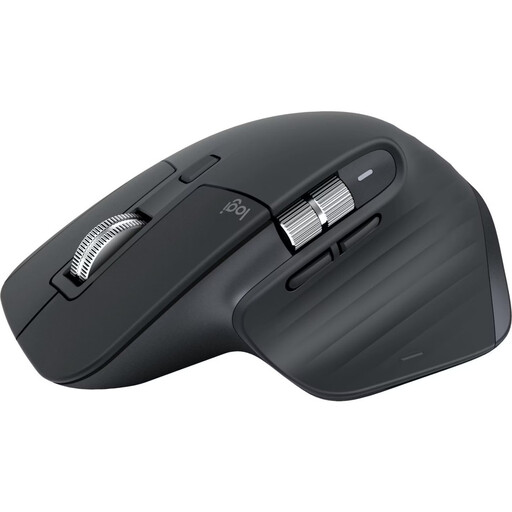
Why this product suits this profile: The right-handed design, MagSpeed wheel and 8,000-DPI Darkfield sensor are aimed at developers, creative professionals and users working with large documents or multiple devices.
The Bluetooth Edition does not require a USB receiver and supports up to three devices. Quiet Click technology is useful in shared workspaces.

Why this product suits this profile: The vertical 57-degree design is intended for users who prefer an alternative hand position or have limited space for mouse movements.
The design is clearly specified and should not be equated with a flat standard mouse. Before buying, you should try the altered operating position.
Up to 4,000 DPI, Bluetooth and USB receiver, support for up to three devices, plus an integrated rechargeable battery with USB-C charging.
We have put together a complete, regularly updated list of products that fully meet these strict selection criteria and the safety regulations applicable in the EU.
The Logitech MX Master 4 adds haptic feedback, an Actions Ring, MagSpeed scrolling and an 8K-DPI sensor to the product family. Up to three devices can be connected; according to the product specifications, battery life is up to 70 days. The additional functions require Logi Options+ on Windows or macOS.
The Logitech MX Master 3S also offers up to 8,000 DPI, Quiet Clicks, MagSpeed and multi-device support. The choice between the two models should therefore be based on the software features you want, the items included and the actual price. Both are more fully featured right-handed models, rather than compact travel mice.
Switch on the mouse and hold down the Easy-Switch or connection button until the status indicator flashes. Then open your computer’s Bluetooth settings and select the displayed model name. Logi Options+ may be required for additional functions such as side buttons, DPI profiles or Smart Actions.
Battery life depends on the model, usage and power-saving mode. Pebble and Signature models are specified as lasting up to 24 months. The M705 Marathon is rated for up to three years. Rechargeable MX models offer up to 70 days per charge according to the product specifications. Manufacturer figures are guidelines and may vary in everyday use.
Yes, if click noise could be disruptive in shared rooms, libraries or meetings. SilentTouch or Quiet Click reduces noise, but does not change the mouse’s size, shape or number of buttons. These features should therefore be assessed separately.