
Lieferung heute & morgen

Qualitätsgarantie
App herunterladen
Kategorien
Choosing a Logitech wireless mouse is a decision that should be guided by technical parameters and the intended use case. Factors like sensor technology, connectivity options, and ergonomic design determine the efficiency and comfort of daily use. This article analyses the essential criteria and presents a selection of models for various user profiles.
The performance of a mouse is defined by the interplay of its core components. An informed decision is based on understanding these technical specifications.
The precision of a mouse depends significantly on its sensor. Logitech employs various technologies here:
The type of wireless connection affects compatibility, security, and stability:
An ergonomic mouse is adapted to the natural posture of the hand and can help reduce strain during extended use. Key considerations include:
Specific features can significantly enhance your workflow:
Based on the technical criteria above, we have compiled a selection of models for different applications.
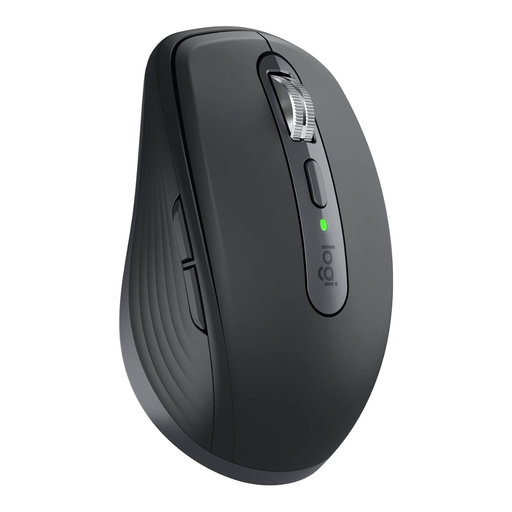
Why We Recommend It The MX Anywhere 3S for Business is engineered for high performance and portability. Its 8000 DPI Darkfield sensor ensures maximum precision on virtually any surface, including glass. Secure connectivity via the Logi Bolt USB receiver and its multi-device capability make it a powerful tool for professionals in hybrid work environments.
Pros
Best For This model is aimed at mobile professionals, consultants, and users who demand the highest standards of precision and flexibility and frequently switch between different workplaces and devices.
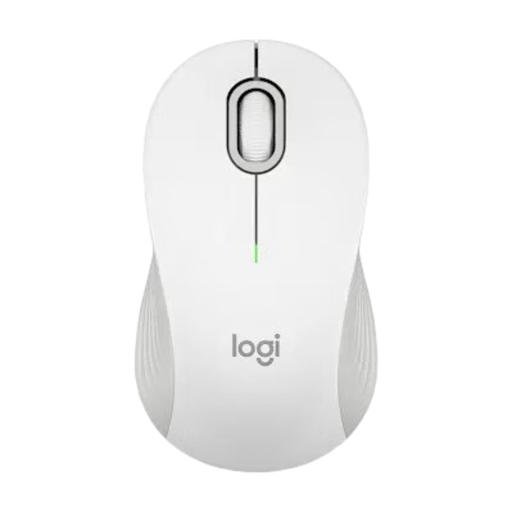
Why We Recommend It The Logitech M550 offers a balanced combination of functionality and durability for daily office use. The SmartWheel scroll wheel, which automatically switches modes, and the exceptionally long battery life of up to 24 months (according to the manufacturer, when used with Logi Bolt) are its core features. Its availability in two sizes enhances ergonomic comfort.
Pros
Best For Ideal for professionals in the office and home office who need a reliable, versatile, and low-maintenance Bluetooth mouse for everyday tasks like document editing and web navigation.
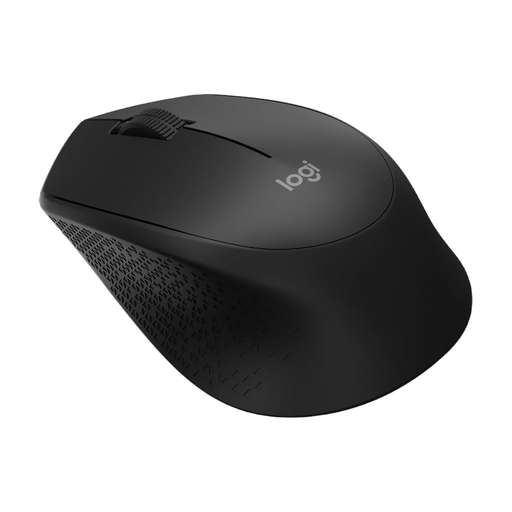
Why We Recommend It The Logitech M280 focuses on the core essentials: reliability, comfort, and ease of use. Its asymmetrical shape, optimised for right-handers, and soft rubber grips provide a comfortable hold. The connection via the USB nano receiver is straightforward (plug-and-play) and stable.
Pros
Best For This model is a pragmatic choice for users seeking a simple and cost-effective laptop mouse or a reliable secondary device for a desktop PC.
The models presented cover specific use cases. However, if you are looking for other peripherals for your workspace, you can find a wider selection of professional solutions in our Business Accessories category.
1. What is the difference between a Logitech wireless mouse with Logi Bolt and one with Bluetooth? A Bluetooth mouse connects directly to the host device. A Logi Bolt receiver also uses Bluetooth technology but creates a dedicated, encrypted wireless channel between the mouse and the receiver. This can lead to a more stable connection in environments with many wireless networks (e.g., open-plan offices) and meets higher security standards (Security Mode 1, Level 4).
2. How can I connect a Logitech mouse to multiple devices? Models with the Easy-Switch feature, like the MX Anywhere 3S, can be paired with up to three devices simultaneously. After the initial pairing via Bluetooth or the Logi Bolt receiver on each device, you can seamlessly switch between the connected computers or tablets by pressing the Easy-Switch button (usually on the bottom of the mouse).
3. Which Logitech mouse is particularly quiet? Models equipped with "Quiet Click" technology, such as the Logitech MX Anywhere 3S, offer significantly reduced click noise. According to Logitech, the click sound is reduced by over 90% compared to standard mice. This feature makes it a suitable quiet mouse for quiet work environments.