
Lieferung heute & morgen

Qualitätsgarantie

Willkommens-Angebote freischalten: KOSTENLOSE Lieferung | Bis zu 80 % RABATT | Kostenlose 30-Tage-JoyPlus-Testphase
App herunterladen
A Logitech wireless mouse can help keep your workspace tidy and make it easier to switch between several devices. The range extends from a compact Bluetooth mouse for use on the go to an ergonomic mouse with multiple programmable buttons. However, office workers, home-office users, creatives, developers, data analysts and gamers all have different requirements.
Before buying, it is worth taking a close look at connectivity, hand size, power supply and software. Some features may sound convincing in marketing materials but are not necessarily relevant to everyone in everyday use.
A high sensor resolution, such as 8,000 DPI or more, enables fast pointer movement. However, it does not automatically make a mouse more comfortable or precise. For working with text, spreadsheets and web applications, consistent tracking, a suitable shape and finely adjustable speed are often more important.
High DPI values, fast signal transmission and short response times can be important for gaming. For a wireless mouse for office and home-office use, however, a considerably lower value is often sufficient.
A Bluetooth wireless mouse can be connected directly to many laptops, tablets and Macs. The device must support Bluetooth Low Energy. A USB receiver can be a practical alternative, but it takes up a port. Some models include a Logi-Bolt receiver, while for others it is optional.
Before buying, check the following:
A large, heavily contoured mouse can be comfortable to grip for people with large hands, but may quickly feel awkward for smaller hands. Left-handed users also need a symmetrical or specifically left-handed design. Weight affects handling too: a heavier mouse can feel more stable, while a lighter one is practical for mobile use.
Pay attention to the hand size and handedness specified by the manufacturer. For example, the Logitech Signature M650 L is designed for large hands and right-handed users. The Logitech Signature M650 L Left variant is intended for large left hands. A symmetrical gaming mouse such as the Logitech G PRO 2 LIGHTSPEED, on the other hand, can be configured for both right- and left-handed users.
The shape should support your hand without leaving your fingers permanently bent at an uncomfortable angle. During longer work sessions, regular breaks and a neutral sitting position are advisable. A mouse is no substitute for an ergonomically designed workspace.
A multi-device mouse can manage up to three paired devices. This is useful if, for example, you switch between a Windows PC, a MacBook and a tablet. Check whether switching is done with a button and whether the required software is available for your operating system.
For compatible models, Logitech Options+ supports features including the customisation of side buttons, scrolling behaviour and pointer speed. Logitech G HUB is generally used for gaming models.
Depending on the product specifications, models with an AA battery can achieve a battery life of up to 24 months. Rechargeable models are usually charged via USB-C and, depending on the device, offer a battery life of up to 70 or 95 days. These figures depend on usage and settings.
With a USB-C mouse, you should also check whether a charging cable is included. According to the product specifications, the Logitech MX Master 4 does not include a USB-C charging cable. An additional cable may therefore be useful when travelling for longer periods.
A quiet mouse with SilentTouch or Quiet Click technology is suitable for open-plan offices, libraries and shared spaces. Claims such as “up to 90 per cent less clicking noise” are manufacturer specifications for the product and do not guarantee a particular volume in every environment.
Programmable mouse buttons can save time when working with spreadsheets, editing images, developing software and gaming. What matters is whether the number and position of the buttons suit your applications.
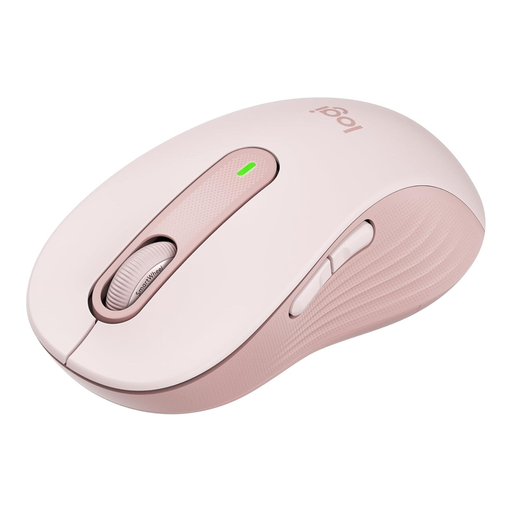
Why this product suits the profile: This mouse combines a large right-handed shape with Bluetooth and Logi-Bolt support. The AA battery is included, and the product specifications state a battery life of up to 24 months.
The “L” size designation makes the target audience clear. According to the product specifications, SilentTouch reduces clicking noise; however, the shape is specifically designed for large right hands.
SmartWheel for precise, fast scrolling, plus customisable side buttons through Logitech Options+.
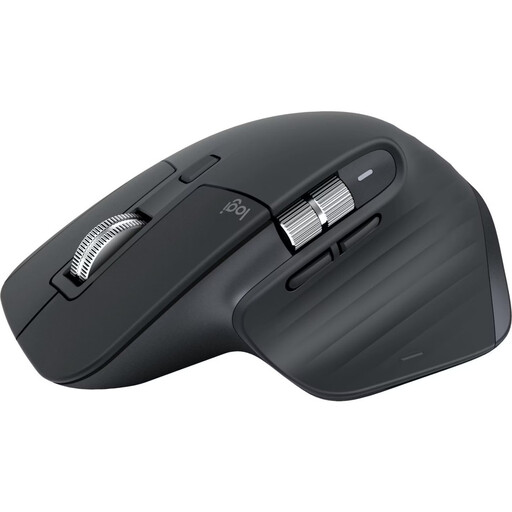
Why this product suits the profile: The ergonomic right-handed shape, 8K DPI Darkfield sensor, MagSpeed scroll wheel and connection to up to three devices are designed for demanding workflows.
The Bluetooth Edition does not need a USB receiver. This leaves a port free on compatible MacBooks or laptops. However, the shape is designed for right-handed users.
Up to 8,000 DPI, seven programmable buttons, USB-C charging and a stated battery life of up to 70 days.
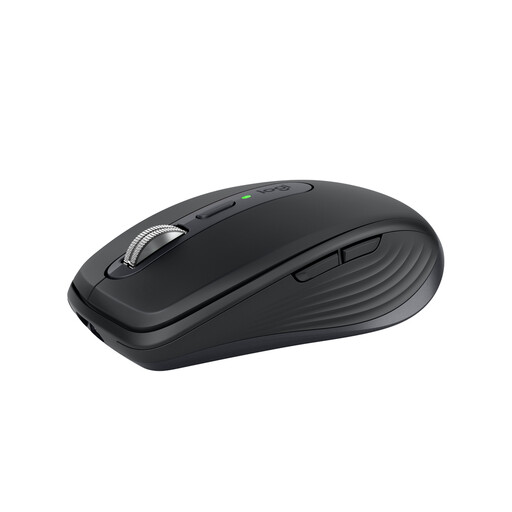
Why this product suits the profile: Weighing 99 grams, its compact design is ideal for commuters, hybrid workspaces and users who move between the office, home office and working on the go.
The compact size stops a large desktop mouse taking up unnecessary space in your bag. For people with large hands or extended stationary use, the smaller shape may be less suitable.
Darkfield sensor with up to 8,000 DPI, Bluetooth, optional Logi-Bolt receiver and USB-C battery with up to 70 days’ battery life according to the product specifications.
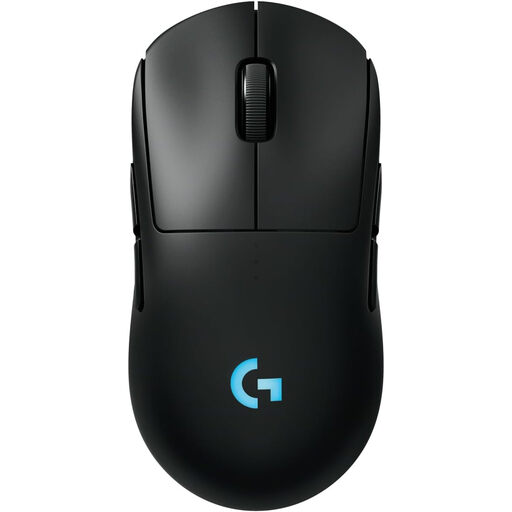
Why this product suits the profile: This symmetrical gaming mouse is designed for players who need an optical sensor, LIGHTSPEED wireless connectivity and customisable magnetic side buttons.
The symmetrical shape and interchangeable side buttons accommodate different handedness. For purely office-based work, however, the gaming features and software may offer more than you need.
HERO-2 sensor with up to 32,000 DPI according to the product data, up to 95 hours of battery life without lighting and USB-C charging.
We have put together a complete, regularly updated list of products that fully meet these strict selection criteria and the safety regulations applicable in the EU.
With Bluetooth models, activate Bluetooth on your computer and select the mouse in the device settings. With a Logi-Bolt or LIGHTSPEED model, plug in the appropriate USB receiver. Depending on the model, you need Logitech Options+ or Logitech G HUB for additional functions such as programmable mouse buttons.
Battery life depends on the model, lighting and usage. The product specifications state up to 24 months with an AA battery for the Signature M650 L. Rechargeable models such as the MX Master 3S and MX Anywhere 3S are specified as offering up to 70 days, while the G PRO 2 LIGHTSPEED offers up to 95 hours without lighting.
The Logitech Signature M650 L is specifically designed for large right hands. If you are looking for additional scroll wheels, multiple buttons and more pronounced ergonomic shaping, you can explore the MX Master range. Left-handed users should look for a left-handed variant or a symmetrical gaming mouse.