
Lieferung heute & morgen

Qualitätsgarantie

Willkommens-Angebote freischalten: KOSTENLOSE Lieferung | Bis zu 80 % RABATT | Kostenlose 30-Tage-JoyPlus-Testphase
App herunterladen
A Logitech wireless mouse can help keep your workspace tidy and work without a cable connected to your PC or Mac. But not every model is right for every hand, operating system or use. Common causes of a disappointing purchase include choosing a mouse that’s too small, picking the wrong connection type or misjudging specifications that work differently in everyday use than they sound in the adverts.
This buying guide explains what to look for before you buy and which models may suit different needs.
“Ergonomic” isn’t a standardised term. What matters is the mouse’s actual dimensions, shape and orientation for right- or left-handed use. A compact mouse may suit smaller hands, while people with larger hands may find their wrist bends more during extended use.
So be sure to check:
A Bluetooth mouse doesn’t need a spare USB port, but your computer or tablet must support Bluetooth. A USB receiver may be more convenient with desktop PCs or older devices. Some models offer both connection types, making it easy to switch between a MacBook, Windows PC and Chromebook.
Before you buy, also check whether a receiver is included and whether the software you want to use works with your operating system. For example, you can customise the side buttons on the Logitech Signature M650 L using Logitech Options+ on Windows and macOS.
DPI describes the sensitivity of the sensor. A very high setting isn’t automatically right for every playing style or screen. For gaming, signal rate, sensor performance, buttons, weight, shape and wireless connection also matter.
A Logitech gaming mouse with programmable buttons can be useful for certain games. For word processing, spreadsheets and web browsing, quiet clicks, precise scrolling and long battery life are often more important.
If you have larger hands, choose a mouse that’s wide and long enough. The Signature M650 L models measure around 118 to 118.7 millimetres in length and are specifically designed for larger hands. The standard version is made for right-handed use. If you’re looking for a mouse for large hands and you’re left-handed, look for the “Left” version.
A symmetrical gaming mouse, on the other hand, may suit either hand. The magnetic side buttons on the Logitech G PRO 2 LIGHTSPEED can be fitted on the left, right or both sides. Any openings you don’t need can be covered with the supplied caps.
For the office and working from home, two connection options are often useful:
The Signature M650 L supports both options and, according to the product specifications, is compatible with Windows, macOS, Linux, ChromeOS, iPadOS and Android. The G PRO 2 LIGHTSPEED is described as being for Windows PCs with a USB port and Logitech G HUB software. Check the requirements of your specific device before buying.
A quiet mouse can be useful in an open-plan office, library or home where you share a room. The Signature M650 L series uses SilentTouch technology to reduce clicking noise. The models also feature a SmartWheel, which switches between precise and fast scrolling.
There are some notable differences in how the mice are powered:
Actual battery life depends on factors including lighting, how intensively you use the mouse and your settings.
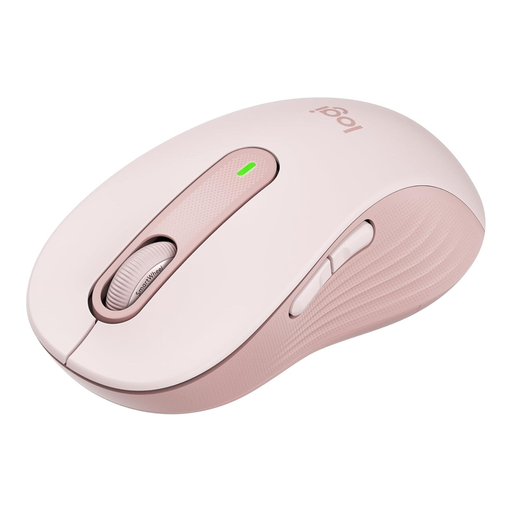
Why this product suits you: Designed for larger right hands, this mouse is a straightforward choice for the office or home working. It connects via Bluetooth or Logi Bolt, and an AA battery is included.
Its specified size for larger hands lowers the risk of accidentally choosing a mouse that’s too small. Having two connection options means you’re not tied to Bluetooth or USB.
SilentTouch clicks, SmartWheel, customisable side buttons and up to 24 months’ battery life according to the product specifications.
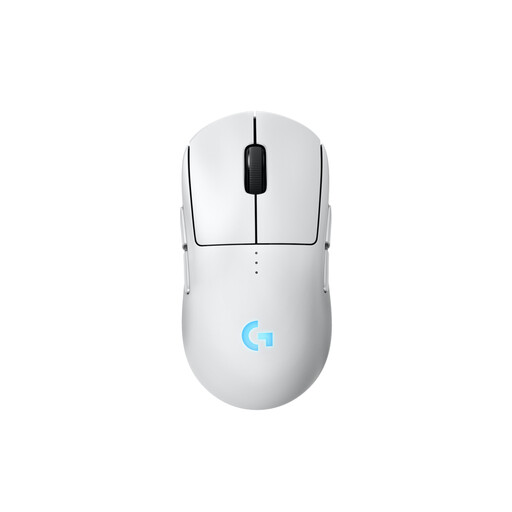
Why this product suits you: For demanding gaming, it combines a HERO 2 sensor, programmable buttons, LIGHTSPEED wireless technology and a symmetrical design.
Its symmetrical design and interchangeable side buttons mean it isn’t fixed to one handed orientation. You can adjust the DPI in G HUB to suit your playing style.
80 grams, 100 to 44,000 DPI, USB-C charging and up to four configurable side buttons.
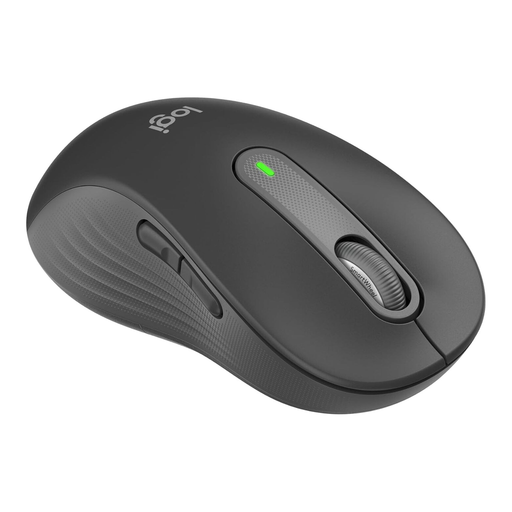
Why this product suits you: This version for larger left-handed users is shaped for the left hand, with the side buttons and thumb area positioned accordingly.
The clearly identified left-handed design means you won’t have to adapt your grip to a right-handed mouse. It’s also designed for larger hands.
Bluetooth and Logi Bolt, quiet clicks, SmartWheel and customisable side buttons for Windows and macOS.
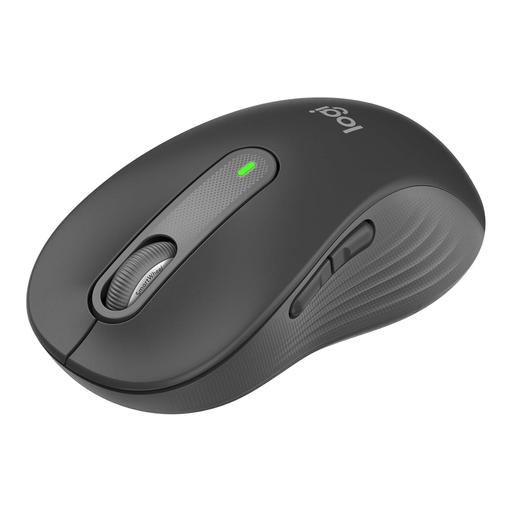
Why this product suits you: Its neutral colour makes it a good fit for long working days and switching between devices at the office or at home.
Compatibility with multiple devices via Bluetooth and Logi Bolt gives you more flexibility than a mouse with just one connection option.
AA battery, SmartWheel, SilentTouch and support for multiple operating systems.
We’ve put together a complete, regularly updated list of products that meet these strict selection criteria and the safety regulations applicable in the EU.
It depends on the model and how you use it. The Signature M650 L takes one AA battery and offers up to 24 months’ battery life according to the product specifications. The G PRO 2 LIGHTSPEED, by contrast, has a built-in battery that charges via USB-C. Lighting and how intensively you use the mouse affect battery life.
Bluetooth is generally sufficient for word processing, web browsing and spreadsheets, provided your computer supports Bluetooth Low Energy. A Logi Bolt receiver may be useful if your Bluetooth connection isn’t stable or you regularly use a desktop PC.
Left-handed users should choose either a mouse specifically designed for left-handed use, such as the Signature M650 L Left, or a symmetrical model such as the G PRO 2 LIGHTSPEED. With gaming mice, it’s also important to check whether the side buttons can be fitted and programmed on the side you want.