
Lieferung heute & morgen

Qualitätsgarantie

Willkommens-Angebote freischalten: KOSTENLOSE Lieferung | Bis zu 80 % RABATT | Kostenlose 30-Tage-JoyPlus-Testphase
App herunterladen
A Logitech wireless mouse can help keep your workspace tidy and make it easier to switch between a laptop, desktop PC and tablet. However, not every model will suit every hand, operating system or working style. Poor purchases are particularly common when buyers focus only on DPI values, long battery life or the product name.
An ergonomic Logitech mouse is not automatically suitable for every hand. Large models can feel too bulky for smaller hands. Conversely, compact mice can feel cramped for users with larger hands. Many ergonomically shaped models are also designed exclusively for right-handed users.
You should therefore pay attention to dimensions, weight and hand orientation. If you are looking for a mouse for large hands, search specifically for a corresponding L variant. Left-handed users need either a symmetrical model or a version explicitly labelled as a left-handed mouse.
A Logitech Bluetooth mouse can be connected directly to many laptops, tablets and compatible desktop PCs. Other models use a USB receiver, sometimes in addition to Bluetooth. Before buying, check whether your computer has a free USB port and supports Bluetooth.
For use with several devices, a multi-device mouse with Easy-Switch functionality is worth considering. However, it is important to check how many devices can actually be paired and whether the required software is compatible with Windows or macOS.
Long battery life can be convenient, but it does not necessarily mean that the power supply suits your everyday needs. Models with an AA battery do not require a charging port, while a rechargeable mouse needs to be charged regularly via USB-C. Also check whether a charging cable is included.
The usual safety guidance applies to integrated lithium batteries: damaged devices should no longer be used, and batteries should not be opened or heated. In Germany, electronic devices and batteries must not be disposed of with household waste.
Bluetooth is practical for mobile users because no additional receiver has to be plugged into the laptop. A USB receiver, on the other hand, can be useful with older PCs or workstations without a reliable Bluetooth connection. Models offering both options provide greater flexibility.
With business models such as the MX range, the Logi Bolt receiver can provide an encrypted connection, depending on the version. For private use, the key considerations are whether the connection can be set up reliably and whether the receiver is included.
DPI describes the sensitivity of the sensor, not automatically its everyday precision. For office work, programming and image editing, controlled pointer movement and a suitable surface are generally more important than the highest possible maximum value.
A sensor offering up to 8,000 DPI can be sufficient for a range of uses. Gaming mice such as the Logitech G Pro 2 Lightspeed, however, are aimed at users who also need low latency, high polling rates and customisable buttons.
A quiet mouse can be more comfortable in open-plan offices, libraries and shared spaces. Logitech refers to noise reduction on selected models as SilentTouch or Quiet Click. These descriptions should be understood as technical product features, not as a guarantee of complete silence.
Different scrolling modes are useful for spreadsheets, long documents and websites. A side scroll wheel or programmable button can streamline your workflows. You can find an overview of other models in the category mice with side scroll wheels.

Why this product suits the profile: The M650 L is designed for right-handed users with larger hands and offers Bluetooth as well as a Logi Bolt USB receiver. The AA battery is included.
The L size designation clearly indicates that it is intended for larger hands. According to the product details, SilentTouch reduces click noise; the side surfaces and side buttons are explicitly described.
Up to 24 months of battery life according to the product details, plus customisable side buttons via Logitech Options+.
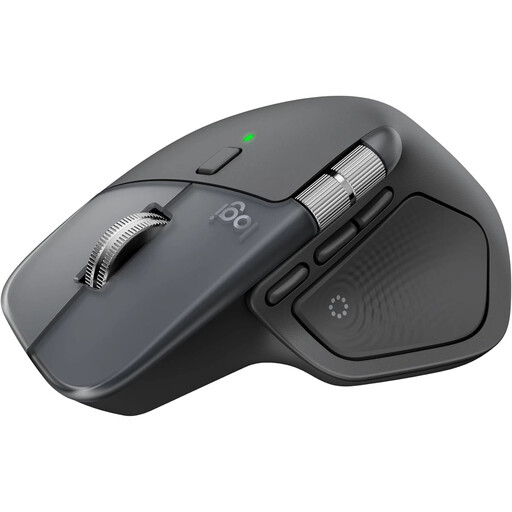
Why this product suits the profile: This ergonomically shaped right-handed mouse is designed for long working sessions, multiple devices and extensive customisation.
The technical specifications list Bluetooth, a USB-C Logi Bolt receiver, USB-C charging and support for up to three devices.
8K DPI sensor, MagSpeed scroll wheel, customisable functions and stated battery life of up to 70 days.
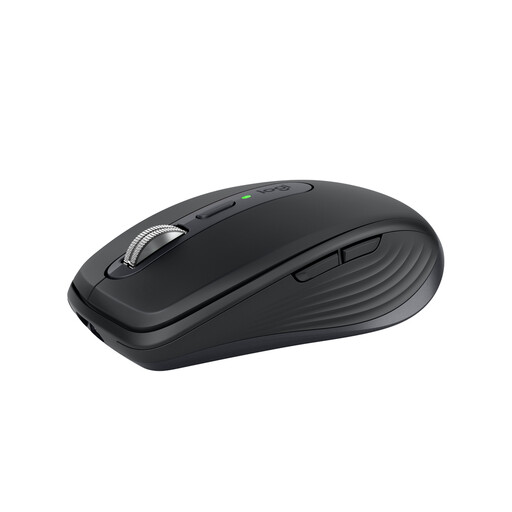
Why this product suits the profile: Weighing 99 grams, its compact design is ideal for changing workspaces, travel and use with up to three devices.
The compact design is specified with precise dimensions. Bluetooth is integrated; a Logi Bolt receiver is optional and should be checked depending on the contents of the package.
8,000 DPI Darkfield sensor, USB-C charging, MagSpeed scroll wheel and up to 70 days of battery life according to the product details.
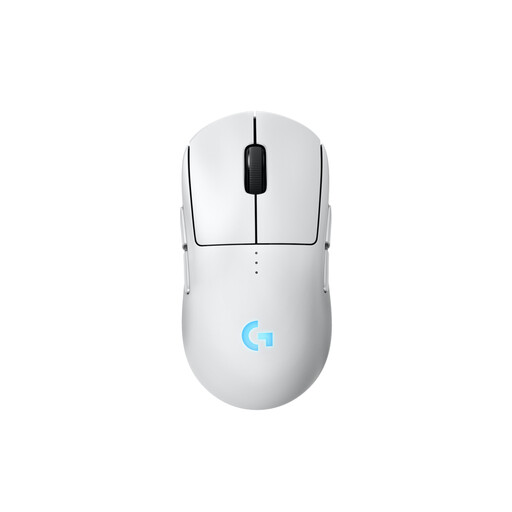
Why this product suits the profile: This symmetrical gaming mouse can be configured for right- or left-handed use and is aimed at users with demanding requirements for response times and programmable buttons.
The hand orientation is clear from the symmetrical shape and interchangeable magnetic side buttons. For office work, its features may be more extensive than necessary.
HERO 2 sensor, LIGHTSPEED wireless technology, USB-C charging, onboard memory and stated battery life of up to 95 hours.
We have put together a complete, regularly updated list of products that fully meet these strict selection criteria and the safety regulations applicable in the EU.
Switch on the mouse and activate pairing mode. Then open the Bluetooth settings on Windows, macOS, Android or iPadOS and select the Logitech model shown. When using multiple devices, you can usually switch between them via an Easy-Switch button.
Battery life depends on the model and how it is used. For the products mentioned, the stated figures range from up to 70 days for rechargeable models to up to 24 months for a mouse with an AA battery. These are manufacturer or product specifications and may vary in everyday use.
A mouse with an AA battery incurs ongoing costs depending on the battery type and how long it is used. A USB-C mouse requires electricity for recharging, but no regular disposable batteries. To calculate the total cost, you should also check whether a USB receiver, charging cable or optional software is required.