Sketchers with limited desk space
You already have a computer and monitor and are mainly looking for a small extra drawing surface. Compare the device’s overall dimensions with the space available, and check the size of the active drawing area too.


For sketching a logo idea on a small desk, a compact graphics tablet is a space-saving starting point if you already have a computer and monitor. A pen display is a good fit if you want to draw directly on the screen and have room for it, as well as the right video connection. If you want to sketch without a connected computer, consider a standalone tablet. For a logo you can scale later, plan to use a vector workflow too.
You already have a computer and monitor and are mainly looking for a small extra drawing surface. Compare the device’s overall dimensions with the space available, and check the size of the active drawing area too.
You want to draw lines directly on the displayed sketch and have room for a pen display, along with a suitable video connection.
You want to capture logo ideas without a connected computer. Check that the tablet generation, stylus and drawing app are compatible with one another.
A good fit if: You already have a computer and monitor and want to draw on a separate surface.
The trade-off: Your drawing appears on the computer screen, not beneath your hand on the tablet.
A good fit if: You want to draw directly on the displayed image and have room for the display on your desk.
The trade-off: The display needs a suitable connected device and compatible ports.
A good fit if: You want to sketch without a connected computer.
The trade-off: Check that the stylus is compatible with your specific tablet generation and see what’s included in the box.
| What matters | What to check before buying | Who it matters most to |
|---|---|---|
| Desk space and drawing area | Compare the overall dimensions and active drawing area separately. Check both against the space available and the size you want to draw at. | If my desk has little room to spare, I want to know how much space the device will actually take up. Around 33% of consumers prioritise keeping the extra footprint to a minimum. |
| Drawing directly on screen | Check whether you want a built-in display, and whether the video connection and cable routing will work with your device. | If I want to look directly at my lines as I draw, being able to work on screen matters to me. Around 27% of consumers put this first. |
| Sketching without a computer | Check whether the device works on its own and whether the stylus and apps are compatible with your specific tablet generation. | If I want to capture logo ideas without a connected computer, I need a device I can use on its own. Around 20% of consumers prioritise being able to sketch without a computer. |
| Developing the logo further | Check in advance that your chosen software and export options will let you continue editing the design as vector paths. | If I want to turn my sketch into a scalable logo, I’ll plan how to develop it further from the outset. Around 20% of consumers put this next step first. |
On a small desk, the device’s overall dimensions matter too. The XPPen Deco mini7 V2 has an active area of 177,8 × 111,1 mm and measures 260,2 × 162,2 mm overall; XPPen lists these as manufacturer specifications.
Measure the space available and compare the overall dimensions and active area using the same unit.
According to the manufacturer, the XPPen Artist 12 3rd cannot be used on its own. For a USB-C connection, the computer’s port must support DisplayPort video output. Alternatively, the manual describes connecting via HDMI and USB-A.
Before you decide, check the host device, video output and the cable route you plan to use.
Inkscape says that tracing a raster image creates curves to use as a starting point for further editing. Adobe describes vector graphics as scalable without loss of quality.
Plan early which software you’ll use to develop the shapes and lettering as editable vectors.
Apple lists Apple Pencil Pro and Apple Pencil (USB-C) as compatible with iPad mini (A17 Pro). The Pencil is not included in the tablet’s listed contents.
For your specific tablet version, check both stylus compatibility and what’s included in the box.
The Inspiroy H430P is a small graphics tablet designed for desks with limited space.
The Deco mini7 V2 is a compact graphics tablet, while the Artist 12 3rd is a pen display.
The Intuos Small CTL-4100K-S is a graphics tablet for use with an existing computer; the Intuos Pro Small PTK470K0B belongs to a different model range.
The iPad mini (A17 Pro) is one example of a small standalone tablet that supports a drawing stylus.
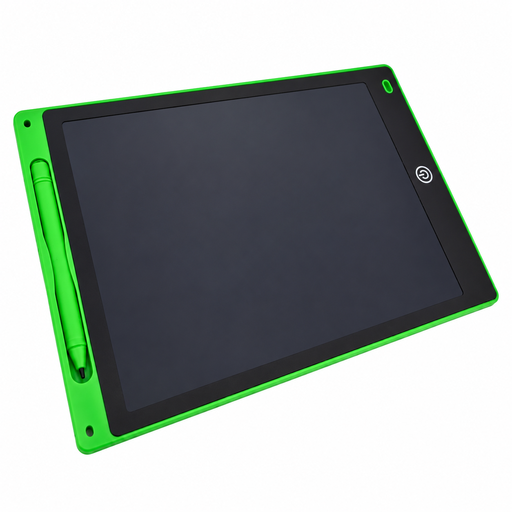
For hand-drawn concept sketches on an LCD drawing surface; not for permanent storage or software-based vector editing.
 No image available
For a simple, hand-drawn concept sketch if you don’t need permanent storage or software-based editing.
Drawing area: 230 × 165 mm. Device dimensions: 285 × 190 × 5 mm. According to the product description, a stylus is included.
The description doesn’t mention any apps or permanent storage. This means the device isn’t suitable for creating a saved logo file that you can continue editing with software.
The XPPen Artist 12 3rd needs a connected device. According to the manual, this can be a computer or a compatible Android phone or tablet. For a one-cable connection to a computer, its USB-C port must support DisplayPort video output. Alternatively, the manual describes using HDMI and USB-A.
No. Inkscape describes tracing a bitmap as a way to create paths for further editing, not as a way to produce a finished result automatically. Plan to edit the design afterwards using suitable vector software.
No. Apple lists Apple Pencil Pro and Apple Pencil (USB-C) as compatible with iPad mini (A17 Pro). Apple also specifies iPadOS 17.5 or later for Apple Pencil Pro. Check the exact model generation before buying.
For a consumer purchase, your statutory rights are against the seller; the Verbraucherzentrale distinguishes these from a voluntary manufacturer’s guarantee. According to the European Union, CE marking is required only for products covered by relevant harmonised legislation that requires it. It is not a general mark of quality or an official approval of an individual product.