Speakers recording long takes
If you want to record a monologue without interruption, make sure you plan for power, storage and starting the recording correctly for the full duration.


For long audition monologues, a lavalier microphone you wear is better suited to extensive movement, while a directional microphone positioned out of shot may work if you stay within a fixed performance area. A separate recorder is useful if you want to record an independent audio file and sync it with the video later. For any setup, check the power supply, storage, connections and a full test recording. Internal recording doesn’t replace choosing the right microphone distance or listening back to your take.
If you want to record a monologue without interruption, make sure you plan for power, storage and starting the recording correctly for the full duration.
If you move around while speaking, check whether the microphone moves with you or can still be positioned correctly at every mark.
If you’ll mostly stay within a limited area and don’t want a microphone visible on your costume, a microphone positioned out of shot may be an option.
| Key concern | What to check before buying | Who is it important to? |
|---|---|---|
| Long, uninterrupted take | Check storage, battery life and power supply separately; the stated recording time isn’t automatically the same as the battery life. | If I want to record a long monologue in one go, I need a setup that will run throughout the recording and has enough storage. Around 36% of consumers put an uninterrupted take at the top of their list. |
| Clear speech while moving | Check whether you can wear the microphone and connect the transmitter, receiver and recording device. | If I move around the performance area while speaking, I want the microphone to move with me. Around 29% of consumers who prioritise movement particularly value this. |
| Microphone out of shot | Check the performance area, distance and positioning; listen back to a test take from the furthest position too. | If I don’t want a microphone visible on my costume and can keep to a defined performance area, a fixed microphone positioned out of shot may work. This is the main concern for around 21% of consumers. |
| Connection to existing equipment | Check the plug, power requirements and any extra cables needed for the complete signal chain. | If I want to use my existing recording device without a complicated setup, the connection and power supply need to be compatible. Around 14% of consumers put a straightforward connection first. |
RØDE states that the Wireless PRO has over 40 hours of internal recording storage per transmitter. DJI gives the Mic 2 a six-hour operating time under test conditions with two connected transmitters and no internal backup recording. These figures refer to different functions.
Check storage, battery life and the recording function you need separately, and test the complete setup before recording your monologue.
Positioning a microphone to cover a fixed performance area doesn’t guarantee clear sound from every position or a quiet room.
Mark out your performance area and listen to a test take from the furthest position. If you’ll be moving around a lot, a microphone you wear may suit your performance better.
The RØDE VideoMic GO II needs additional cables for certain USB connections. The connected device must provide the required plug-in power for the Deity V-Mic D4 Mini.
Before choosing a model, check the socket, power supply, cables and recording device as one complete signal chain.
In its test of the Zoom H1essential, Bonedo noted noticeable handling noise and that no accessories were included. This observation relates to the model tested.
Place the recorder somewhere stable and secure, out of shot, and check a full test recording.
Worth considering if you’re comparing a directional microphone connected to your recording device with a wireless system that records internally on the transmitter.
The Mic 2 may suit you if you’re looking for a wireless microphone with a receiver that matches your chosen kit.
The H1essential is an option if you want to record a separate audio file rather than relying solely on a camera microphone.
The MV7+ may suit a fixed speaking position with a compatible USB-C or XLR setup.
The compact V-Mic D4 Mini is a directional option for devices with a compatible 3.5 mm microphone input.
The following Joybuy products include wireless options for recording while moving, as well as USB and XLR microphones for a fixed speaking position.
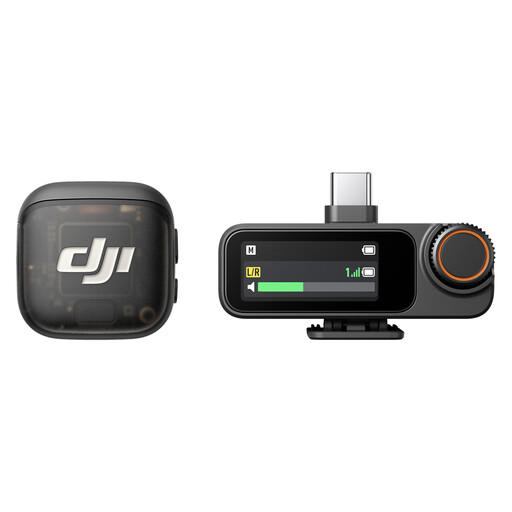 Image unavailable
This wireless kit may suit you if you move around during your monologue and can connect a compatible receiver to your recording device.
The product title states up to 28 hours of battery life and compatibility with iPhone, cameras and Android devices.
 Image unavailable
This USB desktop microphone is better suited to a fixed speaking position than a recording with lots of movement.
The product details list a 14 mm condenser capsule and an adjustable stand. The USB setup described requires a compatible connection on your recording device.
 Image unavailable
This microphone kit may suit you if you record at a fixed speaking position using USB or a compatible XLR audio chain.
The product title describes a dynamic voice microphone with USB/XLR and a boom arm. According to the product details, an XLR cable is not included.
 Image unavailable
This microphone with a boom arm is better suited to a fixed speaking position where you can control your distance from the microphone.
The product title lists USB/XLR. For a better input level, the product description recommends recording from a distance of 2 to 6 inches; according to the product details, an XLR cable is not included.
 Image unavailable
This wireless lavalier microphone may suit you if you move around while speaking and your recording device supports USB-C.
The product description states up to six hours of operation and that you can charge and record at the same time via the receiver. For the Android use described, USB-C and OTG must be enabled.
Record a test with both quiet and loud passages at every planned position, then listen back to the file. If possible, choose a quiet room. If you’re using a recorder, check that it has enough storage and power for the entire take.
No. 32-bit float is a recording feature on certain models, but it doesn’t prevent room noise or every kind of overload before recording. RØDE specifically warns that the internal preamp on the VideoMic GO II may overload when using USB.
Depending on your setup, check your cables, stand, memory card, batteries or rechargeable batteries and, if needed, a compatible XLR recording chain. RØDE lists additional cables for certain USB connections on the VideoMic GO II; Bonedo noted that accessories were missing from the Zoom H1essential they tested.
No. The Bundesnetzagentur sets out the permitted frequency bands and conditions for wireless microphones. Its general assignment from April 2026 replaces older assignments, so check the frequency used by your specific wireless system and the conditions that apply.
Under the GDPR, processing personal data requires an appropriate legal basis. Consent is one option, but not the only one. It isn’t possible to say in general which legal basis applies to a particular recording. Discuss the recording and sharing with the people involved, and follow the requirements of the casting organisation receiving it.