
Lieferung heute & morgen

Qualitätsgarantie

Willkommens-Angebote freischalten: KOSTENLOSE Lieferung | Bis zu 80 % RABATT | Kostenlose 30-Tage-JoyPlus-Testphase
App herunterladen
A low-profile gaming keyboard promises faster reactions and a streamlined desk setup. But the market is flooded with models whose marketing promises are often more style than substance. Many users invest in expensive keyboards only to find that the performance doesn't meet expectations or the build quality deteriorates after just a few months. This guide will help you identify the crucial features and avoid common purchasing pitfalls.
Before you make a decision, you should be aware of the typical pitfalls that often lead to disappointment.
To avoid these mistakes, focus on three objective criteria that determine your keyboard's performance and longevity.
For a low-profile mechanical keyboard, the switches are crucial. Low-profile switches have a shorter total travel distance and an earlier actuation point than traditional mechanical switches.
This difference allows for faster keystrokes and less finger fatigue during long gaming sessions. Models like the CHERRY MX-LP 2.1 use these specialized switches, offering a measurable advantage in fast-paced games.
Using a modern wireless mechanical keyboard requires the right technology. A tri-mode keyboard offers the greatest flexibility and is the most sensible choice for demanding users.
The layout determines the ergonomics and desk footprint. A 65% QWERTZ keyboard is a popular compromise: it removes the number pad and the F-key row but retains the essential arrow keys. This creates significantly more room for sweeping mouse movements, which is particularly advantageous in FPS games. Make sure the layout you need (e.g., German QWERTZ) is explicitly stated to avoid compatibility issues. Furthermore, a customizable RGB gaming keyboard allows for color-coding important keys and function layers.
Instead of making a one-size-fits-all recommendation, we have identified models that meet specific user needs and avoid the pitfalls mentioned.

Why This Fits Their Persona: This model is engineered purely for performance. The user needs minimal latency and the fastest possible reaction times for FPS or MOBA games. The compact 65% layout creates maximum space for the mouse, which is crucial in intense battles.
The keyboard uses a low-latency 2.4 GHz connection for gaming and genuine CHERRY MX Low Profile Speed Switches with a 1.0 mm actuation point, which rules out unreliable connections and inferior switches.
True tri-mode connectivity for maximum flexibility. German QWERTZ layout in a compact 65% format without impractical compromises on the arrow keys.

Why This Fits Their Persona: This user works across multiple devices (PC, laptop, tablet) and values a clean, aesthetic setup. The ability to seamlessly switch between up to five devices and the unique design with a detachable rhythm light bar are key features here.
It offers stable tri-mode connectivity (Bluetooth for 3 devices, 2.4 GHz, USB-C) and uses high-quality, hot-swappable switches. The TKL (80%) layout is a well-designed compromise between compactness and functionality.
Full hot-swap support for easy switch customization. The gasket-mount structure provides a dampened, pleasant typing sound. Note: US QWERTY layout.
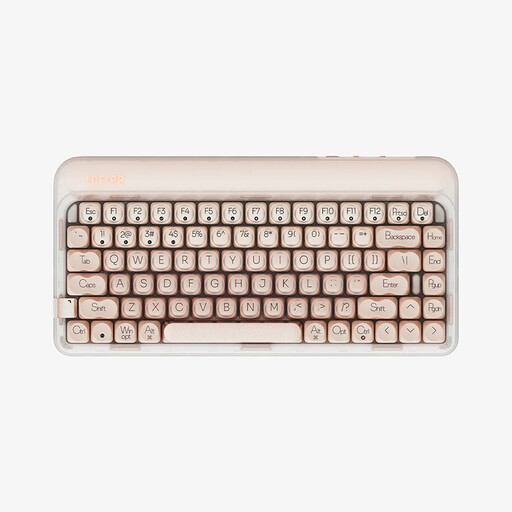
Why This Fits Their Persona: For this user, a soft, quiet typing feel and appealing aesthetics are paramount. The gasket-mount structure and multi-layer sound dampening offer superior writing comfort, while the compact 75% design is modern and space-saving.
Here too, a tri-mode connection ensures reliable performance. The factory-lubed linear Gateron switches and hot-swap capability guarantee a high level of quality and customisation that goes beyond simple marketing terms.
The gasket structure with PORON and IXPE dampening reduces vibrations and creates an exceptionally soft and quiet typing sound. The 75% layout retains the F-key row in a compact form. Note: US QWERTY layout.
We have compiled a complete, up-to-date list of products that fully meet these strict selection criteria and local regulations.
What is the advantage of low-profile switches for gaming? The main advantage is the shorter actuation distance. Keys don't need to be pressed as deeply to register a command. This allows for faster inputs and can reduce finger fatigue during long gaming sessions. For players of fast-paced titles, this can make a noticeable difference in reaction time.
How long does the battery of a wireless mechanical keyboard last? Battery life varies greatly depending on usage, battery capacity, and especially the use of RGB lighting. With the lighting turned off or dimmed, many models can last for several weeks. At full brightness, the battery life of an RGB gaming keyboard can drop to just a few days or even hours. Models with large batteries (e.g., 4000 mAh or more) offer more reserves here.
Is a 65% keyboard suitable for everyday use and typing? Yes, a 65% keyboard is also very suitable for everyday use, but it requires a short adjustment period. Functions like the F-keys (F1-F12), Del, or Home are accessible via a function key (Fn) in combination with other keys. Once you get used to these secondary functions, the compact format provides an ergonomic and efficient working environment.