
Lieferung heute & morgen

Qualitätsgarantie

Willkommens-Angebote freischalten: KOSTENLOSE Lieferung | Bis zu 80 % RABATT | Kostenlose 30-Tage-JoyPlus-Testphase
App herunterladen
A high-quality keyboard is a central tool for productive work in the office and at home. Many users are looking for a low-profile keyboard that not only looks modern but also offers a comfortable and quiet typing experience for long workdays. However, the selection can be overwhelming: Which key switch technology is the right one? Do you need a wired or a wireless keyboard?
This guide will help you understand the crucial features and make an informed decision. We will introduce a selection of models that stand out for their design, functionality, and reliability across various use cases.
Before you decide on a model, you should consider a few technical aspects that significantly impact the user experience.
The type of switch beneath the keycaps determines the typing feel, noise level, and durability.
The connection type is crucial for flexibility at your workspace.
A high-quality keyboard is distinguished by its build quality. Models with an integrated metal plate or an aluminum chassis are particularly rigid and sit firmly on the desk. This not only ensures greater durability but also provides a more solid and precise typing feel, as the keyboard won't flex under heavy keystrokes.
Here is a selection of low-profile keyboards that meet different demands for functionality and design.
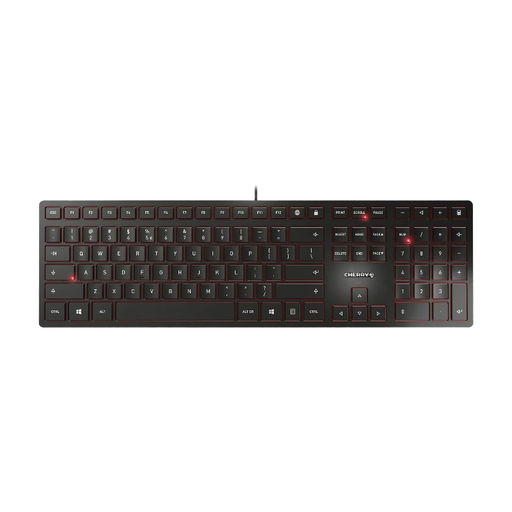
Why it stands out: The CHERRY KC 6000 SLIM is a classic office keyboard designed for reliability and durability. Its extremely slim build is complemented by a solid, integrated metal plate, giving it substantial weight and high stability.
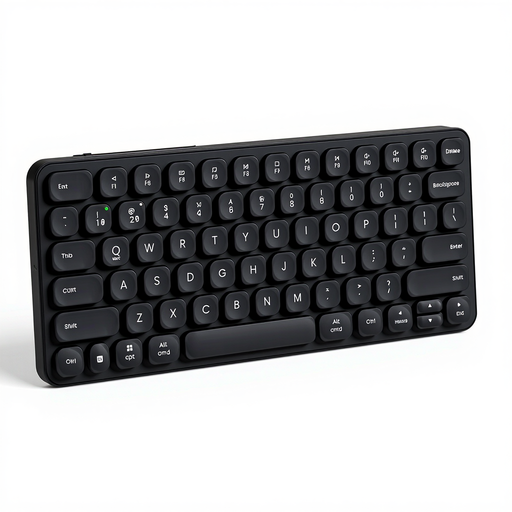
Why it stands out: The RAPOO E9050L is designed for maximum flexibility. As a multi-device keyboard, it can connect to up to four devices simultaneously, allowing for seamless switching between them. Its compact 75% layout also saves valuable desk space.
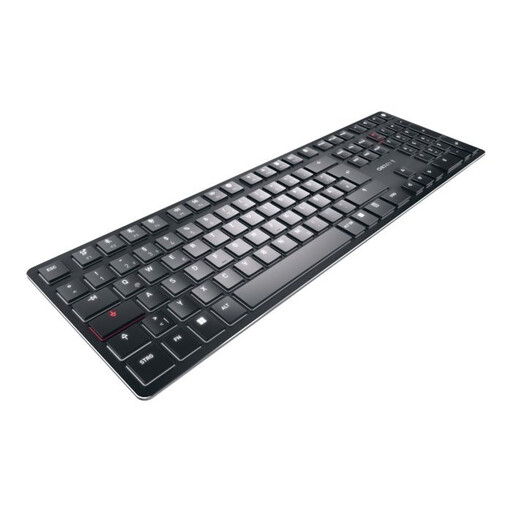
Why it stands out: The CHERRY KW X ULP is a standout on the market. It combines an extremely slim design with the precise, tactile feel of a true mechanical keyboard. This is made possible by the exclusive CHERRY MX Ultra Low Profile switches, which are developed and manufactured in Germany.
The models presented cover a broad spectrum, but the world of keyboards is diverse. If you have a different configuration or a specific design in mind, you may find the right model in our broader selection.
Discover more options in our Black USB Keyboards category.
Low-profile keyboards have shorter key travel. This can lead to potentially faster typing speeds and reduced finger fatigue during long typing sessions. Additionally, the flat design allows for a more ergonomic wrist posture, which may not require a separate wrist rest. Their minimalist design fits well with modern workspaces.
In many cases, yes. Models with scissor-switches or membrane technology are very quiet by design, making them a great choice for open-plan offices or quiet environments. While low-profile mechanical switches offer audible tactile feedback, they are generally more muted than their full-height counterparts.
Yes, technology has made significant strides in this area in recent years. Switches like the CHERRY MX Ultra Low Profile make it possible to achieve the precise and tactile feel of a mechanical keyboard in a very slim chassis. These models combine the durability and typing experience of mechanical switches with the elegant aesthetics of a low-profile keyboard.