
Lieferung heute & morgen

Qualitätsgarantie

Willkommens-Angebote freischalten: KOSTENLOSE Lieferung | Bis zu 80 % RABATT | Kostenlose 30-Tage-JoyPlus-Testphase
App herunterladen
A slow or unreliable internet connection can significantly disrupt daily life, whether for a home office, streaming, or simple online research. Especially in rural areas, holiday homes, or temporary locations like construction sites, a traditional DSL or fibre optic connection is often unavailable or impractical. An LTE router with a SIM slot offers a flexible and high-performance alternative. This device uses the mobile network to create a stable Wi-Fi network—entirely without the need for a landline connection.
This article serves as a guide. We will explain the most important criteria for selecting a suitable device and present a selection of models suited for various use cases.
The decision for a specific model depends on your individual requirements. The following points will help you understand the technical features and make an informed choice.
The speed of your internet connection largely depends on the supported LTE standard. Look for devices that support at least LTE Cat6 (also known as 4G+). This technology uses "Carrier Aggregation" (bundling multiple frequency bands) to enable theoretical download speeds of up to 300 Mbps. This is a crucial factor for demanding applications like 4K streaming, online gaming, or simultaneous use by multiple people. A basic 4G router with a SIM card in Category 4 often only reaches up to 150 Mbps.
Besides the mobile connection, the performance of the local Wi-Fi network is critical. A modern WiFi 6 LTE router (802.11ax standard) offers significant advantages over older standards like WiFi 5 (802.11ac). WiFi 6 is not only faster but, more importantly, more efficient at managing many simultaneously connected devices. This reduces latency and ensures a more stable connection, which is particularly noticeable in a smart home or when used by multiple people in a household.
A good router without a landline should be flexible. Gigabit LAN ports are important for connecting devices like a desktop PC, a gaming console, or network-attached storage (NAS) via cable to reliably use the maximum speed. Some models also offer a WAN port, which allows the router to be used as a conventional Wi-Fi router with an existing modem or to set up a backup connection (failover). For larger living spaces or multi-story homes, Mesh capability is a crucial feature for seamlessly extending the Wi-Fi signal.
Based on the criteria mentioned, we have compiled a selection of devices suitable for different needs.
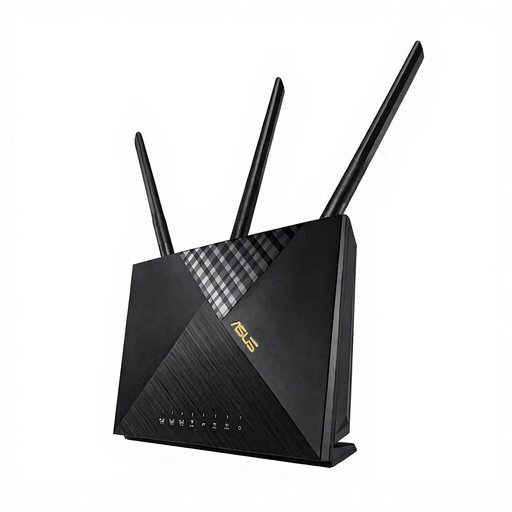
Why it stands out: The ASUS 4G-AX56 combines fast LTE Cat6 with modern WiFi 6. This combination makes it a powerful solution for demanding households and home offices where many devices require a stable and fast connection simultaneously.
Pros:
Who is it for? Users looking for a future-proof solution for their internet in rural areas or as a primary home connection. Ideal for power users, families, and home office workers who value high Wi-Fi performance and network security.
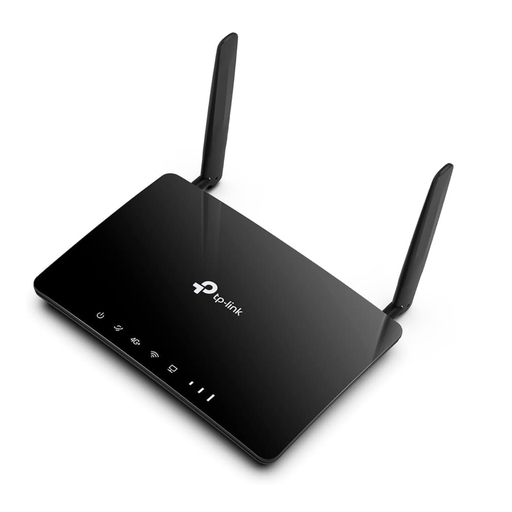
Why it stands out: The Archer MR550 is a reliable Wi-Fi router for a SIM card that focuses on core functionalities. It provides a solid internet speed with 4G+ Cat6 and can be flexibly expanded into a mesh network thanks to TP-Link OneMesh support.
Pros:
Who is it for? Users seeking a straightforward and cost-effective solution for a stable internet connection. Especially suitable for standard applications in apartments, holiday homes, or as a reliable mobile Wi-Fi router for home.
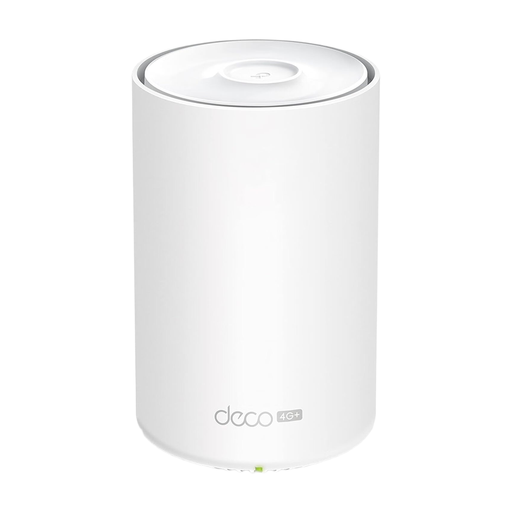
Why it stands out: The Deco X20-4G is more than just a router—it's the gateway to a modular mesh system. It combines the flexibility of a 4G connection with the superior coverage of a mesh network and modern WiFi 6.
Pros:
Who is it for? Users in larger homes or apartments with complex layouts who need consistent and stable Wi-Fi coverage without dead zones. An excellent choice for anyone seeking a scalable solution for their internet in rural areas or as a main connection.
The models presented cover common use cases. If you haven't found the right device for your specific needs, you may find a suitable alternative in our broader selection.
? Discover our full range of 4G Wi-Fi routers
Yes, you need a SIM card with a suitable data plan. Many mobile carriers offer special "data-only plans" that are optimised for use in routers and often include a higher data allowance than traditional smartphone plans. Before purchasing, check the provider's network coverage at your location.
Installation is typically straightforward. You insert the SIM card into the designated slot, connect the router to a power source, and turn it on. The basic configuration of the Wi-Fi name (SSID) and password is usually done through a web interface in a browser or the manufacturer's dedicated smartphone app. Many devices are "Plug and Play" and will automatically connect to the internet after the SIM card is inserted.
Yes, many models are designed for this purpose. An LTE router with a SIM slot that has a dedicated LAN/WAN port can be configured to automatically switch to the 4G mobile connection (failover) if the primary landline connection fails. This ensures uninterrupted internet availability, which is particularly beneficial for home offices or business applications.