
Lieferung heute & morgen

Qualitätsgarantie

Willkommens-Angebote freischalten: KOSTENLOSE Lieferung | Bis zu 80 % RABATT | Kostenlose 30-Tage-JoyPlus-Testphase
App herunterladen
An M.2 NVMe SSD can load operating systems, games and large files significantly faster than a traditional hard drive. However, not every offer with a high MB/s rating is automatically the right choice. The key factors are the slot, PCIe generation, cooling and the storage capacity you actually need.
This buying guide from the Joybuy Product Recommendation Officer explains what PC users, gamers, PlayStation 5 owners and content creators should look out for.
M.2 initially describes only the form factor. Depending on the model, an M.2 SSD may use SATA or PCIe/NVMe. Both variants look similar, but they offer different transfer rates and require compatible connections.
Before buying, check the motherboard, laptop or console manual for:
An M.2 SATA slot is not automatically compatible with a PCIe NVMe SSD.
Manufacturer figures such as 7,400 MB/s or 14,000 MB/s generally refer to sequential measurements taken under specific conditions. An older motherboard with PCIe 3.0 will limit a PCIe 4.0 SSD. A PCIe 5.0 SSD requires a suitable PCIe 5.0 slot to deliver its maximum performance.
The operating system, controller, temperature, fill level and file size also affect actual performance. For gaming and office applications, short access times and sufficient capacity are often more important than the highest quoted number.
An NVMe SSD can become warm during extended write operations or when editing large video files. A motherboard heatsink or an integrated heatsink can help keep the operating temperature within the recommended range.
With a laptop, however, you need to check whether the drive’s height and an additional heatsink will actually fit inside the chassis. The PS5 also has specific requirements regarding format, capacity and cooling. Check compatibility against the latest device information before placing your order.
PCIe 3.0, PCIe 4.0 and PCIe 5.0 mainly differ in their maximum data throughput. A PCIe 4.0 SSD such as the Samsung 990 PRO or Lexar NM790 is a well-balanced choice for many current PCs. A PCIe 5.0 SSD such as the Lexar ARES PRO or Lexar NM990 is aimed more at systems with a corresponding slot and applications involving high data transfers.
Backward compatibility is possible, but the SSD will then operate at the speed of the slower platform.
A 1TB NVMe SSD is suitable as a system drive for applications and a manageable game library. For 4K video footage, extensive project files or a large number of installed games, a 2TB NVMe SSD may be more practical. You should also keep at least around 10 to 20 per cent of the storage free, so the drive has enough working space for management processes.
The specified TBW rating is another important factor when choosing a drive. TBW stands for “Terabytes Written” and describes the amount of data the manufacturer specifies can be written. This figure is not an exact expiry point, but rather a technical guideline.
Check whether a heatsink is included or needs to be purchased separately. Some models offer management software for firmware updates, health monitoring and temperature tracking. Examples include Samsung Magician and KIOXIA or Lexar software.
You should also check the warranty information directly on the product page. A warranty is no substitute for backing up your data: important files should also be stored on a separate drive or in a suitable backup system.
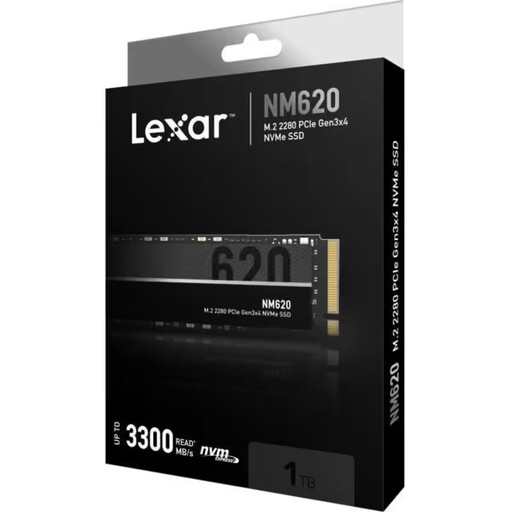
Why this product suits this profile: This 1TB PCIe 3.0 x4 SSD is designed for users looking to upgrade a compatible PC or laptop from SATA or an older hard drive to NVMe.
The clearly stated PCIe 3.0 interface makes the platform requirement clear and prevents you from unnecessarily buying a PCIe 5.0 SSD for an older system.
M.2 2280, read speeds of up to 3,300 MB/s, write speeds of up to 3,000 MB/s and a stated 500 TBW.

Why this product suits this profile: This PCIe 4.0 SSD with an integrated heatsink is designed for high-performance PCs, console gaming and larger video projects.
The integrated heatsink reduces reliance on finding a separately compatible motherboard heatsink. The PCIe 4.0 specification also helps set realistic expectations rather than implying PCIe 5.0 speeds.
According to the product specifications, read speeds of up to 7,450 MB/s and write speeds of up to 6,900 MB/s; 2TB storage capacity and M.2 2280.
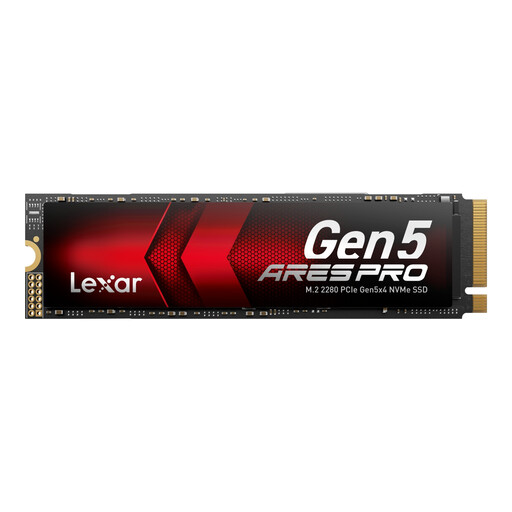
Why this product suits this profile: This PCIe 5.0 SSD is designed for compatible desktop systems and applications involving high sequential data rates, such as large media projects.
The clear Gen5 specification highlights the required PCIe 5.0 slot and increased cooling requirements. This lets you check the platform carefully before buying.
According to the product specifications, read speeds of up to 14,000 MB/s, write speeds of up to 7,500 MB/s, 750 TBW and a five-year limited warranty.
Before installation, shut down the device completely and disconnect it from the mains. With a laptop, disconnect the battery if the design allows it. The SSD is usually inserted at an angle of around 30 degrees and then secured with the designated screw or mounting mechanism.
After startup, a new internal SSD can be initialised and formatted in Disk Management. A backup is required before using it as a system drive. An SSD for gaming, an SSD for video editing or an SSD for a laptop or PC should be checked regularly for firmware updates and temperature levels. Defragmentation is not required for NVMe SSDs; TRIM handles the appropriate storage management.
We have put together a complete, regularly updated list of products that fully meet these strict selection criteria and the safety regulations applicable in the EU.
No. In addition to the M.2 2280 format, the interface, capacity, dimensions and cooling must meet the console’s requirements. A PS5-compatible SSD should be installed with a suitable heatsink unless one is already integrated. The specifications provided by the individual SSD manufacturer and the console are decisive.
Lifespan depends on factors including the amount of data written, temperature, usage and the model. The stated TBW rating serves as a technical guideline. Regular backups remain essential for important data, as electronic storage can fail without warning.
Power consumption varies depending on the controller, PCIe generation, load level and cooling. PCIe 5.0 models can generate more heat under heavy loads. With a laptop, you should therefore consider the manufacturer’s information on power consumption and energy efficiency as well as speed.