
Lieferung heute & morgen

Qualitätsgarantie

Willkommens-Angebote freischalten: KOSTENLOSE Lieferung | Bis zu 80 % RABATT | Kostenlose 30-Tage-JoyPlus-Testphase
App herunterladen
A wireless gaming mouse needs to be more than just lightweight. For fast FPS movements, its shape, connection, sensor tuning and practical charging system matter too. The CHERRY XTRFY M64 Wireless Gaming Mouse combines a weight of 53 g with a Pixart 3395 sensor, 2.4 GHz wireless connectivity and an ergonomic right-handed design.
Before you buy, though, it’s worth taking a closer look at the specifications. A high DPI figure alone says little about how well a mouse will perform day to day. Battery life can also be affected by the actual polling rate, lighting and how you use it.
A 26,000 DPI mouse offers a wide range of sensitivity settings. That doesn’t automatically mean high settings are useful for gaming, though. Many FPS players use much lower sensitivity and need, above all, consistent tracking and a shape they can control.
That’s why it’s important to look at the sensor as part of the overall package. Relevant specifications for the CHERRY XTRFY M64 Wireless include its Pixart 3395 sensor, adjustable polling rates of up to 1,000 Hz and on-the-fly sensitivity adjustments.
Bluetooth is handy for office use and connecting to multiple devices. For competitive gaming, however, a dedicated 2.4 GHz wireless mouse with a USB receiver is generally preferred. Position the receiver as close to the mouse as possible, with a clear line of sight. Metal surfaces, other wireless devices or a poorly placed USB port can affect the connection.
The CHERRY XTRFY M64 Wireless uses a USB dongle for its 2.4 GHz connection. This is a different type of connection from Bluetooth and is designed for use with a single gaming PC.
An ultralight 53 g gaming mouse can make quick changes of direction easier. But that doesn’t mean it will suit every hand size or grip style. Length, width, height, side buttons and finger placement all matter.
According to the product specifications, the M64 Wireless measures 120 × 65 × 39.5 mm. It’s designed for right-handed users and has a low front section. If you’re looking for a symmetrical mouse that suits different hand positions, compare it with models such as the M68 Wireless.
Weight is a useful point of comparison for FPS and esports players. At 53 g, this mouse falls into the lightweight gaming category. A lighter mouse can make large movements across the mouse pad easier, but it won’t make up for a shape that doesn’t suit you.
Look for:
The M64 Wireless has five buttons, an ergonomic right-handed shape and a USB-C port on the side.
The Pixart 3395 is a widely used sensor platform in gaming mice. For a buying decision, the settings actually available are more useful than a single maximum figure. According to the product specifications, the CHERRY XTRFY M64 Wireless supports 125, 250, 500 and 1,000 Hz.
The polling rate tells you how often the mouse reports its position to the computer. At 1,000 Hz, that’s theoretically once every millisecond. What you actually notice will also depend on the game, operating system, monitor and your individual settings.
Also check whether you can make adjustments without extra software. With this model, you can configure CPI, polling rate and debounce time directly using the switches and button on the mouse.
‘Up to’ figures are maximums measured under specific conditions. Using the mouse at 1,000 Hz, frequent charging and other settings can affect battery life. The M64 Wireless is rated for up to 90 hours of battery life.
Other details that matter for everyday use include:
According to the product information, you should charge the mouse using a computer’s USB port. High-powered chargers may damage the internal electronics. The battery is not specified as user-replaceable.
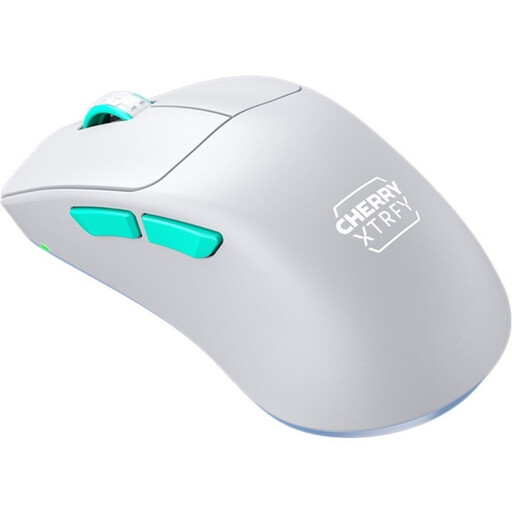
Why this product suits this profile: Its straightforward feature set, including 2.4 GHz wireless connectivity, a Pixart 3395 sensor and a weight of 53 g, makes it a good choice if you want to get started without relying on extensive software.
The specifications cover more than just 26,000 DPI, including the sensor, wireless standard, weight and adjustable polling rate.
53 g, 2.4 GHz USB receiver, Pixart 3395 and up to 75 hours of battery life, according to the product specifications.
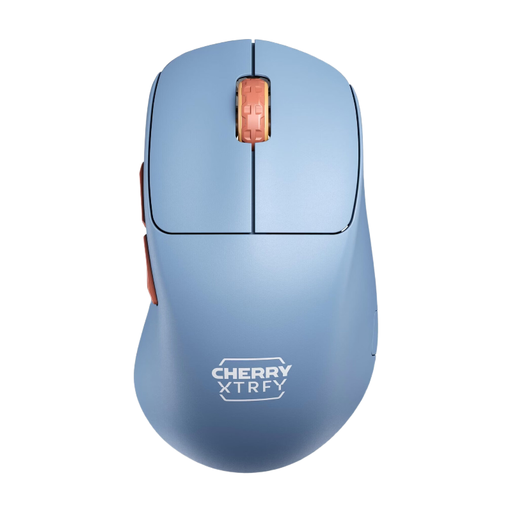
Why this product suits this profile: This version combines a low weight with USB-C, direct configuration and a stated battery life of up to 90 hours at 1,000 Hz.
The long battery life is given with specific conditions, and you can continue using the mouse in wired mode while it charges.
53 g, Pixart 3395, up to 26,000 DPI, 1,000 Hz and a USB-C port, according to the product specifications.
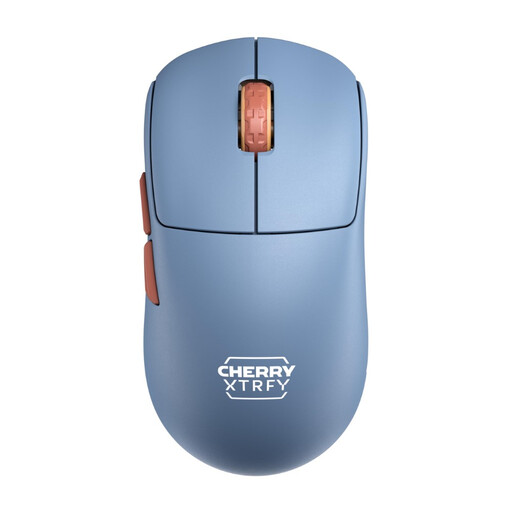
Why this product suits this profile: Its symmetrical design is suited to players who prefer a more flexible grip or don’t need a pronounced right-handed shape.
Its symmetrical shape means you’re not limited to a right-handed ergonomic design if you prefer a different grip.
53 g, 2.4 GHz wireless connectivity, a Pixart 3395 sensor and polling rates of up to 1,000 Hz, according to the product description.
We’ve put together a complete, regularly updated list of products that meet these strict selection criteria and fully comply with the safety regulations in force in the EU.
Plug the USB receiver into an available port on your computer and set the switch on the underside to the active mode. You don’t need a driver to adjust CPI, polling rate or debounce time. Make these adjustments directly on the mouse.
The product information gives the blue version a battery life of up to 90 hours at 1,000 Hz. This figure depends on use and settings. If the battery runs low, you can continue using the mouse with the supplied USB-C cable.
The CHERRY XTRFY M64 Wireless has an ergonomic shape designed for right-handed users. Left-handed users, or anyone looking for a symmetrical shape, should consider the CHERRY XTRFY M68 Wireless as an alternative design.