
Lieferung heute & morgen

Qualitätsgarantie

Willkommens-Angebote freischalten: KOSTENLOSE Lieferung | Bis zu 80 % RABATT | Kostenlose 30-Tage-JoyPlus-Testphase
App herunterladen
Buying a new desktop computer can be a challenge. Especially with compact powerhouses like the Apple Mac mini M4, there are several pitfalls that can quickly turn a good initial investment into an inadequate solution. Many users focus on the processor but overlook crucial details that lead to bottlenecks in their daily workflow. This guide will help you bypass these mistakes and make an informed decision.
Before you buy a compact desktop PC, you should be aware of two common problems that often only become apparent after the purchase.
To avoid the traps mentioned above, you should focus on three core parameters. These determine the actual performance and future-proofing of your system.
The Apple M4 chip is the heart of the new Mac mini. It combines the CPU (Central Processing Unit), GPU (Graphics Processing Unit), and the Neural Engine on a single chip.
A high-performance mini PC needs a solid foundation of RAM and storage.
The ports define how versatile your Apple desktop computer can be. The Mac mini M4 offers a modern selection designed for most professional use cases. Look for the presence of at least two Thunderbolt 4 ports. These allow you to connect up to two high-resolution displays, fast external storage, and docking stations via a single cable. Additional USB-C and an HDMI port complete the package, ensuring compatibility with a wide range of peripherals.
Choosing the right computer heavily depends on your individual requirements. Here are some configurations tailored to specific user groups.
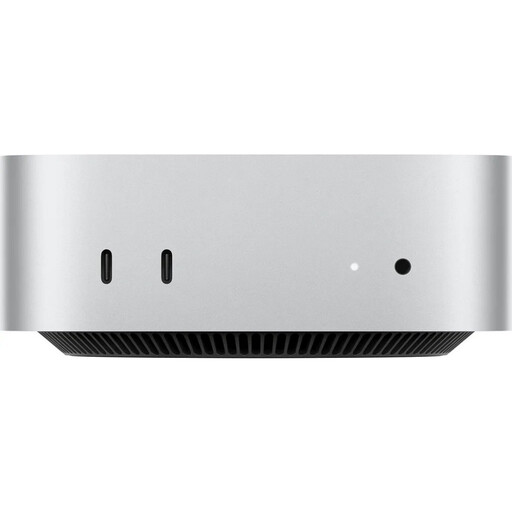
Why This Fits Their Persona: This configuration is designed for demanding creative workflows. The combination of the M4 chip, 16GB of RAM, and a 1TB SSD provides the necessary power for 4K video editing, complex graphic projects, and software development without compromise.
With 16GB of RAM, it bypasses the under-specced RAM trap. The three Thunderbolt 4 and two USB-C ports provide future-proof connectivity and prevent adapter chaos.
High energy efficiency and quiet operation even under load. Seamless integration into the Apple ecosystem with iPhone and iPad.

Why This Fits Their Persona: Ideal for users seeking a capable and compact PC for the home office, studying, or everyday tasks without a large budget. The Ryzen 5 processor offers ample performance for office applications, web browsing, and media playback.
This model comes equipped with 16GB of RAM, which is uncommon in this price range and avoids the RAM bottleneck from the start. The variety of ports is sufficient for a typical home office setup.
Excellent value for money. The ability to drive up to three 4K displays makes it a flexible workstation.

Why This Fits Their Persona: For users who need maximum processing power for specialised tasks like running local AI models, virtualisation, or even compact gaming. The Ryzen AI processor and 24GB of DDR5 RAM offer enormous performance reserves.
This model is designed for peak performance in every aspect, bypassing bottlenecks with generous and fast RAM, a PCIe 4.0 SSD, and specialised ports like dual 2.5G Ethernet and USB4.
Integrated NPU (Neural Processing Unit) for AI acceleration. Support for up to four displays and extremely fast network connectivity.
We have compiled a complete, real-time list of products that fully satisfy these strict selection criteria and UK safety regulations.
Yes, the Mac mini is sold without a monitor, keyboard, or mouse. However, you can use any standard off-the-shelf accessories. Monitors can be connected via HDMI or Thunderbolt 4 (USB-C). Keyboards and mice work via USB or Bluetooth. So, you are not limited to Apple accessories.
Yes, the configuration with the Apple M4 chip and 16GB of RAM is very well-suited for editing 4K video footage. The chip includes a dedicated Media Engine that provides hardware acceleration for encoding and decoding video formats like H.264, HEVC, and ProRes. This ensures smooth playback and fast export times in programs like Final Cut Pro, DaVinci Resolve, or Adobe Premiere Pro.
The Mac mini is known for its very quiet operation. The cooling system is designed to maintain low noise levels even during demanding tasks like rendering video or compiling code. In many everyday scenarios, the fan is inaudible, making the Mac mini an excellent choice for a quiet work environment.