Which workstation is right for your team?

Teams creating straightforward teaching videos

If you mainly edit short, relatively simple lessons, focus on compatible software, enough space for projects and a clear handover process. Peak performance you rarely use doesn’t have to be your top priority.

Teams working on demanding 4K projects

For higher-resolution footage, multiple tracks or complex edits, check that the specific CPU, GPU and RAM configuration suits your editing software and media format. Proxies can help with your workflow, but they don’t replace a planned media storage system.

People responsible for the shared editing workstation

If you look after the workstation, you should organise project access, file handovers and backup recovery. If your footage contains personal data, make sure you also plan appropriate safeguards.

What should your team look for when buying?

Buying priority What to check Who is it most important to?
Editing and export performance Check that your editing software and version, source footage and number of tracks suit the specific CPU, GPU and RAM configuration. For Premiere on Windows, Adobe recommends 32 GB of RAM or more for 4K and higher resolutions. If we edit 4K footage or use multiple tracks, I want to choose specifications that suit the software we actually use. Around 27 % of consumers put editing and export performance first.
Shared use and security Plan accounts, permissions and shared project folders around the way your team works. If you handle footage containing personal data, also consider how to prevent unauthorised access. For a shared computer, I want to manage access and file handovers so that only the right people can access the footage. Around 20 % of consumers prioritise shared use and security.
Media storage and backups Work out your project sizes and how much space you need for originals, working copies and, where relevant, proxies. The BSI distinguishes data mirroring from an independent backup. When projects move between team members, I need enough space for media and a recovery plan. Around 20 % of consumers prioritise storage and backups.
Space and upgrades Check the form factor, available connections and the RAM, SSD and GPU options actually included in the configuration you order. Specifications and upgrade options vary by model. If space is limited or we’re planning upgrades, I want to check the form factor and the specifications included with the order. Around 13 % of consumers prioritise space or future upgrades.
What’s included and support Check whether a monitor and input devices are included, and confirm the support terms and software requirements for the configuration you’re ordering. I want to know in advance what’s included in a complete workstation and which software and support terms apply. Around 20 % of consumers prioritise what’s included and support.

Avoid common buying mistakes

  • Comparing only the workstation family name

    Configurable model families can include different specifications. Details for one version don’t automatically apply to another.

    Check the full product number and compare the CPU, GPU, RAM and drive specifications you’re ordering with the requirements of your editing software.

  • Using the internal SSD as your project archive and only backup

    Project files, working copies and proxies all need storage space. The BSI points out that data mirroring is no substitute for an independent backup.

    Plan your media storage, separate backups and a recovery process.

    Allow for additional storage, as well as the setup and maintenance of a recovery process.

  • Choosing a compact PC or tower based on form factor alone

    The case design doesn’t tell you whether the internal storage capacity, connections and included items will suit your workstation. For the Lenovo version reviewed, the monitor, keyboard and mouse were optional.

    Check the available space, displays you already have, the drives you need and what’s included with the specific configuration.

    Depending on what’s included, you may need additional peripherals or external media drives for your planned workstation.

Brands to consider

Apple

The Mac mini is a compact macOS option, provided your editing software and team storage work with it.

  • For the Mac mini range reviewed, Apple lists hardware support for H.264, HEVC and ProRes.
  • Apple lists entry-level configurations with 16 GB of unified memory and, in some cases, a 256 GB SSD. Codec support doesn’t guarantee any particular editing speed.

HP

The Z2 Tower family is worth considering if your team wants to put together a specific Windows configuration.

  • HP describes upgrade options; for model A40MQET#ABD, it lists 64 GB of RAM, a 2 TB SSD and an RTX 4000 Ada with 20 GB.
  • These specifications apply to the model listed, not automatically to other Z2 models. Manufacturer specifications aren’t the same as an independent editing test.

Lenovo

The ThinkStation P3 Tower Gen 2 is another configurable Windows tower option.

  • For model 30HT00CXEZ, Lenovo lists 64 GB of RAM, a 1 TB SSD, an RTX PRO 2000 Blackwell with 16 GB and on-site service.
  • The specifications and service terms for this model don’t apply to other product numbers. The monitor, keyboard and mouse may be sold separately.

Dell

The Precision 5860 Tower may suit teams that want to assess tower configurations and service options individually.

  • Dell lists a range of processor and storage options, as well as separately selectable service options.
  • Dell says that selecting options can change specifications and delivery dates. Maximum figures for a product family don’t necessarily describe the model you order.

Joybuy products for a shared editing workstation

This selection includes Windows towers and mini PCs for teams setting up a shared editing workstation. Before deciding, check software compatibility, source footage and how you plan to manage shared files.

HP Z2 SFF G1i A40M2ET#ABD desktop PC

HP Z2 SFF G1i A40M2ET#ABD, Core Ultra 7 265K

For teams considering a compact Windows workstation and a specific tower configuration.

32 GB DDR5, 1 TB M.2 SSD, RTX A400 with 4 GB and Windows 11 Pro.

Joybuy

HP Z2 Tower G1i A40MMET desktop PC

HP Z2 Tower G1i A40MMET, Core Ultra 7 265

For teams including a Windows tower rather than a mini PC in their plans.

32 GB DDR5 and Intel Graphics; check the full specifications of the model you order.

Joybuy

HP Z1 Tower G1i A40T1ET#ABD workstation

HP Z1 Tower G1i A40T1ET#ABD, Core Ultra 9 285

For teams comparing tower configurations with specified memory and storage.

64 GB DDR5, 1 TB M.2 SSD and Intel Graphics.

Joybuy

Firebat F1 P mini PC

Firebat F1 P mini PC, AMD Ryzen 7 H 255

For teams considering a mini PC as a space-saving Windows option.

16 GB RAM, 512 GB SSD, Windows 11 Pro, Wi-Fi 6 and USB4.0.

Joybuy
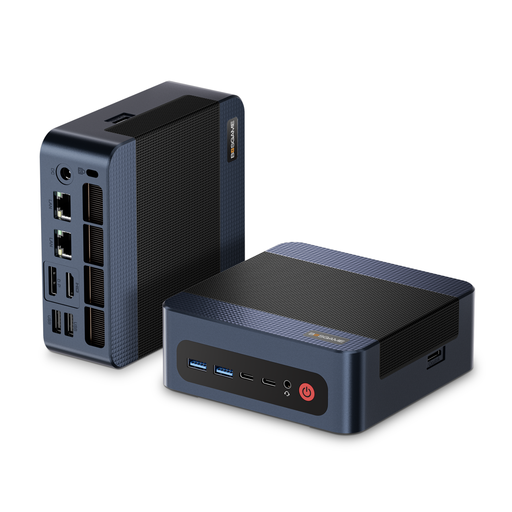
BOSGAME M4 Plus mini PC

BOSGAME M4 Plus mini PC, AMD Ryzen 9 7940HS

For teams comparing a Windows mini PC with specified RAM and SSD capacity.

32 GB DDR5, 1 TB PCIe 4.0 SSD and Windows 11 Pro.

Joybuy

Frequently asked questions

Do I always need 32 GB of RAM for teaching videos in Premiere?

No. In its documented Premiere requirements, Adobe recommends 32 GB of RAM or more for 4K and higher resolutions on Windows. This isn’t a general minimum requirement for every teaching video. Check the version of the software you use, the resolution and the specific hardware configuration.

Can proxies make editing easier on a less powerful computer?

Proxies are smaller working copies of high-resolution media and can help with editing demanding footage. Adobe describes this workflow for Premiere, but your original files, proxies and the links between them still need a planned storage system.

Is a mirrored drive enough to back up projects?

No. Data mirroring isn’t a substitute for a separate backup. In its 2023 backup guidance, the German Federal Office for Information Security distinguishes RAID mirroring from backups, because mirrored data can be changed at the same time. Make sure you also plan how to restore projects.

What should our team check about what’s included and support before ordering?

Check the monitor and input devices, any media drives you need, software terms and the support available for the specific configuration. On the tower page reviewed, Lenovo lists the monitor, keyboard and mouse as optional. Check the package contents to confirm whether this also applies to the model you want.

Can footage of identifiable people simply be stored on a shared PC and published?

Buying a PC doesn’t give you blanket permission to do this. If you process personal data, you’ll need to consider the appropriate legal basis, any information requirements and safeguards against unauthorised access, depending on the content and how it’s used. The German Federal Commissioner for Data Protection and Freedom of Information explains information requirements for processing personal data. Whether consent or another legal basis is needed for a specific recording or publication depends on the circumstances.