
Lieferung heute & morgen

Qualitätsgarantie

Willkommens-Angebote freischalten: KOSTENLOSE Lieferung | Bis zu 80 % RABATT | Kostenlose 30-Tage-JoyPlus-Testphase
App herunterladen
Choosing the right 13-inch MacBook in 2026 comes down to a careful analysis of technical specifications and your specific workflow. The latest models, particularly the MacBook Air with the M5 chip and the new MacBook Neo with the A18 Pro chip, feature key performance differences relevant to distinct user profiles. This guide details the key technical specifications to empower you to make a well-informed decision.
The decision for a specific Apple notebook should be based on an objective evaluation of its hardware components. The following aspects are crucial for your selection.
The central processing unit (CPU) and graphics processing unit (GPU) define the laptop's performance capabilities.
Both chips feature a 16-core Neural Engine, which is optimised for artificial intelligence tasks like those powered by Apple Intelligence.
The amount of unified memory and internal storage affects the system's speed and capacity.
The display and available ports are highly relevant for daily use.
Based on the technical specifications, we present three configurations that cater to different user profiles.
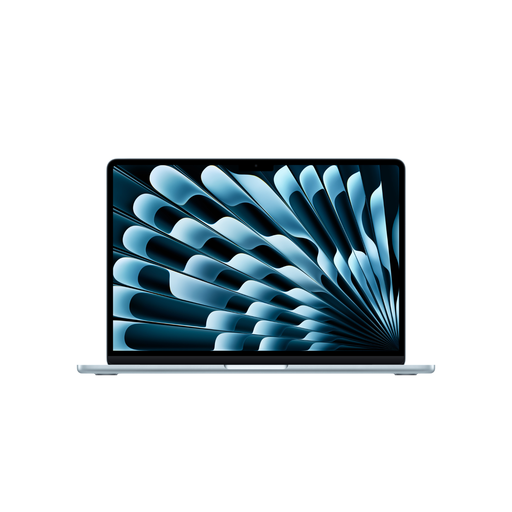
Model Focus: This model is aimed at users who need high performance for demanding tasks in a portable form factor. The M5 chip, combined with 16 GB of RAM and a 512 GB SSD, forms a solid foundation for creative and professional workflows. The long battery life of up to 18 hours (according to Apple) supports working on the go.
Technical Specifications at a Glance:
User Profiles: This Apple notebook is suitable for mobile professionals, creatives, and power users who regularly work with multiple programs, edit photos or videos, or seek a future-proof configuration with significant performance headroom.
View Product: Apple 13-inch MacBook Air (M5)

Model Focus: This MacBook Neo configuration represents a cost-effective option for everyday tasks. The A18 Pro chip provides sufficient performance for office applications, web browsing, streaming, and light photo editing. With 8 GB of RAM and a 256 GB SSD, it is a suitable entry-level configuration. This model forgoes Touch ID, using a lock key instead.
Technical Specifications at a Glance:
User Profiles: Ideal as a MacBook for students and home users whose main requirements are completing assignments, web research, and media consumption. Its attractive 13-inch MacBook price makes it a great choice for budget-conscious buyers.
View Product: Apple 13-inch MacBook Neo (256 GB)

Model Focus: This variant of the MacBook Neo combines the efficiency of the A18 Pro chip with more storage and the convenience of Touch ID. The 512 GB SSD offers ample capacity for users who want to store more data locally. Touch ID enables fast, secure unlocking of the device and authorisation of purchases.
Technical Specifications at a Glance:
User Profiles: Suitable for users who find the MacBook Neo's performance sufficient but value more storage space and biometric authentication. It is a good middle-ground solution between the base Neo and the more powerful Air.
View Product: Apple 13-inch MacBook Neo (512 GB, Touch ID)
| Feature | MacBook Air (M5) | MacBook Neo (A18 Pro) | MacBook Neo (A18 Pro, Touch ID) | | :--- | :--- | :--- | :--- | | Chip | Apple M5 | Apple A18 Pro | Apple A18 Pro | | CPU / GPU | 10-Core / 8-Core | 6-Core / 5-Core | 6-Core / 5-Core | | RAM | 16 GB | 8 GB | 8 GB | | SSD | 512 GB | 256 GB | 512 GB | | Display Resolution | 2560 x 1664 | 2408 x 1506 | 2408 x 1506 | | Battery Life | Up to 18 hrs | Up to 16 hrs | Up to 16 hrs | | Ports | 2x Thunderbolt 4 | 1x USB 3, 1x USB 2 | 1x USB 3, 1x USB 2 | | Wi-Fi | Wi-Fi 7 | Wi-Fi 6E | Wi-Fi 6E | | Weight | 1.23 kg | 1.23 kg | 1.23 kg | | Authentication | Touch ID | Lock Key | Touch ID |
If the configurations presented here don't perfectly match your needs, or if you're looking for other models, the market offers additional options. You can find a wider selection of Apple laptops and other notebooks in our Laptops UK category.
1. What is the main difference between the MacBook Air M5 and the MacBook Neo? The primary difference lies in the integrated chip and its associated performance. The MacBook Air with the M5 chip is designed for higher performance in demanding tasks and features faster ports (Thunderbolt 4) and Wi-Fi 7. The MacBook Neo with the A18 Pro chip is optimised for efficiency in everyday tasks and serves as a more cost-effective alternative.
2. Is 8 GB of RAM enough for a MacBook in 2026? For many use cases such as word processing, web browsing with numerous tabs, email, and media consumption, 8 GB of unified memory is sufficient when paired with Apple's efficient chips. Users who regularly use professional photo or video editing software or engage in intensive multitasking should consider a 16 GB configuration to have performance headroom.
3. What is Apple Intelligence and do I need it? Apple Intelligence is a personal intelligence system integrated into macOS. It assists users with tasks like writing and refining text, organising information, and automating workflows directly on the device. Since both the M5 and A18 Pro chips have a powerful Neural Engine, all models presented here are ready to leverage Apple Intelligence. Its practical benefit will depend on your individual work habits.