
Lieferung heute & morgen

Qualitätsgarantie

Willkommens-Angebote freischalten: KOSTENLOSE Lieferung | Bis zu 80 % RABATT | Kostenlose 30-Tage-JoyPlus-Testphase
App herunterladen
The launch of the 2026 Apple MacBook Air with the M5 chip has generated significant interest among users seeking a lightweight, portable notebook. However, new features like Apple Intelligence and a wide array of configurations also create new uncertainties. Before making a purchase, it's crucial to recognise common marketing traps and understand the technical specs that truly matter. This guide will help you make an informed decision and find a device that meets your needs.
When choosing a new laptop, it's easy to be swayed by marketing hype. Here are two common mistakes that can lead to an unsuitable choice:
To find the right configuration, you should focus on the technical features that have the greatest impact on your user experience.
The new MacBook with M5 Chip represents an evolution of the Apple Silicon architecture. It combines a powerful CPU and GPU with an enhanced Neural Engine. This hardware is the foundation for Apple Intelligence, a system that runs AI-powered features directly on the device. This enables tasks like summarising text, creating images, or organising appointments in a way that is designed for efficiency and privacy. The chip's high energy efficiency also ensures long battery life, making the MacBook Air an ideal ultra-portable notebook.
The unified memory (RAM) is shared across all components of the M5 chip. While the base model with 8 GB is adequate for simple tasks, the MacBook Air M5 16GB configuration is a future-proof investment. Especially for students and creatives who frequently use multiple applications simultaneously or work with large files, 16 GB provides the necessary overhead for a smooth, lag-free workflow. A larger memory configuration is also beneficial for leveraging the new AI features.
A major upgrade for the 2026 Apple MacBook Air is native support for up to two external displays while the laptop's screen is open. This feature, previously exclusive to the Pro models, significantly boosts productivity. You can expand your workspace, which is especially beneficial for research and writing papers in a home office or academic setting.
Choosing the right notebook depends heavily on your individual needs and budget. Here are three recommendations for different types of users.
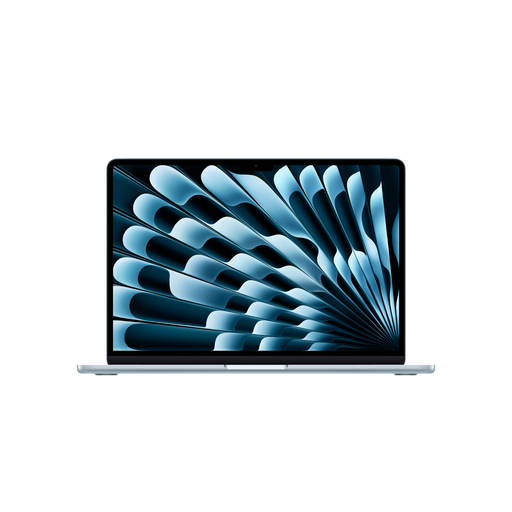
Why this model is a good fit: This model offers a balanced combination of performance, mobility, and future-proofing. Its light weight and long battery life are ideal for daily use at university or on business trips. The 16 GB of RAM and dual-display support make it a versatile work machine.
It provides enough power for demanding everyday tasks without the premium price of a Pro model. The 16 GB of RAM prevents the performance bottleneck that threatens 8 GB models in the future.
The combination of M5 performance, a fanless design, long battery life, and the new ability to connect two external monitors.
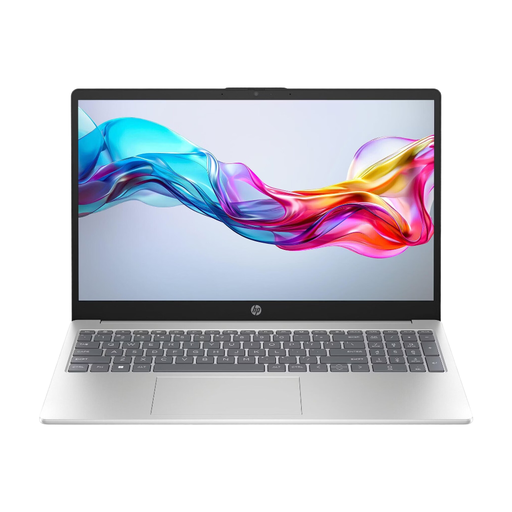
Why this model is a good fit: For users whose main needs are web browsing, email, and Office applications, and who are not tied to the Apple ecosystem. It offers a large display and solid performance for everyday tasks at a significantly lower price.
This notebook avoids the trap of over-investing by delivering functional and reliable performance for standard applications, without the cost of premium features or a specific brand logo.
Excellent value for money for users with basic requirements. The device comes with Windows 11 pre-installed.
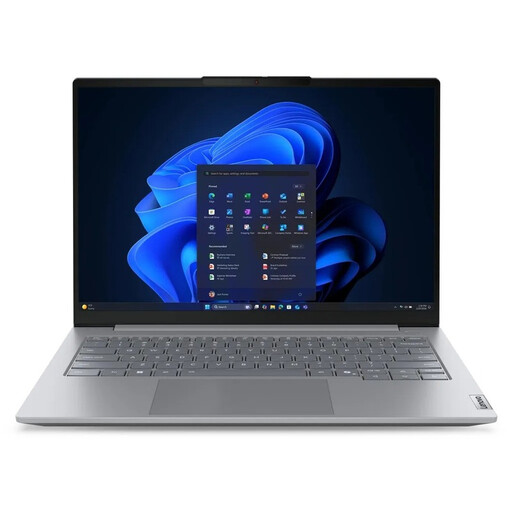
Why this model is a good fit: For users who regularly work with very demanding programs, large datasets, or virtual machines. The generous configuration with 32 GB of RAM, a fast 1 TB SSD, and a 16-inch display makes it a powerful workstation.
It specifically addresses the need for high performance and bypasses the "Pro" trap by offering a productivity-focused configuration that, in some aspects, even surpasses more expensive premium notebooks.
Ample 32 GB of RAM and a large 1 TB SSD, ideal for intensive multitasking and professional applications like video editing or software development.
We have compiled a complete, real-time updated list of products that fully meet these strict selection criteria and all relevant safety standards.
1. Is the 13-inch MacBook Air M5 a good choice for students? Yes, the MacBook Air M5 is an excellent laptop for students. It's lightweight, has a long battery life for lectures and study sessions, and the M5 chip provides enough power for all common academic applications. The new support for two external monitors is also a major advantage for desk work. A configuration with 16 GB of RAM is recommended for long-term use.
2. What is the price of the new MacBook Air with the M5 chip? The MacBook Air price varies depending on the configuration (CPU/GPU cores, memory, SSD size). Base models typically start in the low thousands, while models with more memory and a more powerful chip are correspondingly more expensive. It is advisable to compare current prices on the product pages to find the right deal for your budget.
3. Do I need 8 GB or 16 GB of RAM for the MacBook Air M5? For basic tasks like browsing, email, and word processing, 8 GB can be sufficient. However, if you plan to use multiple applications simultaneously, run creative software, or make heavy use of the new AI features in Apple Intelligence, 16 GB of RAM is the significantly better and more future-proof choice. The extra cost ensures sustained smooth performance and a higher resale value.