
Lieferung heute & morgen

Qualitätsgarantie

Willkommens-Angebote freischalten: KOSTENLOSE Lieferung | Bis zu 80 % RABATT | Kostenlose 30-Tage-JoyPlus-Testphase
App herunterladen
The decision to buy a 13-inch MacBook Neo is often the start of a search for the perfect companion for university, work, and leisure. Its lightweight design, promised performance, and seamless integration into the Apple ecosystem are compelling arguments. However, the selection process has potential pitfalls that can lead to the wrong purchase or unexpected additional costs. This guide will help you find the configuration that truly fits your needs and highlight which details to consider before you buy.
Before you make a decision, it's helpful to understand the typical hurdles many buyers face. An informed choice not only saves you money but also ensures long-term satisfaction.
To find the right MacBook Neo configuration, you should carefully consider three core aspects. These significantly determine its performance and everyday usability.
Storage capacity is one of the most important decisions. Your choice should be based on your typical usage patterns:
The Apple A18 Pro Chip is the heart of the MacBook Neo. It's responsible not only for overall system performance but also for the efficiency that enables long battery life. According to Apple, up to 16 hours of video playback are possible. Furthermore, the chip is specifically designed for AI applications. This Apple Intelligence Laptop can perform tasks like summarising notes, organising appointments, or improving text directly on the device, which protects privacy and boosts productivity.
All MacBook Neo models featured here come with a German MacBook Neo QWERTZ keyboard layout. This is an essential feature for users in Germany, allowing them to type umlauts (?, ?, ü) and special characters effortlessly.
To make your decision easier, we have put together a few configurations and accessories tailored to specific user groups.

Why it's a great fit: This configuration is an ideal student laptop. The 256GB SSD provides enough space for lecture notes, assignments, and essential programs. The long battery life covers a full day at university without needing a charging cable.
The model avoids unnecessary spending on storage that often goes unused with cloud services. The absence of Touch ID further reduces the purchase price without limiting core functionality.
Focused on a balanced price-to-performance ratio for academic life. Delivers the full power of the Apple A18 Pro Chip for smooth workflows.

Why it's a great fit: For users who use their notebook intensively for personal projects, photo management, and entertainment. The 512GB SSD offers ample space, and Touch ID ensures fast, secure access to the device and for online payments.
Investing in 512GB of storage prevents future bottlenecks and makes the device usable long-term without relying on external storage media. Touch ID is a real convenience upgrade that justifies the extra cost.
Offers a combination of generous storage and enhanced ease of use. Ideal for a seamless and secure experience in everyday life.
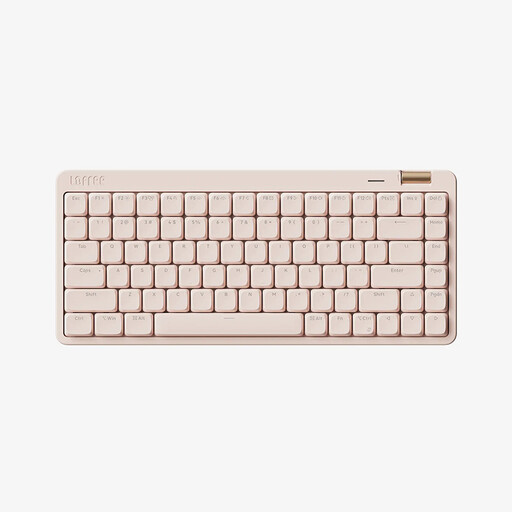
Why this accessory fits: For users who type for many hours a day, an external mechanical keyboard can significantly improve ergonomics. This model complements a MacBook Neo setup with a comfortable and stylish input device.
Addresses the often-neglected aspect of long-term comfort. A good external keyboard prevents the fatigue and strain that can occur with intensive use of laptop keyboards.
The Kailh low-profile switches provide a quiet, linear typing feel. Thanks to tri-mode connectivity (Bluetooth, 2.4G, wired), it can be flexibly connected to various devices.
We've compiled a complete, up-to-date list of products that fully meet these strict selection criteria and German regulations.
Question 1: Which storage capacity is right for me: 256GB or 512GB? Your decision depends on your workflow. If you primarily store documents in the cloud and use few programs, 256GB is an economical choice. For local storage of large files like photos, videos, or extensive software, the 512GB version is recommended to be prepared for the future.
Question 2: What do I need to consider since no power adapter is included? You will need a USB-C power adapter with a minimum output of 20 watts to charge the MacBook Neo. Check if you already own such an adapter from another device (e.g., a smartphone or tablet). If not, you should plan to purchase a suitable one. According to Apple, the Apple 20W USB-C Power Adapter is recommended for optimal charging.
Question 3: Do the MacBook Neo models shown here have a German keyboard? Yes, all MacBook Neo models featured in this article have the standard German QWERTZ keyboard layout. This is designed for typing in the German language with all its umlauts and special characters.