
Lieferung heute & morgen

Qualitätsgarantie

Willkommens-Angebote freischalten: KOSTENLOSE Lieferung | Bis zu 80 % RABATT | Kostenlose 30-Tage-JoyPlus-Testphase
App herunterladen
The Machenike KG98 mechanical gaming keyboard is aimed at users who want to combine a compact design with a number pad, flexible connectivity and mechanical switches. The 96% format can be particularly appealing for gaming, productive work and changing device setups. However, there are a few details to check before buying: a compact layout does not automatically mean a German keyboard layout, and wireless functions may have different requirements depending on the connection type.
This buying guide from the Joybuy Product Recommendation Officer objectively examines the key specifications and shows which version may suit different usage profiles.
Many Machenike KG98 variants are offered with a QWERTY US layout. This means, among other things:
Windows and macOS can be set to a German keyboard layout, but the key labels will still be US-style. If you frequently write German text, you should take this into account before placing your order.
A tri-mode keyboard generally supports three connection methods: USB-C, 2.4 GHz wireless and Bluetooth. For fast-paced gaming, a wired connection or 2.4 GHz wireless is often preferred, while Bluetooth can be convenient for laptops, tablets or several everyday devices.
The three modes may differ in setup, latency, power consumption and device compatibility. Check whether the receiver is included and whether your PC has a suitable USB port.
An RGB gaming keyboard offers visual customisation options, but it does not replace checking the key layout, connectivity and software support. Similarly, ‘hot-swap’ does not mean that every switch will fit. What matters is whether the installed sockets are compatible with the mechanical switches you want to use.
The Machenike KG98’s hot-swap design is described as allowing switches to be replaced without soldering. However, users should still check the exact switch compatibility and the manufacturer’s guidance before making any modifications.
The Machenike KG98 96% keyboard features a compact layout with 98 keys. Compared with a traditional full-size keyboard, it typically retains important sections such as the number pad, function keys and navigation cluster, while reducing the gaps between them.
This format makes sense if you:
Check the actual dimensions of the model selected. ‘96%’ describes the layout, not necessarily a specific case width.
A keyboard with linear switches provides a smooth keypress without a pronounced tactile bump. This can appeal to users who prefer fast, fluid input. However, the noise level depends not only on the switch, but also on the keycaps, case, surface and typing technique.
The version with Ice Cream Pro Max Switch Orange is specified as having pre-lubricated linear switches. Lubrication can reduce friction, but it is not an objective guarantee of a particular sound profile or lifespan. If you are looking for a clearly defined tactile bump or audible feedback, look for tactile or clicky switches instead.
For a wireless mechanical keyboard, battery specifications, charging instructions and the preferred connection method are all relevant. In USB-C mode, the keyboard is connected directly to the device; 2.4 GHz wireless requires the appropriate dongle, while Bluetooth is paired through the device settings.
For the ‘Purple-Gold Switch Purple’ version, the manufacturer specifies an 8000-mAh battery and states that only the supplied USB-C cable should be used. High-performance laptop chargers should not be used, as they may exceed the input limit. This information applies to the specified version and should not automatically be assumed to apply to every KG98 model.
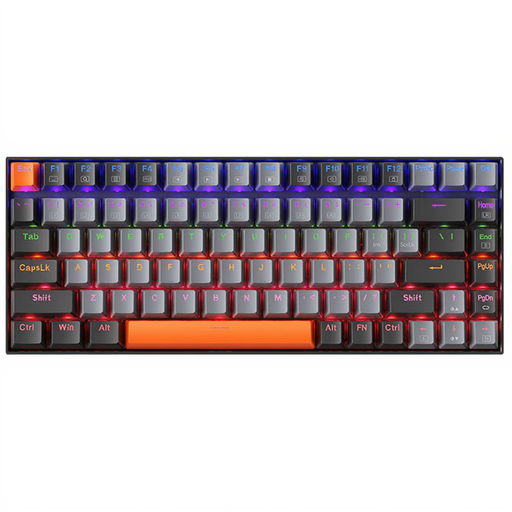
Why this product suits the profile: The wired design focuses on straightforward connectivity without battery management or a wireless receiver.
The connection is made via USB, so there is no need for Bluetooth pairing or checking the charge level. The red switch version and LED backlighting are clearly specified.
Wired operation, mechanical Red switches and LED lighting.
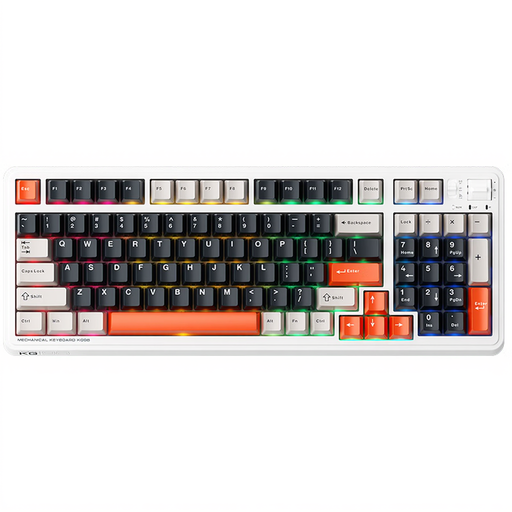
Why this product suits the profile: This model combines a 96% layout, multiple connection methods and customisation options for gaming and productive work.
The QWERTY US layout, hot-swap functionality, linear Ice Cream Pro Max switches, plus USB-C, Bluetooth and 2.4 GHz connectivity are all specifically stated in the product description.
98 keys, a gasket-mount construction with damping layers and RGB side lighting.
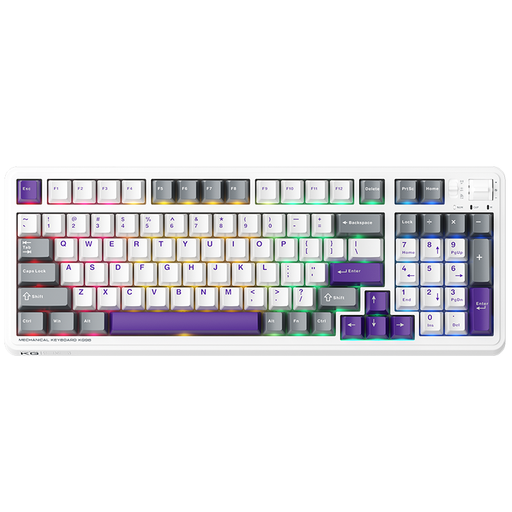
Why this product suits the profile: This version is interesting for users who want to retain the number pad and switch between wired and wireless use.
The manufacturer specifies tri-mode connectivity and an 8000-mAh battery. It also provides specific charging and moisture warnings that need to be followed in everyday use.
96% layout with 98 keys, 2.4 GHz wireless and Bluetooth alongside USB-C.
We have put together a complete, regularly updated list of products that fully meet these strict selection criteria and the safety regulations applicable in the EU.
For Windows and macOS, the USB-C mode is recommended initially, as the keyboard can be recognised directly. With Bluetooth, put the keyboard into pairing mode and then select it in the system settings. For 2.4 GHz, connect the USB receiver to the computer.
If you switch between PC and Mac, you should also check whether the function keys and special key assignments work differently depending on the operating system. With a US layout, the hardware layout remains an important point to check, regardless of the operating system language selected.
For care and maintenance, a dry, soft brush or microfibre cloth is sufficient. Liquids can seep into the foam and electronic components. With a gasket-mount model, do not overtighten the case screws when disassembling it, so that the construction is not placed under unnecessary strain.
The variants listed here are described as having a QWERTY US layout. German input language can be selected in the operating system, but the physical key labels will still not match the German QWERTZ standard.
The version explicitly described as a hot-swap keyboard allows switches to be replaced without soldering. Before buying or modifying the keyboard, check that the switches you want are compatible and review the relevant manufacturer’s specifications.
USB-C and 2.4 GHz wireless are the obvious choices for a fixed gaming setup. Bluetooth is better suited to flexible connections with compatible laptops or other devices. Actual suitability depends on the device, receiver and game being used.