For a small desk, first check the space taken up by the monitor and stand. Then decide whether a compact screen or more pixels on a 27-inch display matters most to you. ASUS Germany and BenQ Germany list a resolution of 3840 × 2160 pixels for selected 27-inch models; smaller models such as the ASUS PA248QFV offer 1920 × 1200. For colour-critical print assessment, a colour gamut figure alone is not enough: the output profile, calibration and soft-proofing conditions are all part of the workflow, as Fogra and Adobe explain.
Who is this selection for?
Magazine designers with limited desk space
If you need room for input devices and paper proofs as well as your screen, the monitor’s overall dimensions with its stand matter more than the screen size alone. For example, BenQ Germany lists the PD2506Q as 570.0 mm wide and 256.9 mm deep with its stand.
Designers working on print-critical projects
If you assess colours for a particular print condition, you need a suitable colour-management and soft-proofing workflow. Fogra describes soft proofing as a simulation of a print condition under specific lighting and viewing conditions. Adobe explains how to work with output profiles.
Magazine designers working on detailed pages
If you want to see the page and control panels at the same time, weigh the extra pixels against the desk space required. ASUS Germany lists the PA279CRV as offering 3840 × 2160 pixels on a 27-inch screen. Check that the scaling works for the way you work.
What should you look for when buying?
Start by checking how much room you have on your desk. Then consider how important print-related colour assessment is to you, and which connections your computer needs.
| Priority |
What to check before buying |
Who it matters most to |
| Space and positioning |
Compare your desk’s width and depth with the monitor’s overall dimensions, including the stand. If you’re using a monitor arm, check the mounting requirements and compatibility. |
If I need room for a keyboard and paper proofs as well as my monitor, I want to know its dimensions with the stand first. Space is the top priority for around 27% of consumers. |
| Colour assessment for print |
Consider the specific model’s colour gamut and calibration options, as well as the output profile and soft-proofing conditions. Fogra also highlights the importance of lighting and viewing conditions. |
If I’m assessing colours for a particular print condition, my whole workflow needs to be suitable. Print colour is the top priority for around 27% of consumers. |
| Page view and workspace |
Consider the screen size, aspect ratio, native resolution and scaling together. ASUS Germany lists the PA248QFV as 24.1 inches, 16:10 and 1920 × 1200; the PA279CRV is 27 inches and 3840 × 2160. |
If I want to see a magazine page and control panels clearly at the same time, I should check how the resolution works with my chosen scaling. Page view is the top priority for around 26% of consumers. |
| Connections and switching between computers |
Check that the monitor and computer support the video connection, charging power and ports you need. BenQ Germany lists USB-C with DisplayPort Alt Mode and 65 W Power Delivery for the PD2506Q. |
If I connect a laptop, I want to know whether the same connection can carry the picture and provide the power I need. Convenient connections are the top priority for around 20% of consumers. |
Common pitfalls when buying a monitor
-
Assuming the screen size tells you how much desk space you’ll need
The overall width and depth, including the stand, vary by model. BenQ Germany lists the PD2506Q as 570.0 × 256.9 mm, while ASUS Germany gives the PA248QFV’s width and depth as approximately 53.18 × 19.04 cm.
Measure the space you can actually use, including room for input devices and paper proofs, then compare it with the monitor’s dimensions. If you’re using a monitor arm, check that it can be attached to your desk.
Depending on your workspace, you may need a suitable mount or a different desk layout.
-
Taking wide colour gamut coverage as proof a monitor is ready for print
Soft proofing is based on a specific print condition and viewing conditions. A percentage figure on its own does not show whether you can use the monitor to assess the finished print accurately.
Confirm the output conditions with your printer and make sure your workflow accounts for the profile, calibration and viewing conditions.
Profiling, the right settings and checking the soft-proofing environment can all take extra time.
-
Assuming USB-C guarantees a single-cable setup
USB-C features depend on the specific monitor and computer. BenQ Germany lists DisplayPort Alt Mode and 65 W Power Delivery for the PD2506Q; EIZO lists a maximum of 70 W for the CS2400S.
Check that both devices support video, provide the charging power you need and have the right ports.
Depending on your computer, you may still need a separate power supply or another connection.
Key brands at a glance
EIZO
The ColorEdge CS2400S is a 24.1-inch option for colour-management-focused work in a limited space.
- EIZO lists hardware calibration and 1920 × 1200 pixels for this model.
- The colour gamut and calibration details come from the manufacturer. For soft proofing, the output profile and viewing conditions also need to suit the print process.
BenQ
The models mentioned range from the 25-inch PD2506Q to the 27-inch PD2732U.
- BenQ Germany lists USB-C with 65 W charging and a height-adjustable stand for the PD2506Q.
- Colour gamut specifications vary by model: figures for the PD2732U do not apply to the PD2506Q.
ASUS
The PA248QFV is a 24.1-inch 16:10 option, while the PA279CRV is a 27-inch model with 4K resolution.
- ASUS Germany lists the PA248QFV as offering 1920 × 1200 pixels, height adjustment and pivot. ASUS lists the PA279CRV as offering 3840 × 2160 pixels.
- These features apply to the specific models mentioned and are manufacturer specifications, not measurements of the individual monitor you buy.
Dell
The UltraSharp U2724D is a 27-inch QHD option for screen-based work where adjustability is important.
- Dell lists a resolution of 2560 × 1440 pixels, height adjustment and pivot.
- These specifications alone do not confirm that the monitor is suitable for an approved print soft proof.
Monitors at Joybuy
The models below are suited to magazine layout at a desk, from more compact Full HD displays to larger 27-inch screens. Before choosing, check how much desk space you have and which resolution suits the way you work.
 No image available
MSI MAG 274UPDFDE E16M, 27-inch UHD
The 27-inch UHD display could suit detailed pages, provided you have room for it on your desk.
The product name specifies UHD at 160 Hz, FHD at 320 Hz, Mini-LED and Rapid IPS.
View at Joybuy
 No image available
INNOCN CB27U1, 27-inch 4K UHD
A 27-inch screen needs space, so choose this size only if it will fit on your desk.
The product name specifies IPS, 3840 × 2160 pixels and 120 Hz.
View at Joybuy
 No image available
Philips 276B9, 27-inch QHD, IPS
QHD is an alternative to Full HD, but at 27 inches it still needs a fair amount of desk space.
The product name specifies 2560 × 1440 pixels, 75 Hz and USB-C with 65 W Power Delivery.
View at Joybuy
 No image available
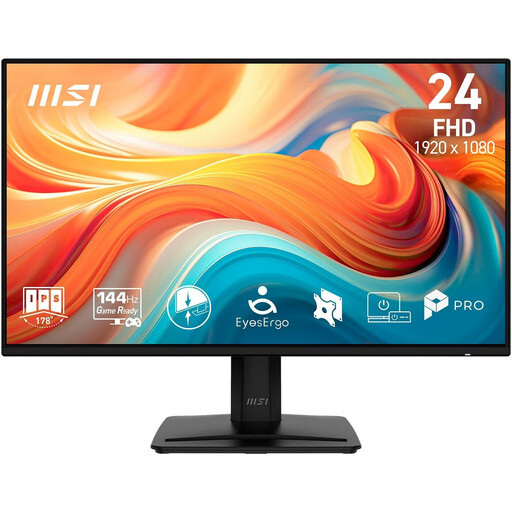
MSI PRO MP242DE E14A, 23.8-inch Full HD
The more compact screen size could work well if desk space is limited. However, Full HD at 1920 × 1080 pixels offers fewer pixels for your page and control panels than QHD or 4K models.
The product name specifies an IPS display, 144 Hz, HDMI, DisplayPort and VGA.
View at Joybuy
 No image available
KOORUI MB24V29FS4, 24-inch Full HD
A 24-inch screen could be a good option if desk space is tight. Full HD at 1920 × 1080 pixels offers fewer pixels for your page and control panels than QHD or 4K models.
The product name specifies an IPS display, 120 Hz and 99% sRGB. A colour gamut figure alone does not prove that the display matches a finished print.
View at Joybuy
Frequently asked questions
Do I need an Adobe RGB monitor for magazine printing?
Not simply because the work is going to print. What matters is which colours you need to assess for the specific job, and whether your workflow is set up with the right profiles and soft-proofing conditions. An Adobe RGB coverage figure on its own does not prove that the display matches the finished print.
What should I do after setting up the monitor to assess colours reliably?
Set up the monitor for the intended output and use suitable colour profiles. Lighting and viewing conditions also matter for soft proofing. Fogra also recommends checking the uniformity of your own monitor. A manufacturer’s specification is no substitute for this check.
Does a manufacturer’s guarantee offer the same protection as your statutory rights?
No. If a product is faulty, you have statutory rights against the seller; a guarantee is an additional, voluntary promise whose terms are set out in the guarantee conditions. The Verbraucherzentrale also notes that consumers generally have a 14-day right to cancel a typical online purchase, although exceptions may apply and the specific contract should be checked.


