When several people use the same desk, a compact desktop is a sensible starting point. Whether a Windows mini PC, Mac mini or larger desktop is right for you depends on your layout software, monitors and how much scope you want to upgrade later. For InDesign 21.3 and later, Adobe specifies at least 8 GB RAM on Windows and recommends 16 GB; Apple says the memory in the Mac mini with M6 cannot be upgraded after purchase.
Which option is right for you?
Layout designers working on large projects
If you work on extensive pages with lots of placed images, check your layout software’s memory requirements and the monitor setup you have planned. For InDesign on Windows, Adobe specifies at least 8 GB RAM and recommends 16 GB.
Teams sharing a hot desk
If several people use the same computer and desk, key considerations include a compact footprint, suitable ports and separate user accounts. The Federal Office for Information Security recommends setting up individual, password-protected accounts on shared devices.
Designers focused on print
If you’re preparing magazine pages for print, plan for display quality, colour management and preflight separately from the computer’s performance. Adobe describes preflight and packaging InDesign files as steps to prepare work for output and handover.
What should you look for when buying?
Compact Windows desktop
A good fit if: you use Windows software, have limited desk space and want memory that may be accessible for upgrades later, depending on the model.
Consider: Ports, maintenance options and what’s included vary by model and configuration.
Mac mini
A good fit if: your workflow requires macOS, or your existing peripherals are compatible, and you can decide on the specification in advance.
Consider: Apple says the memory in the Mac mini with M6 cannot be upgraded after purchase.
Larger, upgradeable desktop
A good fit if: internal expansion options matter more to you than keeping the footprint as small as possible.
Consider: Check the dimensions and the actual number of available slots on the specific configuration for your shared workspace.
| Buying consideration |
What should you check before buying? |
Who should pay particular attention? |
| Layout work and large files |
Choose your software and version first. Check its requirements for RAM, processor and SSD; for InDesign 21.3 and later, Adobe specifies at least 8 GB RAM on Windows and recommends 16 GB. |
When I work on extensive pages with lots of placed images, I want to match the specification to my software and project size. Around 36% of consumers say layout performance is their main concern. |
| Space and shared use |
Measure the available desk space and check the monitor, USB and network ports against the specific configuration. Separate, password-protected user accounts are a sensible security measure when a computer is shared. |
When I share a desk with others, I need space for my existing equipment and separate computer logins. Around 29% of consumers say a shared workspace is their main concern. |
| Display and print handover |
Plan your monitor and output requirements separately. In InDesign, preflight and packaging the required project files can help with handover; make sure colour management suits your intended print or proofing workflow. |
When I prepare magazine pages for print, I want to plan the display and handover process around the intended output. Around 21% of consumers focus primarily on print output. |
| Upgrade options and future costs |
Before buying, check which components are accessible and whether the software and peripherals you need are already available or included. You’ll need to choose the RAM specification for the Mac mini with M6 in advance. |
When I want to adapt my computer later, I check memory access and what’s included before committing to a configuration. Around 14% of consumers say upgradeability is their main concern. |
Common buying mistakes
-
Choosing solely from a mini PC top picks list
A high ranking in an office-computer test doesn’t automatically mean the tested configuration will suit your layout software, monitor and print requirements.
Compare the full model number and configuration with your software requirements and the ports you need.
-
Assuming you can upgrade the Mac mini’s RAM later
Apple says the built-in memory in the Mac mini with M6 cannot be upgraded after purchase.
Choose the amount of memory you need before ordering, based on your software and projects.
-
Only copying the layout file when handing over a project
Linked graphics and fonts may be missing when you share your work. Adobe describes preflight and packaging files as steps to prepare for handover.
Check the project before sharing it and gather the files the recipient will need.
Key brands to consider
Apple
The Mac mini with M6 or M5 Pro is part of Apple’s compact macOS desktop range.
- Apple states that the Mac mini with M6 supports up to three external displays, depending on the combination of ports and resolutions.
- Apple says the memory in the Mac mini with M6 cannot be upgraded after purchase.
Lenovo
The ThinkCentre M75q Gen 5 Tiny is a compact Windows business desktop range for spaces where desk space is limited.
- Lenovo specifies 16 GB RAM and a 512 GB SSD for variant 12RQ003QEZ, with tool-free access to the memory and SSD modules.
- This specification applies to the stated variant and may not apply to every Lenovo device.
Dell
The Dell Pro Micro QCM1250 is a configurable Windows mini desktop for space-constrained work areas.
- Dell offers a range of processor and memory configurations.
- Check the specification of each individual configuration, as other details may change when you make your selection.
HP
The Elite Mini 800 G9 is part of HP’s compact Windows desktop range.
- For variant CP9H2EA#ABD, HP specifies Windows 11 Pro, 16 GB RAM and a 512 GB SSD.
- These details apply to this variant and do not confirm the specification of other Elite Mini models.
GEEKOM
The A5 Pro 2026 Edition is a compact Windows option; one of the described variants comes with a Ryzen 5 7530U, 16 GB RAM and a 1 TB SSD.
- The manufacturer describes this product range as having upgradeable memory.
- Check the exact specification and upgrade options for the individual variant before comparing it with other computers.
Joybuy products for magazine layout and shared workspaces
This selection includes compact macOS desktops and a Windows mini PC for layout work at a shared desk.
 No image available
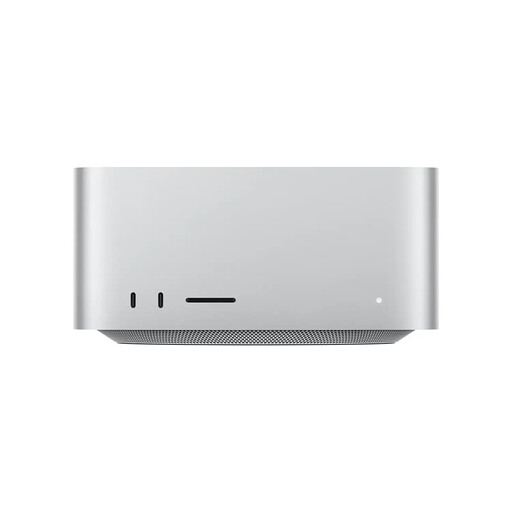
Apple Mac Studio, Apple M5 Ultra, 30-Core CPU, 64-Core GPU, 96 GB Unified Memory, 1 TB SSD
For extensive layout projects at a shared desk, its stated compact design is a useful space-saving feature.
96 GB Unified Memory and 1 TB SSD. Dimensions: 19,7 × 19,7 × 9,5 cm.
Six Thunderbolt 5 ports, HDMI and an SDXC card reader.
View at Joybuy
 No image available
Apple Mac mini, M6 12-Core CPU, 12-Core GPU, 16 GB Unified Memory, 256 GB SSD
For a shared desk, the Mac mini, described as a mini PC, is a compact macOS option, provided its specification suits your workflow.
16 GB Unified Memory and 256 GB SSD; HDMI and three Thunderbolt 4 ports.
Apple says the memory in the Mac mini with M6 cannot be upgraded after purchase.
View at Joybuy
 No image available
Apple Mac mini, M6 12-Core CPU, 12-Core GPU, 16 GB Unified Memory, 512 GB SSD
This Mac mini configuration could be a good fit if macOS is part of your layout workflow and you’re looking for 512 GB SSD storage.
16 GB Unified Memory and 512 GB SSD; HDMI and three Thunderbolt 4 ports.
Apple says the memory in the Mac mini with M6 cannot be upgraded after purchase.
View at Joybuy
 No image available
Apple Mac mini, M6 12-Core CPU, 12-Core GPU, 24 GB Unified Memory, 512 GB SSD
If your macOS workflow needs more memory than the 16 GB variants offer, this 24 GB configuration is worth considering.
24 GB Unified Memory and 512 GB SSD; HDMI and three Thunderbolt 4 ports.
Apple says the memory in the Mac mini with M6 cannot be upgraded after purchase.
View at Joybuy
 No image available
BMAX B6 Pro Mini-PC, Intel Core i5-1030NG7, 16 GB LPDDR4, 512 GB NVMe SSD
For a shared workspace, this computer, described as a compact Windows mini PC, is an option if its ports suit your monitors.
16 GB LPDDR4 and 512 GB NVMe SSD; Windows 11.
The product title lists outputs for up to three 4K displays, as well as Wi-Fi 5 and Bluetooth 4.2. Check the port details against your monitors.
View at Joybuy
Frequently asked questions
Do I need a dedicated graphics card for magazine layout?
Not necessarily; it depends on your setup. Check the requirements for your specific layout software and monitors. For InDesign on Windows, Adobe distinguishes between minimum requirements and the conditions for optimal GPU performance.
How do we hand an InDesign project over to someone else or a printer?
Adobe recommends running a preflight check before packaging your files. The packaging feature can collect linked graphics and required local font files, among other things; there is an exception to the stated copying option for fonts activated from Adobe Fonts.
What should we set up when several people use the same computer?
The Federal Office for Information Security recommends giving each person their own password-protected user account with appropriate access rights. You should also plan where shared project files will be stored and how they’ll be handed over.
Which additional devices or software should I consider before buying?
Check whether you already have a monitor, keyboard, mouse and the layout software you need, or whether they’re included in the offer. What’s included can vary depending on the computer and the specific offer.


