
Lieferung heute & morgen

Qualitätsgarantie

Willkommens-Angebote freischalten: KOSTENLOSE Lieferung | Bis zu 80 % RABATT | Kostenlose 30-Tage-JoyPlus-Testphase
App herunterladen
As a competitive PC gamer, you know that milliseconds can mean the difference between victory and defeat. A Magnetic Switch Keyboard promises a tangible advantage with technologies like Rapid Trigger and adjustable actuation points. However, the market is flooded with marketing buzzwords and technical specs that confuse more than they clarify. Before you invest, it's crucial to understand the common pitfalls that can lead to a costly mistake.
This guide will help you separate the wheat from the chaff. We'll analyze the critical features that define a great Hall Effect keyboard and show you what to look for to make an informed decision for your gaming setup.
Many manufacturers advertise impressive numbers, but not every specification automatically translates to better in-game performance. Here are three common marketing traps you should be aware of.
To gain a real performance edge, you should focus on three core technical aspects. These define the responsiveness and customizability of your future gaming keyboard for FPS.
The heart of any Magnetic Switch Keyboard is the ability to precisely define the actuation point of every single key. Hall Effect sensors magnetically measure the key's position instead of relying on a physical contact point.
The form factor directly impacts how much space you have for mouse movements. For FPS players who often use low mouse sensitivity, a compact gaming keyboard is a smart choice.
Durability and typing feel are determined by the internal construction.
Based on the criteria above, we have identified a few models suited for different needs and budgets.
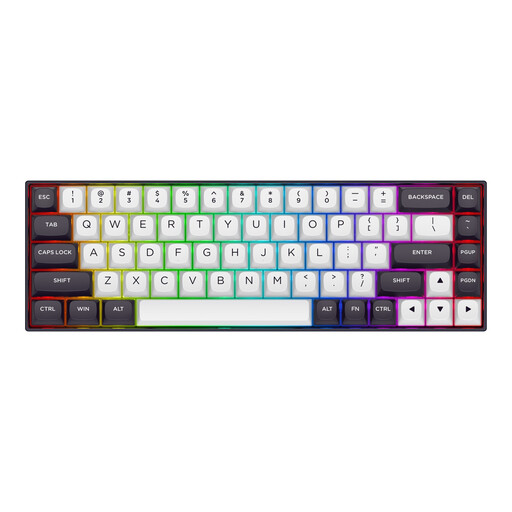
Why This Fits Their Persona: This model is meticulously tailored to the needs of FPS players. The compact 65% layout (68 keys) maximizes mouse space, while core technologies like Rapid Trigger and an 8K polling rate are aimed directly at achieving minimal latency.
The keyboard combines a high polling rate with a fully adjustable actuation point (0.2 mm to 4.0 mm), ensuring that the fast signal transmission is made usable by precise input control.
Focused design for competitive FPS titles; aluminum top plate for stability without unnecessary weight.
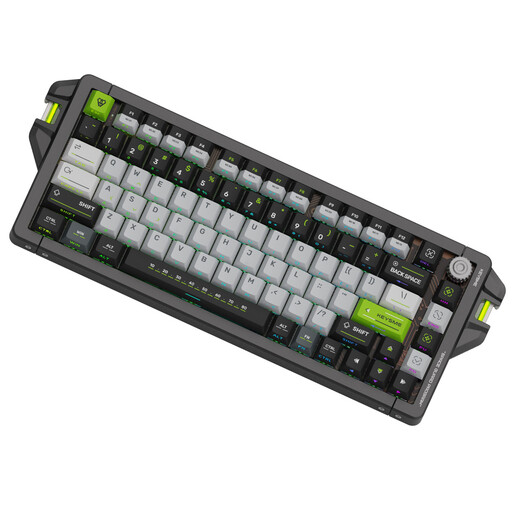
Why This Fits Their Persona: For gamers who refuse to compromise on materials and build quality. The full CNC aluminum case, gasket-mount construction, and high-quality PBT keycaps deliver a premium feel and longevity.
This model avoids the "material hype" trap by pairing a robust aluminum case with a thoughtful internal gasket-mount structure. This ensures a balanced typing feel that goes beyond the spec sheet.
Extremely precise actuation point adjustment (0.05 mm increments); Gateron Magnetic Jade Switches for crisp tactile and audible feedback.
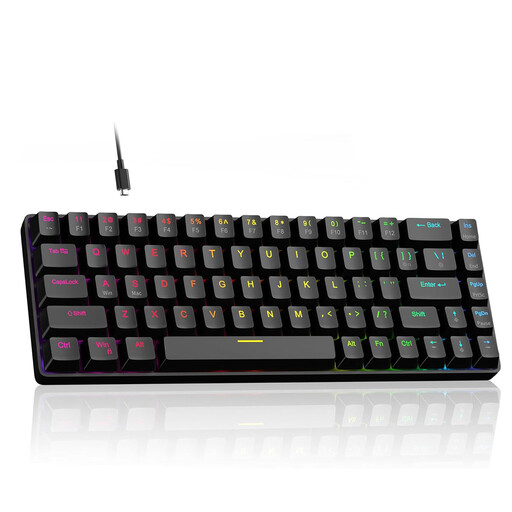
Why This Fits Their Persona: This model provides access to crucial performance features like Hall Effect switches, Rapid Trigger, and an 8000Hz polling rate in a very compact 60% form factor. It's a great choice for players who want to try these technologies without immediately investing in the premium segment.
It avoids the trap of vague promises by offering a clearly defined adjustment range for the actuation point (0.1 mm to 4.0 mm). Additionally, despite its 60% layout, it retains dedicated arrow keys, which improves everyday usability.
Offers high-end features in an accessible package; hot-swap capability allows for changing switches without soldering.
Magnetic switch technology is constantly evolving. If you want to explore more models selected based on objective performance criteria, you can find a wider selection in our dedicated category.
1. Is a magnetic switch keyboard worth it for games other than FPS? Yes, although the advantage is most pronounced in FPS games. In rhythm games, the low latency and instant reset enable more precise inputs. In MOBAs or MMOs, a custom-set, higher actuation point can help prevent accidentally triggering abilities.
2. How do you properly configure the actuation point and Rapid Trigger? Configuration is done through the manufacturer's software. For the actuation point, start with a low value (e.g., 0.4 mm) for keys like W, A, S, and D, and a higher value (e.g., 1.5 mm) for ability keys to avoid misclicks. For Rapid Trigger, a sensitivity of 0.15 mm to 0.25 mm is a good starting point. Experiment in-game to find the configuration that works best for you.
3. What is the difference between Hall Effect switches and optical switches? Both technologies are faster than traditional mechanical switches. Hall Effect switches use magnetic fields to measure the exact position of a key, which enables a dynamically adjustable actuation point and Rapid Trigger. Optical switches actuate by interrupting a beam of light. They are very fast but typically have a fixed actuation and reset point, which limits customization options compared to Hall Effect technology.