
Lieferung heute & morgen

Qualitätsgarantie

Willkommens-Angebote freischalten: KOSTENLOSE Lieferung | Bis zu 80 % RABATT | Kostenlose 30-Tage-JoyPlus-Testphase
App herunterladen
Choosing the right AIO water cooler can be a challenge. The market is flooded with models that advertise impressive ARGB lighting and lofty performance claims. But not every all-in-one solution delivers on its promises. Many buyers invest in expensive processor cooling, only to find they've fallen into one of several common traps.
As your Joybuy Product Recommendation Officer, I'm here to help you identify these pitfalls. We'll focus on the objective criteria that define a good PC water cooler, ensuring your investment enhances your system's performance and longevity instead of becoming a disappointment.
The 3 Most Common Traps When Buying an AIO Water Cooler:
To make an informed decision, you should focus on technical facts. Three core parameters are decisive for an AIO's performance and suitability.
The size of the radiator is directly linked to its cooling capacity. A larger surface area can dissipate more heat into the ambient air.
The choice, therefore, depends on your CPU, your overclocking ambitions, and, most importantly, your PC case's compatibility.
Ensure that both the pump and the fans feature PWM (Pulse Width Modulation) control. This allows the motherboard to dynamically adjust their speed based on the CPU temperature. The result is quiet operation under low load and maximum cooling performance when it's needed. Systems without PWM often run at a constant, audible speed.
Check the product description carefully for explicit and native support for your CPU socket. For LGA 1700 water cooling and its successor, LGA1851, a special contact frame is advantageous as it distributes mounting pressure more evenly than the motherboard's standard mechanism. For CPU coolers for AM5, an offset mounting option is a plus, as it positions the cooling block directly over the CPU chiplet hotspots. Don't rely on vague claims like "supports Intel & AMD."
Here are some recommendations tailored to specific user profiles that purposefully avoid the pitfalls mentioned.
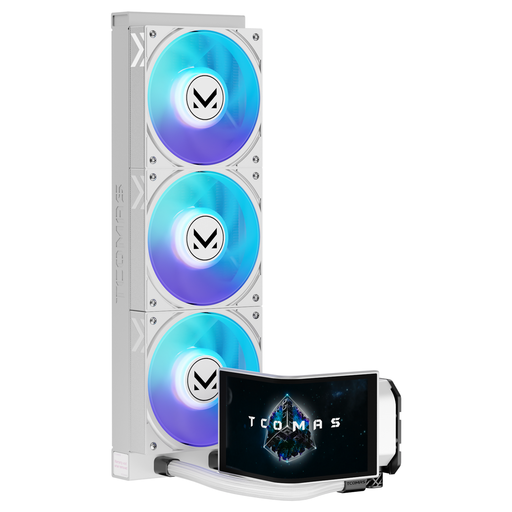
Why it fits: This white AIO is designed for users who want to build an aesthetically stunning system. The combination of a white design, an ARGB CPU cooler, and a large display makes it the centerpiece of any build.
It sidesteps the "form-over-function" trap by pairing its eye-catching design with a high-performance 360mm radiator. The display is not just for show; it can be used as a functional AIO with a display to show system stats.
The curved 6.67-inch AMOLED display offers a unique visual canvas and extensive customisation options for system data or personal animations.
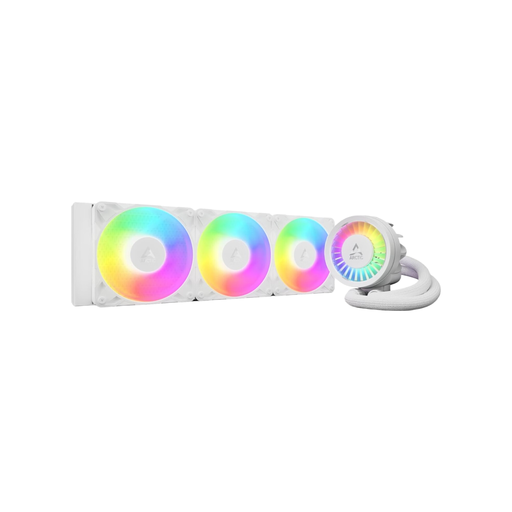
Why it fits: This model is engineered for maximum cooling performance. Its thick 38mm radiator and additional VRM fan are ideal for users who overclock their high-end CPUs and want to ensure stable voltage regulator temperatures.
Directly addresses the compatibility trap by including a contact frame for Intel LGA1700/1851 and native offset mounting for AMD AM5. This ensures optimal mounting pressure and improved heat transfer.
The integrated, PWM-controlled VRM fan actively cools the motherboard's voltage regulators, an often-overlooked aspect that increases system stability under load.
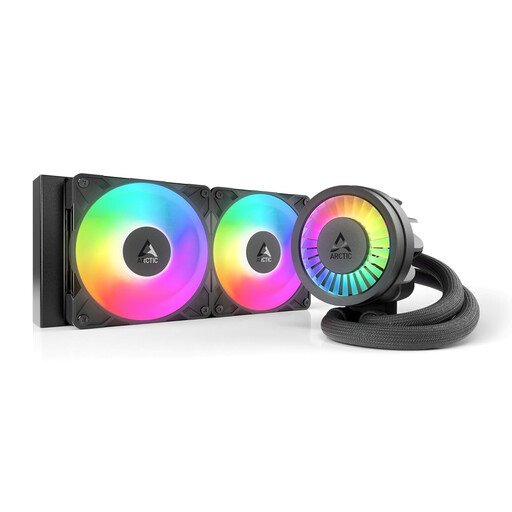
Why it fits: This 240mm AIO offers an excellent balance of performance, compatibility, and price. It's the ideal choice for most gaming PCs in standard mid-tower cases that need reliable and quiet cooling.
Debunks the "bigger is always better" myth by offering very high cooling efficiency for its size. The PWM-controlled pump and fans also avoid the noise trap, ensuring quiet daily operation.
Offers many of the premium features of the 360mm version, like the VRM fan and integrated cable management, in a more compact and budget-friendly package.
We've compiled a complete, up-to-date list of products that fully meet these strict selection criteria and UK regulations.
The lifespan of an AIO water cooler is primarily limited by two factors: permeation (the slow evaporation of coolant through the tubing) and the lifespan of the pump. Modern AIOs from quality manufacturers have an expected lifespan of about 5 to 7 years. The manufacturer's warranty, which is often 5 or 6 years, is a good indicator of expected durability.
Not necessarily. A 360mm AIO has higher theoretical cooling potential, but its actual benefit depends on the overall system. In a case with poor airflow, a 360mm AIO can't reach its full potential. For mid-range CPUs (e.g., up to 125W TDP), the difference in cooling performance between a high-quality 240mm AIO and a 360mm AIO is often minimal. The larger variant is most worthwhile for heavily overclocked, high-end processors.
Both cooling methods have their merits.
The choice depends on your budget, desired aesthetics, your CPU's performance, and the size of your case.