Joybuy Insights

Mechanical Gaming Keyboard Buyer’s Guide

Selecting a mechanical gaming keyboard involves analysing technical specifications that directly impact performance, tactile feel, and durability. Parameters like mounting style, connectivity, and keycap material are crucial factors for the user experience. This article breaks down the relevant features and presents a selection of models that meet specific technical requirements.

Buyer's Guide: Technical Criteria for Mechanical Keyboards

The decision for a specific model should be based on an evaluation of objective criteria. The following technical aspects are central to a keyboard's functionality and customisability.

1. Keyboard Layout and Form Factor

The layout determines the physical size and the number of keys. Common formats include:

  • Full-Size (100%): Includes all keys, including the number pad. Requires the most desk space.
  • Tenkeyless (TKL, 80%): Omits the number pad, creating more space for mouse movement.
  • 75% Layout: A compact format that retains the arrow keys and a function row but arranges the key cluster more tightly. A 75% keyboard offers a compromise between functionality and space-saving.

2. Mounting Style: The Key to Typing Feel and Acoustics

The way the printed circuit board (PCB) is secured within the case has a significant impact on the typing experience.

  • Tray Mount: The PCB is screwed directly into the case. This is a cost-effective method but can lead to an inconsistent typing feel.
  • Gasket Mount: With this method, the PCB is sandwiched between gaskets made of silicone or Poron. A gasket mount design isolates the PCB from the case, which reduces vibrations and provides a softer, more dampened, and acoustically consistent typing experience.

3. Hot-Swap Capability

A hot-swap keyboard allows you to change the mechanical switches without soldering. This offers maximum flexibility to tailor the keyboard's typing feel and acoustics to your personal preferences. Users can easily swap between linear, tactile, or clicky switches depending on their needs (gaming vs. typing).

4. Connectivity Options

  • Wired: Offers the lowest latency and a stable connection, which is relevant for competitive gaming.
  • Wireless: A wireless mechanical keyboard provides more flexibility and a cleaner setup. Common technologies are 2.4 GHz wireless (low latency) and Bluetooth (high compatibility with multiple devices).

5. Keycap Material

  • ABS (Acrylonitrile Butadiene Styrene): Cheaper to produce, but tends to develop a shiny, "greasy" look over time from wear.
  • PBT (Polybutylene Terephthalate): PBT keycaps are more resistant to wear and chemicals. They retain their textured surface for longer and often produce a deeper sound.

6. Additional Features

  • Keyboard with a Rotary Knob: A programmable knob allows for quick control of system functions like volume or screen brightness.
  • Keyboard with a Display: An integrated screen can display system information (CPU load, battery), the time, or custom GIFs, enhancing functionality.
  • RGB Lighting: An RGB keyboard offers per-key customisable lighting effects that can serve both aesthetic purposes and visually organise key functions.

Featured Mechanical Keyboard Selections

The following models were selected based on their specific technical features and overall functionality.
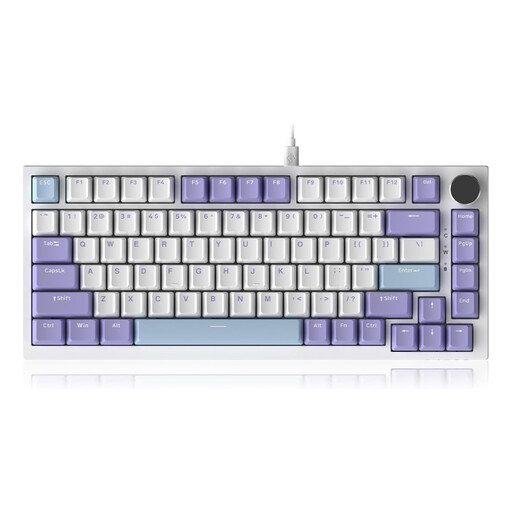
AJAZZ AK820 75% TKL Wired Mechanical Keyboard

AJAZZ AK820 75% TKL Wired Mechanical Keyboard

Why We Recommend This Product The AK820 model focuses on essential performance features for gaming and productivity. Its wired connection ensures minimal latency. The combination of a gasket mount and multi-layer sound dampening aims to deliver an optimised typing feel and a reduced noise profile.

Pros:

  • Compact 75% Layout: Saves desk space while retaining essential keys.
  • Gasket Structure: Provides a dampened and flexible typing feel by decoupling the PCB.
  • Hot-Swap PCB: Supports 3-pin and 5-pin switches for easy customisation.
  • CNC-Machined Knob: Allows for precise and rapid volume control.
  • PBT Keycaps: Durable material with a wear-resistant surface.

Who It's For: Users looking for a reliable, wired keyboard with a high-quality tactile feel and acoustics for gaming and office work, who also value a compact design.

AJAZZ AK980 V2 Wireless Mechanical Keyboard

AJAZZ AK980 V2 Wireless Mechanical Keyboard

Why We Recommend This Product The AK980 V2 is a feature-rich keyboard that offers flexibility through tri-mode connectivity and advanced features like a TFT display. Its 98% layout is a compromise that integrates a number pad into a slightly more compact form factor.

Pros:

  • Tri-Mode Connectivity: Switch between 2.4G Wireless, Bluetooth 5.0, and USB-C cable.
  • Smart TFT Display: Shows system status, connection mode, and custom images.
  • Large Battery: The 10,000 mAh capacity allows for extended wireless use.
  • Hot-Swap Capability: Compatible with 3-pin and 5-pin switches.
  • Gasket Mount with Sound Dampening: Five layers of foam reduce case resonance.

Who It's For: Users who need a versatile wireless mechanical keyboard for multiple devices and appreciate advanced features like a display and a rotary knob for an efficient workflow.
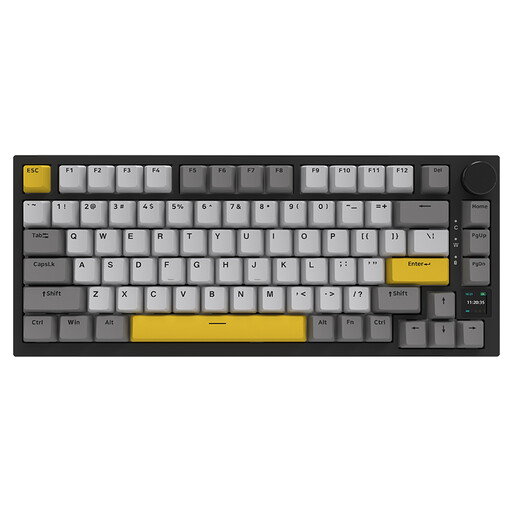
Ajazz AK820 Pro 75% Mechanical Tri-Mode Keyboard

Ajazz AK820 Pro 75% Mechanical Tri-Mode Keyboard

Why We Recommend This Product The AJAZZ AK820 Pro combines the compact form of the AK820 with the advanced features of the Pro series. It offers tri-mode connectivity, a TFT display, and a high-quality gasket mount structure with a flex-cut PCB, making it a highly refined custom keyboard right out of the box.

Pros:

  • Tri-Mode Connectivity: Bluetooth 5.1, 2.4 GHz Wireless, and USB-C for maximum flexibility.
  • Interactive TFT Colour Display: For showing battery level, connection mode, date, and custom GIFs.
  • Gasket Structure with Flex-Cut PC Plate: Delivers an exceptionally soft and bouncy typing feel.
  • 4000 mAh Battery: Ensures solid wireless usage time.
  • South-Facing RGB LEDs: Optimal illumination without glare, ideal for shine-through keycaps.

Who It's For: Keyboard enthusiasts and power users seeking a compact 75% keyboard with wireless freedom, a display, and a build optimised for tactile feel and acoustics.


Other Options and Alternatives

If the featured models don't perfectly match your requirements, a wide range of configurations is available. Different layouts, switch types, and designs offer a suitable solution for every use case. You can find a larger selection in our main keyboard category.

Discover more models in the category: USB Wired Computer Keyboard


Frequently Asked Questions (FAQ)

1. What is the functional advantage of a mechanical keyboard over a membrane keyboard? Mechanical keyboards use an individual, physical switch for each key. This results in more precise tactile feedback, higher durability (often 50 million keystrokes or more per switch), and a faster response time. The variety of switch types (linear, tactile, clicky) also allows for individual customisation to the user's preferences.

2. What exactly does "gasket mount" mean on a keyboard? Gasket mount is a mounting method where the PCB and plate assembly is not screwed directly to the case. Instead, it is "floated" between gasket elements made of a dampening material like Poron or silicone. This decoupling minimises the transfer of vibrations to the case, resulting in a softer keystroke and a more consistent, deeper sound profile.

3. Are PBT keycaps objectively better than ABS keycaps? PBT keycaps have a higher density and a rougher texture than ABS keycaps. This makes them more resistant to the wear that causes a shiny surface on ABS caps. PBT also yellows less under UV exposure. Acoustically, PBT caps often produce a deeper sound. Whether this is "better" depends on personal preference, but in terms of durability and material value retention, PBT offers measurable advantages.